1 SATRAP validation tests TST-SATRAP
All the test specifications in this section assume the testing user has obtained a copy of the satrap-dl project from an official repository.
1.1 Verify data modelling artifacts TST-001
Preconditions and setup actions
- Access to the SATRAP-DL system concept documents
- Access to the SATRAP-DL database schema
- Access to the SATRAP-DL system deployment artifacts
- Access to the SATRAP-DL source code
Test steps
- Review the SATRAP-DL system concept documents, database schema, deployment artifacts and source code to verify the linked requirements related to data modelling, database paradigm, integration of semantic search capable technology and flexibility of DBMS.
- Check for alignment by comparing the system concept documents with the database schema and deployment artifacts to ensure that there is consistency between them, e.g., that the database schema accurately reflects the data model specified in the documents.
Expected outcome
As the verification method of this TC is review of design, the expected outcomes are already embedded in the test steps.
Parent links: SRS-001 Data modelling language, SRS-002 Database paradigm, SRS-003 Semantic search, SRS-004 Extensibility of the data model, SRS-005 NoSQL data model
Child links: TRP-001 TCER: modelling
| Attribute | Value |
|---|---|
| platform | GNU/Linux (Dockerized SATRAP deployment environment) |
| execution_type | Manual |
| verification_method | Review of design (R) |
| release | alpha |
| complexity | 1 |
| test_data | see referenced files |
| version | 0.1 |
1.2 Verify software engineering practices TST-002
Verify that the design and implementation of SATRAP-DL adheres to software best practices.
Preconditions and setup actions
- Access to SATRAP-DL source code
Test steps
- Verify the consistent use of naming conventions.
- Verify adherence to SOLID, the 5 principles of object-oriented design SOLID principles.
Expected outcome
- Naming convention either explicitly defined or referenced (e.g., inherited from PEP-8) and the implementation largely complies with the choice.
- Main architectural modules adhere to the SOLID design principles.
Parent links: SRS-024 Design and implementation principles
Child links: TRP-002 TCER: SW engineering
| Attribute | Value |
|---|---|
| platform | GNU/Linux (Dockerized SATRAP deployment environment) |
| execution_type | Manual |
| verification_method | Review of design (R) |
| release | alpha |
| complexity | 3 |
| test_data | see referenced files |
| version | 0.1 |
1.3 Verify STIX and reasoning engine TST-003
Verify usage of DBMS equipped with automated reasoning and the use of the STIX 2.1 standard for CTI representation.
Preconditions and setup actions
- Access to SATRAP-DL database
- Access to SATRAP-DL source code
Test steps
- Verify that the DBMS technology used in SATRAP-DL integrates or has compatibility with an automated reasoning engine, with the preferred solution being TypeDB.
- Verify that SATRAP-DL uses STIX 2.1 as the default standard format for CTI representation.
Expected outcome
Embedded in test steps.
Parent links: SRS-014 Native reasoning engine, SRS-023 CTI representation in STIX 2.1
Child links: TRP-003 TCER: STIX and reasoning
| Attribute | Value |
|---|---|
| platform | GNU/Linux (Dockerized SATRAP deployment environment) |
| execution_type | Manual |
| verification_method | Review of design (R), Inspection (I) |
| release | alpha |
| complexity | 1 |
| test_data | see referenced files |
| version | 0.1 |
1.4 Verify STIX 2.1-based data model TST-004
Analyze data model adherence to that of STIX 2.1.
Preconditions and setup actions
- Access to the SATRAP-DL database schema
- Access to the SATRAP-DL source code
Test steps
- Verify that the data model of SATRAP-DL is aligned with the data model of STIX 2.1: check for correct mapping and interpretation for all non-custom properties.
Expected outcome
Embedded in test steps.
Parent links: SRS-013 STIX 2.1 data model
Child links: TRP-004 TCER: data model
| Attribute | Value |
|---|---|
| platform | GNU/Linux (Dockerized SATRAP deployment environment) |
| execution_type | Manual |
| verification_method | Analysis (A) |
| release | alpha |
| complexity | 5 |
| test_data | see referenced files |
| version | 0.1 |
1.5 Verify centralized management TST-005
Verify centralized management of system parameters customization (e.g., logging severity, db connections, file paths) via a dedicated configuration file, log storage, exception types and error messages.
Preconditions and setup actions
- Access to the SATRAP-DL source code
Test steps
- Verify that system parameters for logging severity can be customized in a centralized manner: e.g., logging severity: debug, info, warn, error
- Verify that system parameters for db connections can be customized in a centralized manner.
- Verify that system parameters for file paths can be managed from a dedicated, centralized configuration file.
- Verify that there is a designated centralized location for storing logs.
- Verify that exceptions are specified in a centralized manner, e.g., by maintaining all the error codes in a configuration file.
Expected outcome
Embedded in test steps.
Parent links: SRS-020 System configuration file, SRS-021 Centralized logging, SRS-022 Centralized exception handling
Child links: TRP-005 TCER: centralized management
| Attribute | Value |
|---|---|
| platform | GNU/Linux (Dockerized SATRAP deployment environment) |
| execution_type | Manual |
| verification_method | Inspection (I) |
| release | alpha |
| complexity | 2 |
| test_data | see referenced files |
| version | 0.1 |
1.6 Verify code clarity TST-006
Verify source code documentation and readability quality, as well as release on GitHub.
Preconditions and setup actions
- Access to SATRAP-DL source code
- Access to GitHub
Test steps
- Verify that the source code of SATRAP-DL, at the level of class and function definitions, is implemented either in a self-explanatory manner or that it is well documented within the source code, e.g., using doc strings.
Expected outcome
Embedded in test steps.
Parent links: SRS-025 Code readability
Child links: TRP-006 TCER: code clarity
| Attribute | Value |
|---|---|
| platform | GNU/Linux (Dockerized SATRAP deployment environment) |
| execution_type | Manual |
| verification_method | Inspection (I) |
| release | alpha |
| complexity | 3 |
| test_data | see referenced files |
| version | 0.1 |
1.7 Verify secure programming TST-007
Ensure various input sanitization and validation security measures are in place.
Preconditions and setup actions
- Access to the SATRAP-DL data models and database schema
- Access to the SATRAP-DL source code
Test steps
- Verify that SATRAP-DL components receiving input validate the input and reject it in case the validation fails; the validation may include integrity checks, syntactic checks, semantic checks, parameter out-of-range checks, etc.
- Verify that SATRAP-DL perform sanitization of input and output (data passed across a trust boundary); sanitization may include removing, replacing, encoding, or escaping unwanted characters.
- Verify that network connections and other resources accessed are properly terminated when they are no longer required.
- Verify that all software dependencies including 3rd-party libraries are listed and maintained in a configuration file.
- Verify that log strings are sanitized and validated before being logging to prevent log injection attacks.
- Verify that SATRAP-DL does not log sensitive information such as passwords or entity identifiers.
- Verify that the data model enforces semantic integrity ensuring that relationships and constraints adhere to the intended meaning; this can be based on measures such as data validation with respect to schemas and relationship constraints, technical possibility of automated checks for data redundancy and inference powered by a reasoning engine.
Expected outcome
Embedded in test steps.
Parent links: SRS-028 Input validation, SRS-029 Input sanitization, SRS-030 Resource management, SRS-032 Dependencies management, SRS-036 Log validation, SRS-037 Sensitive information
Child links: TRP-007 TCER: secure programming
| Attribute | Value |
|---|---|
| platform | GNU/Linux (Dockerized SATRAP deployment environment) |
| execution_type | Manual |
| verification_method | Inspection (I), Review of design (R) |
| release | alpha |
| complexity | 3 |
| test_data | see referenced files |
| version | 0.1 |
1.8 Test setup + MITRE ATT&CK ingestion TST-008
Test the SATRAP initialization and setup/deployment scripts and its mechanism for retrieving datasets from MITRE ATT&CK in STIX 2.1, and making them available for other system components to adequately process and insert the information into the CTI SKB.
Preconditions and setup actions
- Access to the SATRAP-DL deployment artifacts
- Access to the internet or a pre-downloaded copy of MITRE ATT&CK data sets in STIX 2.1, e.g., the enterprise TTPs
- TypeDB Docker container pulled and running using the
init-satrap.shscript - SATRAP Docker network created using the
init-satrap.shscript - SATRAP volume for persistent TypeDB storage created using the
init-satrap.shscript - Docker Engine (or daemon) running with the right privileges for the testing user
TypeDB Studioversion2.28.6installed: Link to GitHub release (alternatively you can interact with the TypeDB backend directly via its CLI)- A plain/empty project created in TypeDB Studio
- SATRAP Docker container created using the
build-satrap.shscript
Test steps
- Run the SATRAP
setupCLI command to create the SATRAP TypeDB data schema for STIX 2.1 and load it into the CTI SKB.
$ ./satrap.sh setup

Starting SATRAP...
Database 'satrap-skb-alpha' will be created at 'typedb:1729'
Do you want to continue? (y/n): y
Database 'satrap-skb-alpha' successfully created from:
Schema: /home/alab/cti-analysis-platform/satrap/assets/schema/cti-skb-types.tql
Rules: /home/alab/cti-analysis-platform/satrap/assets/schema/cti-skb-rules.tql
- Run the SATRAP
etlCLI command to run the ETL (Extract, Transform, Load) pipeline for the ATT&CK enterprise TTP data set selected by default, confirm by typingyesand pressing enter.
$ ./satrap.sh etl

Starting SATRAP...

The ETL process will be executed with the following parameters (modify at 'satrap_params.yml'):

Extraction datasource: https://raw.githubusercontent.com/mitre-attack/attack-stix-data/master/enterprise-attack/enterprise-attack.json
Load into: database 'satrap-skb-alpha' at typedb:1729

Do you want to continue? (yes/no): yes

Logging to file: /home/alab/cti-analysis-platform/satrap/assets/logs/2025-03-29/info.log
Expected outcome
- Start
TypeDB Studio, select your database as shown below (satrap-skb-alpha):

- Open your previously created TypeDB project (or create a fresh one)
- Press the
Export Schema Typesbutton from the TypeDB Browser, as shown below
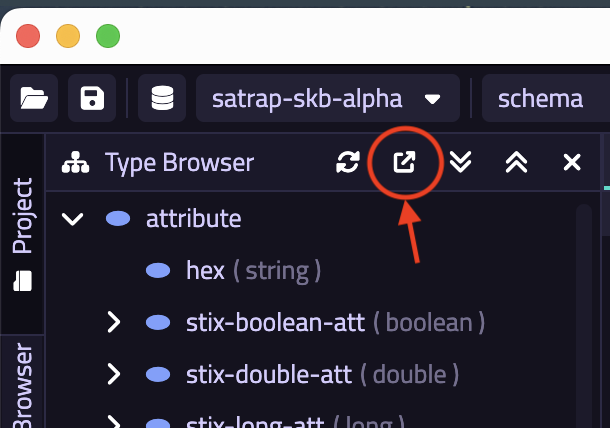
- Save the exported content in a
.tqlfile, e.g.,test-schema.tqland compare the content of this file with the evidence provided in our test data (a simplediffwill do); the path to the reference schema is indicated here.
- Once the ETL execution is finished, the printout in the terminal should read a total of
215498entries. Note that the correctness of the actual mappings and correspondence soundness between the transformed content loaded into TypeDB is tested via our comprehensive unit test suites found undertestsfolder at the project root, which can be run using ourrun_tests.shscript.
docs/specs/TST/assets/satrap-schema-types.tql
Parent links: SRS-006 Integration of common CTI, SRS-043 TypeDB Studio
Child links: TRP-008 TCER: MITRE ATT&CK ingestion
| Attribute | Value |
|---|---|
| platform | GNU/Linux (Dockerized SATRAP deployment environment) |
| execution_type | Manual |
| verification_method | Test (T) |
| release | alpha |
| complexity | 2 |
| test_data | see referenced files |
| version | 0.1 |
1.9 Verify ETL architecture TST-009
Preconditions and setup actions
- Access to the SATRAP-DL system concept documents
Test steps
- Verify that the system architecture considers a component (here the ETL subsystem) to deal with the ETL process.
- Verify that the ETL subsystem includes a component in charge of orchestrating the full extract-transform-load (ETL) process.
- Verify that the ETL subsystem has a dedicated component for the ingestion of datasets in STIX 2.1.
- Verify that the ETL subsystem includes a component in charge of transforming data in STIX 2.1 format into the representation language of the the CTI SKB schema.
- Verify that the ETL subsystem has a component responsible for the insertion of content into the CTI SKB.
- Verify that SATRAP-DL provides a component in charge of managing database operations and connections.
Expected outcome
Embedded in test steps.
Parent links: SRS-008 ETL subsystem, SRS-009 ETL Transformer, SRS-010 Database manager
Child links: TRP-009 TCER: ETL architecture
| Attribute | Value |
|---|---|
| platform | GNU/Linux (Dockerized SATRAP deployment environment) |
| execution_type | Manual |
| verification_method | Review of design (R) |
| release | alpha |
| complexity | 2 |
| test_data | see referenced files |
| version | 0.1 |
1.10 Verify CTI SKB inference rules TST-010
Preconditions and setup actions
- Access to the SATRAP-DL source code
Test steps
- Verify that SATRAP-DL implements inference rules that allow for the automated derivation of knowledge over existing relations in the CTI SKB by inspecting the CTI SKB inference rule definition file and CTI SKB type definitions files stored in the
satrap/assets/schemafolder.
Expected outcome
Embedded in test steps.
satrap/assets/schema/cti-skb-rules.tqlsatrap/assets/schema/cti-skb-types.tql
Parent links: SRS-012 Inference rules
Child links: TRP-010 TCER: CTI SKB inference
| Attribute | Value |
|---|---|
| platform | GNU/Linux (Dockerized SATRAP deployment environment) |
| execution_type | Manual |
| verification_method | Analysis (A) |
| release | alpha |
| complexity | 5 |
| test_data | see referenced files |
| version | 0.1 |
1.11 Test Jupyter notebook frontend TST-011
Test that the provided Jupyter notebook frontend executes as expected.
Preconditions and setup actions
- Access to source code of SATRAP-DL
- Access to SATRAP-DL deployment artifacts
- Docker Engine (or daemon) running with the right privileges for the testing user
- Successful execution of the
init-satrap.shscript - SATRAP Docker container created using the
build-satrap.shscript - Microsoft VS Code Studio installed (v1.98.2)
- Microsoft VS Code Studio Dev Containers installed, i.e., the VS Code extension (v0.401.0)
Test dependencies
- TST-008 executed successfully
Test steps
- Open the source code of SATRAP-DL (here we assume the use of VS Code) and open the project in the dev container (see the README).
- Navigate to the VS Code Studio terminal and create a new Terminal (if a prompt not available) to access the SATRAP container file system and run
poetry shell, followed bypoetry install. - Navigate to the folder
satrap/frontend/quick_start.ipynband using theSelect kernelbutton, choose the Python environment that was just activated and prepared using the commands in the previous step. - Run each cell from top to bottom in order.
Expected outcome
- The obtained outcome must match the test data evidence available in
satrap/docs/specs/TST/assets/quick_start-test-reference.ipynb.
docs/specs/TST/TST-008.mddocs/specs/TST/assets/quick_start-test-reference.ipynb
Parent links: SRS-015 Jupyter Notebook frontend
Child links: TRP-011 TCER: Jupyter Notebook frontend
| Attribute | Value |
|---|---|
| platform | GNU/Linux (Dockerized SATRAP deployment environment) |
| execution_type | Manual |
| verification_method | Test (T) |
| release | alpha |
| complexity | 2 |
| test_data | see referenced files |
| version | 0.1 |
1.12 Test ETL logging TST-012
Validate the logging feature of the ETL subsystem.
Preconditions and setup actions
- Access to source code of SATRAP-DL
- Access to SATRAP-DL deployment artifacts
- Access to the internet or a pre-downloaded copy of MITRE ATT&CK data sets in STIX 2.1, e.g., the enterprise TTPs
- TypeDB Docker container pulled and running using the
init-satrap.shscript - SATRAP Docker network created using the
init-satrap.shscript - SATRAP volume for persistent TypeDB storage created using the
init-satrap.shscript - Docker Engine (or daemon) running with the right privileges for the testing user
- SATRAP Docker container created using the
build-satrap.shscript
Test dependencies
- TST-008 executed successfully
Test steps
- Run
./satrap.sh etlto launch the default ETL job, fetching a MITRE ATT&CK Mobile data set.
Expected outcome
- Check the generated log in the
satrap/assets/logsfolder (under date folders and timestamped files according to ETL execution time) to validate the following:
- a log entry is generated at the beginning of the job, indicating the start time
- each log entry recording an event comes with a log level: DEBUG, INFO, WARNING, ERROR, CRITICAL
- there is at least a log entry for each ETL phase (i.e., extraction, transformation and loading) describing the status in terms of success/failure and some minimal hint or additional information explaining or complementing the execution status.
Parent links: SRS-033 Functional ETL events logging
Child links: TRP-012 TCER: ETL logging
| Attribute | Value |
|---|---|
| platform | GNU/Linux (Dockerized SATRAP deployment environment) |
| execution_type | Manual |
| verification_method | Test (T) |
| release | alpha |
| complexity | 2 |
| test_data | see referenced files |
| version | 0.1 |
1.13 Inspect settings for CM TST-013
Inspect the centralized settings file to verify that some of its content is read from a user-controller configuration management file allowing configuration management without requiring software rebuild.
Preconditions and setup actions
- Access to the SATRAP-DL source code
Test steps
- Navigate to the
settings.pyfile atsatrap/settings.py. - Navigate to the YAML configuration management file
satrap/assets/satrap_params.ymlexposed to and managed by the user. - Check that the YAML file is read into memory (e.g., in a Python dictionary).
- Check that at least one parameter in
settings.pyis read from the in-memory copy of thesatrap_params.ymlfile.
Expected outcome
- At least one entry containing a runtime variable assignment making use of the in-memory copy of the configuration/parameters YAML file, e.g.,
VARIABLE = satrap_parameters_dictionary.get('key-1').get('key-2')
satrap/assets/satrap_params.ymlsatrap/settings.py
Parent links: SRS-041 Configuration management mechanism
Child links: TRP-013 TCER: CM settings
| Attribute | Value |
|---|---|
| platform | GNU/Linux (Dockerized SATRAP deployment environment) |
| execution_type | Manual |
| verification_method | Inspection (I) |
| release | alpha |
| complexity | 2 |
| test_data | see referenced files |
| version | 0.1 |
1.14 Test command line interface (CLI) TST-014
Test that a command line interface is implemented and that it provides at least the commands specified in the software requirement specification (SRS) this test traces to.
Preconditions and setup actions
- Access to source code of SATRAP-DL
- Access to SATRAP-DL deployment artifacts
- Access to the internet or a pre-downloaded copy of MITRE ATT&CK data sets in STIX 2.1, e.g., the enterprise TTPs
- TypeDB Docker container pulled and running using the
init-satrap.shscript - SATRAP Docker network created using the
init-satrap.shscript - SATRAP volume for persistent TypeDB storage created using the
init-satrap.shscript - Docker Engine (or daemon) running with the right privileges for the testing user
- A plain/empty project created in TypeDB Studio
- SATRAP Docker container created using the
build-satrap.shscript
Test dependencies
- TST-008 executed successfully
Test steps
- Run
./satrap.sh rules - Run
./satrap.sh stats - Run
./satrap.sh techniques - Run
./satrap.sh mitigations - Run
./satrap.sh search campaign--0c259854-4044-4f6c-ac49-118d484b3e3b - Run
./satrap.sh info_mitre T1027.001
Expected outcome
- The execution of this step prints out the following
Inference rules defined in the knowledge base:
targeting-via-attribution
course-of-action-for-intrusion-set
usage-via-attribution
transitive-use
- The execution of this step prints out the following
+-----------------------+------------------------+
| STIX Domain Objects   |   Total in the CTI SKB |
+=======================+========================+
| course-of-action      |                    285 |
+-----------------------+------------------------+
| attack-pattern        |                    668 |
+-----------------------+------------------------+
| malware-family        |                    624 |
+-----------------------+------------------------+
| campaign              |                     34 |
+-----------------------+------------------------+
| tool                  |                     89 |
+-----------------------+------------------------+
| identity              |                      1 |
+-----------------------+------------------------+
| intrusion-set         |                    170 |
+-----------------------+------------------------+
- The execution of this step prints out the following:
See docs/specs/TST/assets/satrap-cli-techniques-evidence.txt
- The execution of this step prints out the following
See docs/specs/TST/assets/satrap-cli-mitigations-evidence.txt
- The execution of this step prints out the following
+---------------------+---------------------------------------------------------+
| Property            | Value                                                   |
+=====================+=========================================================+
| type                | campaign                                                |
+---------------------+---------------------------------------------------------+
| first-seen          | 2022-10-01 04:00                                        |
+---------------------+---------------------------------------------------------+
| created             | 2024-06-10 18:57                                        |
+---------------------+---------------------------------------------------------+
| name                | KV Botnet Activity                                      |
+---------------------+---------------------------------------------------------+
| last-seen           | 2024-01-01 05:00                                        |
+---------------------+---------------------------------------------------------+
| alias               | KV Botnet Activity                                      |
+---------------------+---------------------------------------------------------+
| description         | [KV Botnet                                              |
|                     | Activity](https://attack.mitre.org/campaigns/C0035)     |
|                     | consisted of exploitation of primarily “end-of-life”    |
|                     | small office-home office (SOHO) equipment from          |
|                     | manufacturers such as Cisco, NETGEAR, and DrayTek. [KV  |
|                     | Botnet                                                  |
|                     | Activity](https://attack.mitre.org/campaigns/C0035) was |
|                     | used by [Volt                                           |
|                     | Typhoon](https://attack.mitre.org/groups/G1017) to      |
|                     | obfuscate connectivity to victims in multiple critical  |
|                     | infrastructure segments, including energy and           |
|                     | telecommunication companies and entities based on the   |
|                     | US territory of Guam. While the KV Botnet is the most   |
|                     | prominent element of this campaign, it overlaps with    |
|                     | another botnet cluster referred to as the JDY           |
|                     | cluster.(Citation: Lumen KVBotnet 2023) This botnet was |
|                     | disrupted by US law enforcement entities in early 2024  |
|                     | after periods of activity from October 2022 through     |
|                     | January 2024.(Citation: DOJ KVBotnet 2024)              |
+---------------------+---------------------------------------------------------+
| revoked             | false                                                   |
+---------------------+---------------------------------------------------------+
| modified            | 2024-10-03 10:11                                        |
+---------------------+---------------------------------------------------------+
| stix-id             | campaign--0c259854-4044-4f6c-ac49-118d484b3e3b          |
+---------------------+---------------------------------------------------------+
| spec-version        | 2.1                                                     |
+---------------------+---------------------------------------------------------+
| created-by          | The MITRE Corporation                                   |
+---------------------+---------------------------------------------------------+
| external-references | ['Lumen KVBotnet 2023', 'mitre-attack', 'DOJ KVBotnet   |
| by                  | 2024']                                                  |
+---------------------+---------------------------------------------------------+
- The execution of this step prints out the following
+---------------------+---------------------------------------------------------+
| Property            | Value                                                   |
+=====================+=========================================================+
| type                | attack-pattern                                          |
+---------------------+---------------------------------------------------------+
| created             | 2020-02-05 14:04                                        |
+---------------------+---------------------------------------------------------+
| name                | Binary Padding                                          |
+---------------------+---------------------------------------------------------+
| description         | Adversaries may use binary padding to add junk data and |
|                     | change the on-disk representation of malware. This can  |
|                     | be done without affecting the functionality or behavior |
|                     | of a binary, but can increase the size of the binary    |
|                     | beyond what some security tools are capable of handling |
|                     | due to file size limitations.   Binary padding          |
|                     | effectively changes the checksum of the file and can    |
|                     | also be used to avoid hash-based blocklists and static  |
|                     | anti-virus signatures.(Citation: ESET OceanLotus) The   |
|                     | padding used is commonly generated by a function to     |
|                     | create junk data and then appended to the end or        |
|                     | applied to sections of malware.(Citation: Securelist    |
|                     | Malware Tricks April 2017) Increasing the file size may |
|                     | decrease the effectiveness of certain tools and         |
|                     | detection capabilities that are not designed or         |
|                     | configured to scan large files. This may also reduce    |
|                     | the likelihood of being collected for analysis. Public  |
|                     | file scanning services, such as VirusTotal, limits the  |
|                     | maximum size of an uploaded file to be                  |
|                     | analyzed.(Citation: VirusTotal FAQ)                     |
+---------------------+---------------------------------------------------------+
| revoked             | false                                                   |
+---------------------+---------------------------------------------------------+
| modified            | 2023-03-30 21:01                                        |
+---------------------+---------------------------------------------------------+
| stix-id             | attack-pattern--5bfccc3f-2326-4112-86cc-c1ece9d8a2b5    |
+---------------------+---------------------------------------------------------+
| spec-version        | 2.1                                                     |
+---------------------+---------------------------------------------------------+
| created-by          | The MITRE Corporation                                   |
+---------------------+---------------------------------------------------------+
| external-references | ['ESET OceanLotus', 'Securelist Malware Tricks April    |
| by                  | 2017', 'mitre-attack', 'VirusTotal FAQ']                |
+---------------------+---------------------------------------------------------+
docs/specs/TST/assets/satrap-cli-techniques-evidence.txtdocs/specs/TST/assets/satrap-cli-mitigations-evidence.txt
Parent links: SRS-042 Command line interface (CLI)
Child links: TRP-014 TCER: SATRAP CLI
| Attribute | Value |
|---|---|
| platform | GNU/Linux (Dockerized SATRAP deployment environment) |
| execution_type | Manual |
| verification_method | Test (T) |
| release | alpha |
| complexity | 2 |
| test_data | see referenced files |
| version | 0.1 |
1.15 Verify open-source TIP integration TST-017
This test case is aimed at validating the adoption of open-source TIPs by the SATRAP design.
Preconditions and setup actions
- Access to the SATRAP-DL system concept documents
Test steps
- Review the SATRAP-DL system concept documents to confirm that SATRAP adopts either or both, MISP and OpenCTI, as open-source TIPs (Threat Intelligence Platform) to manage cyber threat intelligence content and maintain the CyFORT CTI repository.
Expected outcome
- Embedded in test steps
Parent links: SRS-044 Open-source TIP integration
Child links: TRP-015 TCER: Open-source TIP adoption
| Attribute | Value |
|---|---|
| platform | N/A |
| execution_type | Manual |
| verification_method | Review of design (R) |
| release | alpha |
| complexity | 1 |
| test_data | see referenced files |
| version | 0.1 |
1.16 Verify release and licensing TST-018
Verify the release model and licensing approach adopted for SATRAP-DL.
Preconditions and setup actions
- Access to the SATRAP-DL source code
Test steps
- Verify that the source code of SATRAP-DL is released on GitHub via a public repository.
- Verify that 3rd-party libraries used in SATRAP-DL, if any, have open source licenses that do not restrict the privileges granted by the license selected for SATRAP-DL.
Expected outcome
Embedded in test steps.
Parent links: SRS-026 Public release, SRS-027 Open-source licensing
Child links: TRP-016 TCER: release + licensing
| Attribute | Value |
|---|---|
| platform | N/A |
| execution_type | Manual |
| verification_method | Inspection (I) |
| release | alpha |
| complexity | 1 |
| test_data | see referenced files |
| version | 0.1 |
1.17 Verify layered architecture of SATRAP TST-019
Preconditions and setup actions
- Access to the SATRAP-DL system concept documents
- Access to the SATRAP-DL source code
Test steps
- Verify that the system architecture design and the code include a dedicated module or component encapsulating the analytic functions provided by SATRAP.
- Verify that the design of the system architecture and the code include a dedicated module or component aimed at providing the end-user functionality to be serviced by the system.
- Verify that the frontend is designed to interact with the service layer of SATRAP.
Expected outcome
Successful validation of all the test steps.
Parent links: SRS-015 Jupyter Notebook frontend, SRS-045 CTI analysis engine, SRS-046 CTI analysis toolbox
Child links: TRP-017 TCER: SATRAP architecture
| Attribute | Value |
|---|---|
| platform | N/A |
| execution_type | Manual |
| verification_method | Review of design (R), Inspection (I) |
| release | alpha |
| complexity | 2 |
| test_data | N/A |
| version | 0.1 |
1.18 Verify enforcement of semantic data integrity TST-020
Preconditions and setup actions
- Access to the SATRAP-DL system concept documents
- Access to the SATRAP-DL source code
Test steps
- Verify that the system enforces semantic integrity of data by implementing measures for validating conformance of the input data with the data model and relationships constraints.
Expected outcome
- Evidence in the code and/or conceptual documents of the described measures.
Parent links: SRS-007 Semantic data integrity
Child links: TRP-018 TCER: Semantic data integrity
| Attribute | Value |
|---|---|
| platform | N/A |
| execution_type | Manual |
| verification_method | Review of design (R), Analysis(A) |
| release | alpha |
| complexity | 4 |
| test_data | N/A |
| version | 0.1 |
2 DECIPHER validation tests TST-DECIPHER
All the tests specifications in this section assume the testing user has obtained a copy of the satrap-dl project from an official repository.
2.1 Test containerized deployment TST-021
Validate the DECIPHER infrastructure stack deployment using the containerized deployment scripts and configuration files.
Preconditions and setup actions
- Docker Engine (or daemon) running with execution privileges for the testing user
- Access to the DECIPHER deployment artifacts in the
/deploymentfolder - Access to a terminal with bash shell with
curlfor executing the deployment scripts - Access to a web browser for service accessibility verification
- No pre-existing images, containers or volumes from previous DECIPHER deployments exist in the Docker environment
Test steps
AC1, AC4: Full-stack startup
- From the SATRAP-DL project root folder, navigate to the
deployment/directory. - Copy the
env-templatefile to.env - In the
.envfile, fill in the environment variablesMISP_BASE_URLandFLOWINTEL_APP_IPaccording to your environment. The default values uselocalhost. See the README in the deployment folder for details. - Run the startup script with the full-stack flag:
./decipher_up.sh --all
- Once the script finishes running, run
docker psand verify that the following containers are running:- MISP: a container for image
ghcr.io/misp/misp-docker/misp-core:latest - Flowintel: a container for image
ghcr.io/flowintel/flowintel:2.3.0 - DECIPHER REST service: a container for image
decipher/api:latest
- MISP: a container for image
- Run
docker volume lsand verify that there are three volumes prefixed withflowinteland two volumes prefixed withmisp. - Open a web browser and verify that the following services are reachable (URLs relative to the deployment endpoint):
- MISP login page: accessible at
https://localhostby default or at the IP and port specified in the environment variables. - Flowintel login page: accessible at
http://localhost:7006by default or at the IP and port specified in the environment variables. - DECIPHER API: home page of the REST service accessible at
http://localhost:8000.
- MISP login page: accessible at
AC2: Teardown with volume purge
- Run the teardown script with the full-stack and purge flags:
./decipher_down.sh --all --purge
- Run
docker ps -aand verify that there are no containers with a name starting withflowintelormisp. - Run
docker volume lsand verify that the named data volumes noted in step 6 of AC1 are no longer listed.
AC3: Selective startup
- Run the startup script with the API-only flag:
./decipher_up.sh --api
- Run:
curl -X 'GET' \
  'http://localhost:8000/health' \
  -H 'accept: application/json'
- Verify that the DECIPHER API response corresponds to the following:
{"status":"ok","service":"decipher-api","analyzers_loaded":1,"available_types":["suspicious_login"],"logging_level":"INFO"}
- Run
docker ps -aand verify that no containers for themispandflowintelexist.
Expected outcome
AC1. The verification conditions in steps 5-7 are satisfied. Services start successfully with the configured environment variables from the .env file.
AC2. All containers are stopped and removed. Associated named data volumes are removed.
AC3. The validations in steps 3 and 4 are satisfied. Only the DECIPHER API container is running. MISP and Flowintel containers are not present.
Parent links: SRS-048 DECIPHER infrastructure stack: deployment
Child links: TRP-019 Test containerized deployment
| Attribute | Value |
|---|---|
| platform | GNU/Linux distribution or any platform with a bash shell |
| execution_type | Manual |
| verification_method | Test (T) |
| release | Beta |
| complexity | 2 |
| test_data | N/A |
| version | 0.4 |
2.2 Test DECIPHER REST service and API TST-022
Validate that the DECIPHER REST service exposes the required endpoints with correct request/response schemas.
Preconditions
- Docker Engine (or daemon) running with execution privileges for the testing user
- A shell with
curlinstalled for sending HTTP requests to the DECIPHER API - Accessible MISP and Flowintel instances are running
- The DECIPHER REST service is not running
- The
configdirectory at the root of SATRAP-DL contains only files ending withtemplate.yaml - A user with
Userrole created in MISP and an API key generated for that user
Setup actions
- Configure the MISP and Flowintel instances in a
config/decipher-settings.yamlfollowing the configuration instructions in the README of DECIPHER (/decipher/README.md). Use a MISP API key of aUserrole. - Run the DECIPHER service via
./decipher_up.sh --apiand verify that it is running at http://localhost:8000 (Note: if a different host/port is used, update the curl commands accordingly)
Test dependencies
- TST-021 executed successfully (containerized deployment of DECIPHER stack)
Test steps
- Send a POST request to the analysis endpoint with valid
suspicious_loginalert data:
curl -X 'POST' \
  'http://localhost:8000/api/v0.1/analyze/suspicious_login' \
  -H 'accept: application/json' \
  -H 'Content-Type: application/json' \
  -d '{
  "username": "jdoe",
  "target_host": "192.168.1.10",
  "src_ips": ["10.0.0.1", "10.0.0.2"],
  "timestamp": "2026-03-10T08:30:00Z"
  }'
- Send a POST request to the incidents endpoint with a valid score and registered alert type:
curl -X 'POST' \
  'http://localhost:8000/api/v0.1/incident' \
  -H 'accept: application/json' \
  -H 'Content-Type: application/json' \
  -d '{
  "priority_level": "priority-level:high",
  "title": "Multiple suspicious login attempts from external IP",
  "template_id": "suspicious_login",
  "description": {
    "system_affected": "My database server",
    "detected_by": "SIEM"
  }
}'
- Send a GET request to the analyzers endpoint:
curl -X 'GET' \
  'http://localhost:8000/api/v0.1/analyzers' \
  -H 'accept: application/json'
- Send a GET request to the health endpoint:
curl -X 'GET' \
  'http://localhost:8000/health' \
  -H 'accept: application/json'
- Send a GET request to the home endpoint:
curl -X 'GET' \
  'http://localhost:8000/' \
  -H 'accept: application/json'
Expected outcome
- The response is a JSON body containing the following fields:
"analyzed_scenario": "suspicious_login",severity,report, andcreated_case. - The response is a JSON body with an
id> 0 and a non-emptylink. - The response is a JSON body listing all registered alert types, including
suspicious_login, with their corresponding input schemas. - The response is a JSON body containing
"status": "ok",analyzers_loaded(integer >= 1), andlogging_level. - The response is a JSON body containing the service
versionand documentation references (docs,redoc). - All responses from AC1 through AC5 are structured, machine-readable JSON.
Parent links: SRS-049 DECIPHER REST service and API
Child links: TRP-020 Test DECIPHER REST service and API
| Attribute | Value |
|---|---|
| platform | GNU/Linux |
| execution_type | Manual |
| verification_method | Test (T) |
| release | Beta |
| complexity | 2 |
| test_data | N/A |
| version | 0.5 |
2.3 Test analysis endpoint core behavior TST-028
Validate the core behavior of the analysis endpoint: request and response structure, input validation, error handling, and case creation configuration.
Preconditions
- Docker Engine (or daemon) running with execution privileges for the testing user
- A shell with
curlinstalled - MISP and Flowintel instances running
- The DECIPHER REST service is not running
- A user with
Userrole created in MISP and an API key generated for that user
Setup actions
- Follow the configuration instructions in the README of DECIPHER (
/decipher/README.md) and ensure that:- The MISP and Flowintel instances are set in
config/decipher-settings.yamlwith valid API keys. config/decipher-runtime-cfg.yamlandconfig/decipher-scoring-cfg.yamlexist with the default values.
- The MISP and Flowintel instances are set in
-
Bring the DECIPHER stack up and ensure the DECIPHER service is reachable at http://localhost:8000 (Note: if a different host/port is used for the REST service, update the curl commands accordingly)
./decipher_up.sh --all
Test steps
AC1: Successful analysis with valid data
- Send a POST request to the
suspicious_loginanalysis endpoint with valid alert data:
curl -w " HTTP %{http_code}" \
  -X 'POST' \
  'http://localhost:8000/api/v0.1/analyze/suspicious_login' \
  -H 'accept: application/json' \
  -H 'Content-Type: application/json' \
  -d '{
  "username": "jdoe",
  "target_host": "192.168.1.10",
  "src_ips": ["10.0.0.1", "10.0.0.2"],
  "timestamp": "2026-03-10T08:30:00Z"
  }'
AC2: Analysis endpoint with invalid data
- Send a POST request to the analysis endpoint with structurally invalid data (e.g., missing required fields):
curl -w " HTTP %{http_code}" \
  -X 'POST' \
  'http://localhost:8000/api/v0.1/analyze/suspicious_login' \
  -H 'accept: application/json' \
  -H 'Content-Type: application/json' \
  -d '{
  "username": "jdoe",
  "target_host": "192.168.1.10"
  }'
AC3: Analysis endpoint with unregistered alert type
- Send a POST request to the analysis endpoint with an alert type that is not registered:
curl -w " HTTP %{http_code}" \
  -X 'POST' \
  'http://localhost:8000/api/v0.1/analyze/nonexistent_scenario' \
  -H 'accept: application/json' \
  -H 'Content-Type: application/json' \
  -d '{
  "username": "jdoe"
}'
AC4: Internal analysis failure
- Corrupt
config/decipher-runtime-cfg.yamlwith invalid YAML content. For example, replace the line:
analysis:
with
analysis: x
- Send a POST request with valid alert data to the analysis endpoint.
curl -w " HTTP %{http_code}" \
  -X 'POST' \
  'http://localhost:8000/api/v0.1/analyze/suspicious_login' \
  -H 'accept: application/json' \
  -H 'Content-Type: application/json' \
  -d '{
  "username": "jdoe",
  "target_host": "192.168.1.10",
  "src_ips": ["10.0.0.1"],
  "timestamp": "2026-03-10T08:30:00Z"
  }'
- Verify that the response contains the string
HTTP 500. - Restore
config/decipher-runtime-cfg.yamlto its original state by deleting the addedx.
AC5: Case creation enabled
- Set
enable_case_creation: trueinconfig/decipher-runtime-cfg.yaml. - Send a POST request with valid alert data:
curl -w " HTTP %{http_code}" \
  -X 'POST' \
  'http://localhost:8000/api/v0.1/analyze/suspicious_login' \
  -H 'accept: application/json' \
  -H 'Content-Type: application/json' \
  -d '{
    "username": "testuser",
    "target_host": "192.168.1.10",
    "src_ips": ["10.0.0.1"],
    "timestamp": "2026-03-10T10:00:00Z"
    }'
- Verify that the response field
created_case.idis non-zero and the case with the returned ID exists at the URL returned increated_case.link. - Verify that the description of the case contains the following sections:
- Scenario: with reference to suspicious login
- Alert information: the data corresponds to data sent in the POST request
- Severity score
- Score breakdown
- Additional information: including log_summary, misp_available and misp_events_found rows.
- Restore
enable_case_creation: falseafter the test.
AC6: Case creation disabled
- Ensure
enable_case_creation: falseinconfig/decipher-runtime-cfg.yaml. - Send a POST request with valid alert data (e.g. the one in AC1).
- Verify that the response status is HTTP 200.
- Verify that
created_case.idis 0 andcreated_case.linkis an empty string. - Verify that the
reportcontains a message indicating that case creation is disabled in thelog_summary.
AC7: MISP search disabled
- Set
enable_misp_search: falseinconfig/decipher-runtime-cfg.yaml. - Send a POST request with valid alert data (e.g. the one in AC1).
- Verify that the response status is HTTP 200.
- Verify that in the
log_summaryof thereportfield in the response indicates that MISP search is disabled.
Expected outcome
AC1: The printed output contains the string HTTP 200 and a JSON response containing the following fields: "analyzed_scenario": "suspicious_login", severity, report, and created_case.
AC2: The printed output contains the string HTTP 422 and the response body contains an invalid data message with validation error details identifying the missing or invalid fields.
AC3: The printed output contains the string HTTP 404 and a message informing about an unknown alert type.
AC4: The validation in step 3 succeeds.
AC5: Steps 3 and 4 are successfully validated.
AC6: The validations from steps 3 to 5 succeed.
AC7: Steps 3 and 4 are successfully validated.
Parent links: SRS-050 DECIPHER service: analysis endpoint, SRS-057 Runtime-configurable DECIPHER features
Child links: TRP-021 Test analysis endpoint core behavior
| Attribute | Value |
|---|---|
| platform | GNU/Linux |
| execution_type | Manual |
| verification_method | Test (T) |
| release | Beta |
| complexity | 3 |
| test_data | N/A |
| version | 0.4 |
2.4 Test full workflow of analysis endpoint TST-023
Validate the full analysis pipeline using the suspicious_login threat scenario with MISP search and Flowintel case creation enabled.
Preconditions
- DECIPHER stack running (
./decipher_up.sh --all) - A reachable MISP and Flowintel instance set in
config/decipher-settings.yamlwith valid API keys. The MISP key is for aUserrole. config/decipher-runtime-cfg.yamlwith the following settings:enable_misp_search: trueenable_case_creation: trueevent_timestamp: 2d
config/decipher-scoring-cfg.yamlwith default scoring values- Access to a shell with
curlandpython>=3.11 - A MISP user with
Adminrole
Setup actions
- Login with an
Adminuser into MISP and ensure that the following taxonomies are enabled ("Event actions" $\rightarrow$ "List taxonomies"): admiralty-scale, tlp, type, nis2. - Go to "Input filters" $\rightarrow$ "Warninglists" and enable the
cisco-umbrella-blockpage-ipv4warning list. - From the project root folder, go to
tests/decipher/runnersand update thepush_misp_events.shscript with the URL and API key of your MISP instance. - Run the script to create test events in MISP:
cd tests/decipher/runners
./push_misp_events.sh
- Login into MISP with the test user and verify that 5 events, identifiable by the "Info" description starting with
[TEST], are present.
Test dependencies
- TST-022 executed successfully (basic API endpoint validation)
- TST-028 executed successfully (analysis endpoint core behavior)
Test steps
Analysis pipeline with matching event data
- Send the POST request:
curl -s \
  -X 'POST' \
  'http://localhost:8000/api/v0.1/analyze/suspicious_login' \
  -H 'accept: application/json' \
  -H 'Content-Type: application/json' \
  -d '{
  "username": "root",
  "target_host": "10.0.0.3",
  "src_ips": ["185.220.100.1", "45.33.32.156", "146.112.61.105"],
  "timestamp": "2026-03-10T08:30:00Z"
  }' | jq
- Go to the events list in MISP and verify that each of the events listed in the
report.misp_events_foundresponse field contains at least one attribute corresponding to one of the IOCs sent in the body of the POST request above. - Verify that the id of the event "[TEST] Low: Regular user login from corporate network" does not appear in the found IDs, because the attribute belongs to a warning list.
- Go to the Flowintel case at the returned URL.
Runtime settings for MISP search
- In the
config/decipher-runtime-cfg.yamlfile, setevent_timestamp: 5m - Send again the POST request of step 1 above.
- Set the
event_timestampvalue to7d.
Clean up
- Run
rm -rf .venv-pymispto remove the Python environment created for pushing events to MISP.
Expected outcome
Analysis pipeline with matching event data
- The following holds in the response:
report.misp_events_foundcontains two IDs.severityis greater than 0.report.score_breakdowncontains a list with two objects. One of these objects has anattribute_breakdownslist with two elements and the other object andattribute_breakdownslist with one element.
- The validation succeeds.
- The validation succeeds.
- The following holds in the case page:
- The case has a
priority-level:lowtag. - The case description contains the alert input data, the computed severity score, a human-readable breakdown of the score and an "additional information" section with details on the MISP search and errors.
- The case has a
Runtime settings for MISP search
- The following holds in the response:
misp_availableisTruereport.misp_events_foundis an empty list.severityis 0.
tests/decipher/runners/push_misp_events.sh
Parent links: SRS-051 Threat scenario analysis: suspicious login, SRS-052 Analysis endpoint: IOC search in MISP for CTI enrichment, SRS-054 Analysis endpoint: optional creation of prioritized case
Child links: TRP-022 Test full workflow of analysis endpoint
| Attribute | Value |
|---|---|
| platform | GNU/Linux, MISP, Flowintel |
| execution_type | Manual |
| verification_method | Test (T) |
| release | Beta |
| complexity | 4 |
| test_data | tests/decipher/runners/events_simulator.py |
| version | 0.4 |
2.5 Test runtime-configurable DECIPHER features TST-024
Validate that DECIPHER features can be toggled and tuned at runtime via the configuration YAML file without restarting the service.
Preconditions
- DECIPHER stack running (
./decipher_up.sh --all) - Reachable MISP and Flowintel instances set in
config/decipher-settings.yamlwith valid API keys config/decipher-runtime-cfg.yamlwith the following settings:analysis.enable_misp_search: trueanalysis.enable_case_creation: truemisp_search.event_timestamp: 2dpriority_thresholds.high: 0.6
- Access to a shell with
curl
Test dependencies
- TST-023 executed successfully (full workflow of analysis endpoint)
Test steps
- Send the following POST request:
curl -s \
  -X 'POST' \
  'http://localhost:8000/api/v0.1/analyze/suspicious_login' \
  -H 'accept: application/json' \
  -H 'Content-Type: application/json' \
  -d '{
  "username": "dba",
  "target_host": "10.0.0.3",
  "src_ips": ["192.168.10.15","192.168.10.16"],
  "timestamp": "2026-03-10T08:30:00Z"
  }' | jq
- In
config/decipher-runtime-cfg.yaml, sethigh: 0.5inpriority_thresholds. - Send again the POST request of step 1 above.
- In
config/decipher-runtime-cfg.yaml, setenable_case_creation: false. - Send again the analysis request in step 1 and confirm that
created_case.idis 0. - In the
config/decipher-scoring-cfg.yamlset the values:
confidence_weights:
  analysis: 0.8
  empirical: 0.2
- Send the POST request of step 1 again.
- Restore the original
config/decipher-scoring-cfg.yamlandconfig/decipher-runtime-cfg.yaml.
Expected outcome
(1) The response shows a severity of approximately 0.54 and the URL of a case created in Flowintel . The case has a priority-level:medium tag.
(3) A new case was created with priority-level:high tag.
(5) The severity and misp_events_found are the same; the created_case defaults to {"id": 0, "url": ""}.
(7) The returned severity is higher than the severity in step 1 (approximately 0.606).
Parent links: SRS-053 Analysis endpoint: CTI-driven scoring engine for MISP, SRS-057 Runtime-configurable DECIPHER features
Child links: TRP-023 Test runtime-configurable DECIPHER features
| Attribute | Value |
|---|---|
| platform | GNU/Linux |
| execution_type | Manual |
| verification_method | Test (T) |
| release | Beta |
| complexity | 3 |
| test_data | see referenced files |
| version | 0.4 |
2.6 Test analysis endpoint graceful degradation TST-026
Validate the analysis endpoint behavior when external services (MISP, Flowintel) are unavailable.
Preconditions and setup actions
- Docker Engine (or daemon) running with execution privileges for the testing user
- DECIPHER stack running
config/decipher-runtime-cfg.yamlwith default values and:enable_misp_search: trueenable_case_creation: true
Test dependencies
- TST-022 executed successfully (basic API endpoint validation)
Test steps
- Bring MISP down:
cd /deployment
./decipher_down.sh --misp
- Send a POST request with valid alert data:
curl -w " HTTP %{http_code}" \
  -X 'POST' \
  'http://localhost:8000/api/v0.1/analyze/suspicious_login' \
  -H 'accept: application/json' \
  -H 'Content-Type: application/json' \
  -d '{
  "username": "root",
  "target_host": "10.0.0.1",
  "src_ips": ["185.220.100.1"],
  "timestamp": "2026-03-10T12:00:00Z"
  }'
-
Restart MISP:
./decipher_up.sh --misp -
Bring Flowintel down:
cd /deployment
./decipher_down.sh --flowintel
- Send the following POST request
curl -w " HTTP %{http_code}" \
  -X 'POST' \
  'http://localhost:8000/api/v0.1/analyze/suspicious_login' \
  -H 'accept: application/json' \
  -H 'Content-Type: application/json' \
  -d '{
  "username": "root",
  "target_host": "10.0.0.1",
  "src_ips": ["185.220.100.1"],
  "timestamp": "2026-03-10T18:00:00Z"
  }'
- Bring Flowintel up again:
./decipher_up.sh --flowintel
Expected outcome
(2) The following holds in the response:
- the printed output contains HTTP 200.
- severity is greater than 0.
- report contains a message in log_summary indicating a MISP enrichment failure due to an unreachable network.
(5) The following holds in the response:
- the printed output contains HTTP 200.
- severity is greater than 0.
- report contains a message in log_summary indicating case creation failure.
Parent links: SRS-051 Threat scenario analysis: suspicious login, SRS-052 Analysis endpoint: IOC search in MISP for CTI enrichment, SRS-054 Analysis endpoint: optional creation of prioritized case
Child links: TRP-024 Test analysis endpoint graceful degradation
| Attribute | Value |
|---|---|
| platform | GNU/Linux |
| execution_type | Manual |
| verification_method | Test (T) |
| release | Beta |
| complexity | 4 |
| test_data | tests/decipher/integration/events_simulator.py |
| version | 0.4 |
2.7 Test incidents endpoint TST-025
Validate the DECIPHER incidents endpoint for creating prioritized cases in Flowintel from an externally provided MISP priority level and optional case data.
Preconditions and setup actions
- Docker Engine (or daemon) running with execution privileges for the testing user
- A reachable Flowintel instance set in
config/decipher-settings.yamlwith a valid API key - DECIPHER stack running
- Access to a shell with
curl
Test steps
AC1: Valid incident creation
- Send the following POST request to the incidents endpoint:
curl -w " HTTP %{http_code}" \
  -X 'POST' \
  'http://localhost:8000/api/v0.1/incident' \
  -H 'accept: application/json' \
  -H 'Content-Type: application/json' \
  -d '{
  "priority_level": "priority-level:high",
  "title": "Brute force attempt detected",
  "description": {
    "source_system": "SIEM-001",
    "affected_user": "admin"
  }
  }'
- Verify that the printed output contains
HTTP 200. - Verify that the response body contains:
id: a non-zero integer (the Flowintel case ID)link: a string starting with the configured Flowintel case URL (e.g.http://localhost:7006/case/<id>)
- Access the created case in Flowintel using the returned
linkand verify that it exists. - Verify that the title of the case in Flowintel matches the
titlefield provided in the request body with the string[DECIPHER]as a prefix and a timestamp as a suffix.
AC2: Invalid priority level rejection
- Send a POST request with a priority level that is not a valid MISP
priority-leveltaxonomy tag:
curl -w " HTTP %{http_code}" \
  -X 'POST' \
  'http://localhost:8000/api/v0.1/incident' \
  -H 'accept: application/json' \
  -H 'Content-Type: application/json' \
  -d '{
  "priority_level": "unclassified"
  }'
- Verify that the printed output contains
HTTP 422. - Verify that the response body contains a validation error message referencing the
priority_levelfield.
AC3: Priority tag matches requested priority level
- Send a POST request with
priority_levelset topriority-level:severe:
curl -w " HTTP %{http_code}" \
  -X 'POST' \
  'http://localhost:8000/api/v0.1/incident' \
  -H 'accept: application/json' \
  -H 'Content-Type: application/json' \
  -d '{
  "priority_level": "priority-level:severe"
  }'
- Verify that the printed output contains
HTTP 200. -
Open the created case in Flowintel using the returned
linkand verify that it carries thepriority-level:severetag. -
Send a POST request with
priority_levelset tolow:
curl -w " HTTP %{http_code}" \
  -X 'POST' \
  'http://localhost:8000/api/v0.1/incident' \
  -H 'accept: application/json' \
  -H 'Content-Type: application/json' \
  -d '{
  "priority_level": "low"
  }'
- Verify that the printed output contains
HTTP 200. - Open the created case in Flowintel and verify that it carries the
priority-level:lowtag.
AC4: Case description
- Send a POST request with a
descriptionobject containing additional key-value pairs:
curl -w " HTTP %{http_code}" \
  -X 'POST' \
  'http://localhost:8000/api/v0.1/incident' \
  -H 'accept: application/json' \
  -H 'Content-Type: application/json' \
  -d '{
  "priority_level": "priority-level:medium",
  "title": "Suspicious login from unknown IP",
  "description": {
    "source_system": "SIEM-001",
    "affected_user": "jsmith",
    "notes": "Multiple failed attempts followed by successful login"
  }
  }'
- Open the created case in Flowintel using the returned
link. - Verify that the case description contains the fields provided in the
descriptionobject:source_system,affected_user, andnotes.
Expected outcome
AC1: All the validations in steps 2 to 5 succeed.
AC2: Successful validation on steps 2 and 3.
AC3: The priority tag of each created case matches the priority_level sent in the request; steps 2, 3, 5 and 6 are successfully validated.
AC4: The description fields from the request body appear in the case description in Flowintel.
Parent links: SRS-055 DECIPHER service: incidents endpoint
Child links: TRP-025 Test incidents endpoint
| Attribute | Value |
|---|---|
| platform | GNU/Linux |
| execution_type | Manual |
| verification_method | Test (T) |
| release | Beta |
| complexity | 3 |
| test_data | see referenced files |
| version | 0.5 |
2.8 Test extensible analyzer framework TST-027
Validate the extensibility, registration safety, and input isolation properties of the DECIPHER analyzer framework.
Preconditions and setup actions
- Access to the DECIPHER source code (
decipher/) - The
suspicious_loginanalyzer is registered by default
Test steps
AC1: Decorator-based registration without API-layer modification
- Open
decipher/analyzers/registry.pyand locate theAnalyzerRegistryclass. - Verify that:
- The class exposes a
registerclass method intended for use as a decorator (@AnalyzerRegistry.register). - The method stores the decorated class in the internal
_analyzersdict keyed byalert_type, without any import or reference todecipher/api.py.
- The class exposes a
- Open
decipher/analyzers/suspicious_login.pyand verify that theSuspiciousLoginAnalyzerclass is decorated with@AnalyzerRegistry.register. - Open
decipher/analyzers/__init__.pyand verify that adding a new analyzer module requires only a single import line in that file — no changes todecipher/api.py.
AC2: Duplicate registration is rejected at startup
- Open
decipher/analyzers/registry.pyand locate theregisterclassmethod. - Verify that, before inserting a new entry, the method checks whether
alert_typeis already present in_analyzers.
AC3: Error on duplicated analyzer identifier
- Verify that a duplicate
alert_typeraises aValueErrorwith a message identifying the conflicting identifier (e.g."Analyzer for '<type>' already registered").
Expected outcome
AC1: Successful verification of steps 2 and 4.
AC2: Successful verification of step 2.
AC3: Successful verification of step 1.
Parent links: SRS-056 Extensible analyzer framework
Child links: TRP-026 TCER: extensible analyzer framework
| Attribute | Value |
|---|---|
| platform | Any |
| execution_type | Manual |
| verification_method | Inspection (I) |
| release | Beta |
| complexity | 5 |
| test_data | see referenced files |
| version | 0.4 |
2.9 Test analysis scenario: suspicious web scanning TST-030
Validate the scenario-specific behavior of the suspicious_nt_scanning threat scenario: the reporting of known, likely-legitimate scanning sources in the identified-scanners field, the invariance of the severity score with respect to those matches, and the default case creation decision.
The behavior shared by all analysis scenarios (request and response structure, unknown alert type, internal failures, and the enable_case_creation and enable_misp_search toggles) is covered by TST-028 and is not repeated here.
Preconditions
- DECIPHER stack running (
cd deployment && ./decipher_up.sh --all) - A reachable MISP and Flowintel instance set in
config/decipher-settings.yamlwith valid API keys for aUserrole (MISP). config/decipher-runtime-cfg.yamlwith the following settings:enable_misp_search: trueenable_case_creation: trueevent_timestamp: 7denforce_warninglist: true
- Access to a shell with
curlandjq - A MISP user with
Adminrole and an API key for this user - The MISP attribute
71.6.199.23of typeip-srcis not present in the MISP instance (check with "Event actions" $\rightarrow$ "Search attributes").
Setup actions
- Login with an
Adminuser into MISP and ensure that the following taxonomies are enabled ("Event actions" $\rightarrow$ "List taxonomies"): admiralty-scale, tlp, type. - Enable warninglists related to public scanning services (in case of error, check the name of the decipher running container with
docker ps):
docker exec decipher-api-1 \
  python -m decipher.tools.warninglists_mgr enable --api-key <misp-admin-key>
- From the project root folder, go to
tests/decipher/runnersand update thepush_misp_events.shscript with the URL and the API key of your MISP instance. - Run the script to create the web scanning test events in MISP:
cd tests/decipher/runners
./push_misp_events.sh
- Login into MISP with the test user and verify that the 6 events defined in
tests/decipher/data/web_scanning_events.json, identifiable by the "Info" description starting with[TEST], are present, and that the event "[TEST] Undefined: Research scanner inventory" contains tworesearch-scannerobjects. - In MISP, search for warninglists containing the IP address
66.240.192.138("Input filters" $\rightarrow$ "Warninglists" $\rightarrow$ "Search in Warninglists") and note the names as<scanner-wl>. - Run
rm -rf .venv-pymispintests/decipher/runnersto remove the Python environment created for pushing events to MISP.
Test dependencies
- TST-028 executed successfully (analysis endpoint core behavior)
Test steps
AC1, AC2, AC5: Analysis with matching threat intelligence
- Send the POST request with the alert data of the sqlmap campaign event:
curl -s \
  -X 'POST' \
  'http://localhost:8000/api/v1/analyze/suspicious_nt_scanning' \
  -H 'accept: application/json' \
  -H 'Content-Type: application/json' \
  -d '{
  "src_ip": ["91.240.118.172"],
  "uri": ["/app-login.php", "http://owncloud.abc.lu/index.php?id=1%20OR%201=1", "/.env"],
  "user_agents": ["sqlmap/1.7.2#stable (http://sqlmap.org)"],
  "http_method": ["POST", "GET"],
  "target_host": "lhc.abc.lu"
  }' | jq
- Go to the Flowintel case at the URL returned in
created_case.link.
AC3: Warninglist match reported for a public scanning service
- Send the POST request with the alert data of the exploitation attempt within a wanringlisted scanning service range:
curl -s \
  -X 'POST' \
  'http://localhost:8000/api/v1/analyze/suspicious_nt_scanning' \
  -H 'accept: application/json' \
  -H 'Content-Type: application/json' \
  -d '{
  "src_ip": ["66.240.192.138"],
  "uri": ["/cgi-bin/.%2e/%2e%2e/bin/sh", "/actuator/env"],
  "user_agents": ["Mozilla/5.0 (compatible; Nmap Scripting Engine; https://nmap.org/book/nse.html)"],
  "http_method": ["GET"],
  "target_host": "10.20.30.40:8080",
  "timestamp": "2026-08-25T03:02:11Z",
  "detection_chain": [[3001, "path traversal pattern"], [3002, "actuator endpoint probing"]]
  }' | jq
- Verify in MISP that the event "[TEST] High: Exploitation attempts from a public scanning service range" is listed in
report.misp_events_found.
AC3: Research scanner match reported from MISP objects
- Send the POST request with the alert data of the research scanner inventory event:
curl -s \
  -X 'POST' \
  'http://localhost:8000/api/v1/analyze/suspicious_nt_scanning' \
  -H 'accept: application/json' \
  -H 'Content-Type: application/json' \
  -d '{
  "src_ip": ["167.94.138.34", "141.212.123.17"],
  "uri": ["/", "/favicon.ico"],
  "user_agents": ["Mozilla/5.0 (compatible; CensysInspect/1.1; +https://about.censys.io/)"],
  "http_method": ["GET"],
  "target_host": "www.abc.lu",
  "timestamp": "2026-08-23T14:00:00Z"
  }' | jq
- Go to the Flowintel case at the URL returned in
created_case.link.
AC6: No matching threat intelligence
- Send the POST request with the alert data of the zero-match control event, whose source IP address is no known scanner:
curl -s \
  -X 'POST' \
  'http://localhost:8000/api/v1/analyze/suspicious_nt_scanning' \
  -H 'accept: application/json' \
  -H 'Content-Type: application/json' \
  -d '{
  "src_ip": ["203.113.7.221"],
  "uri": ["/nonexistent-probe-path-zero-match"],
  "user_agents": ["curl/8.7.1"]
  }' | jq
- Send the same request with
src_ipreplaced by a known scanning source with no threat intelligence attached to it:
curl -s \
  -X 'POST' \
  'http://localhost:8000/api/v1/analyze/suspicious_nt_scanning' \
  -H 'accept: application/json' \
  -H 'Content-Type: application/json' \
  -d '{
  "src_ip": ["71.6.199.23"],
  "uri": ["/nonexistent-probe-path-zero-match"],
  "user_agents": ["curl/8.7.1"]
  }' | jq
Clean up
- Delete the
[TEST]events created in MISP and the cases created in Flowintel.
Expected outcome
AC1, AC2, AC5: Analysis with matching threat intelligence
- The following holds in the response:
analyzed_scenarioissuspicious_nt_scanning.severityis approximately 0.987.report.misp_events_foundcontains the IDs of the "SQL injection scanning campaign against public web apps".report.score_breakdowncontains a breakdown of the event withevent_id,score,severity,confidenceand anattribute_breakdownslist.report.identified-scannersis an empty list, since the source IP address matches no known scanning source.created_case.idis non-zero andcreated_case.linkpoints to the created case.
- The following holds in the case page:
- The case has a
priority-level:severetag - The case description contains the section "Scenario", referring to suspicious network/web scanning, "Alert information" with the data sent in the POST request, "Severity score", "Score breakdown" with the per-event and per-attribute contributions, and "Additional information" with the
log_summary,identified-scanners,misp_availableandmisp_events_foundentries. - The description ends with a note stating that the
identified-scannersfield is contextual only and does not reduce the severity score.
- The case has a
AC3: Warninglist match reported for a public scanning service
- The following holds in the response:
severityis approximately 0.667.report.identified-scannerscontains one entry for the source IP address66.240.192.138, naming<scanner-wl>as the matching source.created_case.idis non-zero.
- The validation succeeds.
AC3: Research scanner match reported from MISP objects
- The following holds in the response:
report.identified-scannerscontains an entry per source IP address, mapping167.94.138.34to the project and domain labels of the Censysresearch-scannerobject and141.212.123.17to those of the University of Michigan one.report.misp_events_foundcontains the ID of the research scanner inventory event.severityis 0, since the undefined threat level of the matched event contributes no severity, and no priority threshold is reached.created_case.idis non-zero: the case is created in spite of the zero score, because the known-scanner context is evidence for the analyst.
- The case description contains the information of both matching IPs in the "identified-scanners" section.
AC6: No matching threat intelligence
- The following holds in the response:
severityis 0.report.misp_events_foundis an empty list andreport.score_breakdowncontains no event result.report.identified-scannersis an empty list.created_case.idis 0,created_case.linkis an empty string andreport.log_summarystates that no case was created because no threat intelligence was found for the alert IOCs.
- The response is as in step 1, except that
report.identified-scannerscontains an entry mapping71.6.199.23to<scanner-wl>and that a case is created, withcreated_case.idnon-zero and apriority-level:baseline-minortag. The severity score remains 0, that is, the known-scanner match does not raise it.
Additional coverage by automated tests
The uncovered parts of the acceptance criteria in SRS-059 are verified by the unit and integration tests as outlined below.
- AC1, alert schema and IOCs mapping:
TestNetworkScanningAlertandTestNetworkScanningIOCSearchintests/decipher/network_scanning_test.py. - AC1 and AC2, structure of the analysis result:
TestScoringAndExtensionandTestCaseCreationintests/decipher/scenario_analyzer_test.py, andTestAnalysisResultModelintests/decipher/analyzers_test.py. - AC3, content of the
identified-scannersfield:TestNetworkScanningIdentifiedScannersintests/decipher/network_scanning_test.py,TestIdentifyKnownScannersintests/decipher/misp_enrichment_test.py, andTestCheckWarninglistsandTestSearchObjectMatchesintests/decipher/misp_connector_test.py. The lookup ofresearch-scannerobjects at the level of the MISP connector, against a live MISP instance, is additionally covered byTestSearchObjectMatchesintests/decipher/integration/misp_research_scanner_test.py. - AC4, invariance of the score:
TestNetworkScanningIdentifiedScannersandTestNetworkScanningIOCSearchintests/decipher/network_scanning_test.py, andTestSearchIocintests/decipher/misp_connector_test.py. - AC6, case creation decision at severity 0:
TestNetworkScanningCaseSuppressionintests/decipher/network_scanning_test.py. - AC7, MISP unavailable or disabled:
TestMISPSearchDisabledandTestCTIRetrievalintests/decipher/scenario_analyzer_test.py, andTestNetworkScanningIdentifiedScannersintests/decipher/network_scanning_test.pyfor the failure of the scanner lookup itself.
tests/decipher/runners/events_simulator.pytests/decipher/runners/push_misp_events.sh
Parent links: SRS-059 Threat scenario analysis: suspicious web scanning
Child links: TRP-028 Test analysis scenario: suspicious web scanning
| Attribute | Value |
|---|---|
| platform | GNU/Linux, MISP, Flowintel |
| execution_type | Manual |
| verification_method | Test (T) |
| release | Stable |
| complexity | 3 |
| test_data | tests/decipher/data/web_scanning_events.json |
| version | 1.1 |
3 SATRAP-DL validation tests TST-SATRAP-DL
All the test specifications in this section assume the testing user has obtained a copy of the satrap-dl project from an official repository.
3.1 Retrieve software identification details TST-029
Validate that any deployment build of SATRAP-DL provides accessible means to retrieve version and identification details through both CLI and REST API interfaces.
Preconditions and setup actions
- Docker Engine (or daemon) running with execution privileges for the testing user
- SATRAP running in a Dockerized environment (see the SATRAP README - Getting started)
- DECIPHER REST service running at http://localhost:8000 (see the DECIPHER README - Getting started). Note: if a different host/port is used, update the test steps accordingly
- Access to a shell with
curland standard CLI tools - Access to a web browser
Test steps
-
From the project root folder, execute the SATRAP CLI command:
./satrap.sh --versionor./satrap.sh -V -
Send a curl request to the root endpoint of the DECIPHER REST API:
curl http://localhost:8000 -
In a web browser access the URL:
http://localhost:8000/docs
Expected outcome
- Both commands return:
SATRAP v1.0. - The response body corresponds to the following JSON structure:
{
  "service": "DECIPHER Analysis API",
  "version": "v1",
  "docs": "/docs",
  "redoc": "/redoc",
  "health": "/health",
  "analyzers": "/api/v1/analyzers"
}
- The DECIPHER API docs are accessible and clearly show the version
v1in the title and in the endpoint's URLs, e.g.,/api/v1/incident
Parent links: SRS-038 Software identification
Child links: TRP-027 Test software identification with version
| Attribute | Value |
|---|---|
| platform | GNU/Linux (Dockerized SATRAP deployment environment), Web browser, REST API client (e.g., curl) |
| execution_type | Manual |
| verification_method | Test (T) |
| release | Stable |
| complexity | 2 |
| test_data | N/A |
| version | 1.0 |