1.0 SONAR Low-Level Architecture
Low-level architecture requirements for SONAR (SIEM-Oriented Neural Anomaly Recognition) subsystem.
1.1 SONAR training pipeline sequence LARC-019
Training workflow sequence diagram
The training pipeline retrieves historical alerts from Wazuh Indexer, extracts features, and trains the MVAD model.

Key operations
| Component | Operation | Input | Output |
|---|---|---|---|
| Scenario Loader | Parse YAML | Scenario file path | UseCase object |
| Data Provider | Fetch alerts | Time range, filters | Raw alerts (JSON) |
| Feature Engineer | Extract features | Raw alerts | Time-series DataFrame |
| MVAD Engine | Train model | Time-series data | Trained model object |
| File System | Persist model | Model object | Model file path |
Error handling
- Insufficient data: Warns if sample count < minimum threshold
- Missing fields: Uses default values or raises validation error
- API failures: Retries with exponential backoff
- Model persistence: Validates write permissions before training
Related documentation
- Training sequence diagram:
docs/manual/sonar_docs/uml-diagrams.md#training-workflow
Parent links: SRS-038 Joint Host-Network Training, SRS-048 Default Detector Training
Child links: SWD-022 SONAR class structure and relationships, SWD-023 SONAR feature engineering design, SWD-024 SONAR data shipping design, SWD-025 SONAR debug mode design
1.2 SONAR detection pipeline sequence LARC-020
Detection workflow sequence diagram
The detection pipeline loads a trained model, processes recent alerts, and generates anomaly scores with optional shipping to data streams.

Detection modes
| Mode | Behavior | Use Case |
|---|---|---|
| historical | Process fixed time range | Batch analysis, validation |
| realtime | Continuous monitoring | Production deployment |
| batch | Scheduled execution | Periodic scans |
Post-processing steps
- Thresholding: Filter scores above configured threshold
- Consecutive filtering: Require N consecutive anomalies
- Enrichment: Add metadata (timestamp, scenario ID, severity)
- Formatting: Convert to OpenSearch document format
Related documentation
- Detection sequence diagram:
docs/manual/sonar_docs/uml-diagrams.md#detection-workflow
Parent links: SRS-027 ML-Based Anomaly Detection, SRS-035 Offline Anomaly Detection, SRS-042 Prediction Shipping Feature
Child links: SWD-022 SONAR class structure and relationships, SWD-023 SONAR feature engineering design, SWD-024 SONAR data shipping design, SWD-025 SONAR debug mode design
2.0 RADAR Low-Level Architecture
Low-level architecture requirements for RADAR (Real-time Alert Detection and Automated Response) subsystem.
2.1 RADAR scenario setup flow LARC-015
The diagram below depicts the RADAR scenario setup flow.

Parent links: HARC-004 RADAR architecture, HARC-005 RADAR Automated Test Framework architecture, SRS-050 RADAR scenario: DLP1 - insider data exfiltration, SRS-051 RADAR scenario: suspicious login, SRS-052 RADAR scenario: DDoS detection, SRS-053 RADAR scenario: malware C2 beaconing
Child links: SWD-018 RATF: ingestion phase, SWD-019 RATF: setup phase
2.2 RADAR active response flow LARC-016
The diagram below depicts the RADAR active response flow.
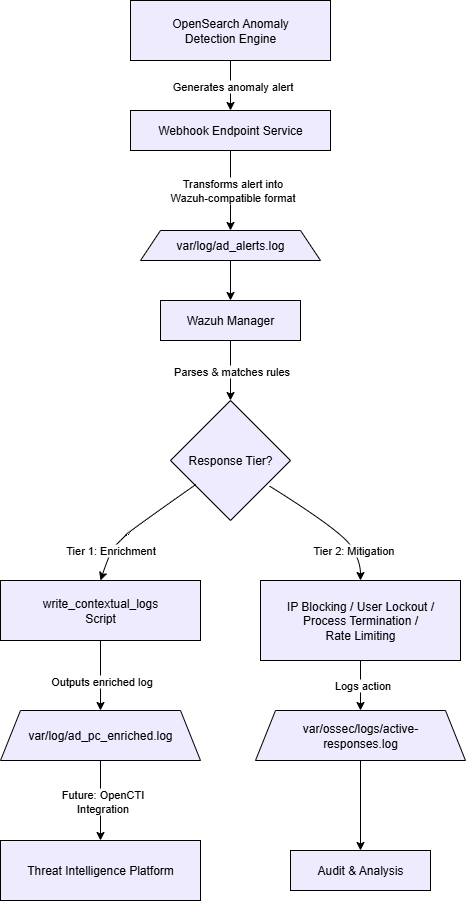
Parent links: HARC-004 RADAR architecture, HARC-005 RADAR Automated Test Framework architecture, SRS-050 RADAR scenario: DLP1 - insider data exfiltration, SRS-051 RADAR scenario: suspicious login, SRS-052 RADAR scenario: DDoS detection, SRS-053 RADAR scenario: malware C2 beaconing
Child links: SWD-019 RATF: setup phase, SWD-020 RATF: simulation phase, SWD-021 RATF: evaluation phase
2.3 RADAR integration with Opensearch modules LARC-017
The diagram below depicts how RADAR integrates with Wazuh Opensearch modules.
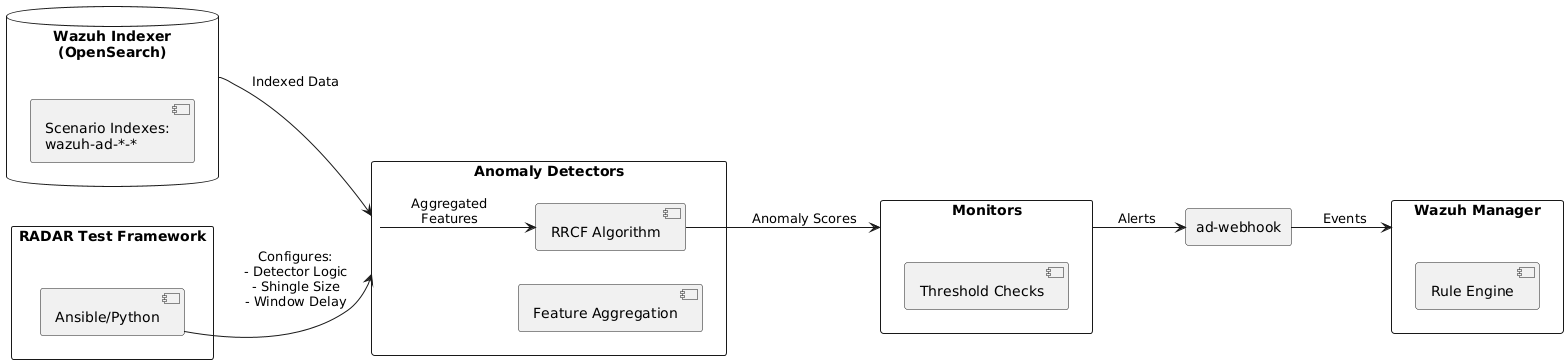
Parent links: HARC-004 RADAR architecture, HARC-005 RADAR Automated Test Framework architecture, SRS-050 RADAR scenario: DLP1 - insider data exfiltration, SRS-051 RADAR scenario: suspicious login, SRS-052 RADAR scenario: DDoS detection, SRS-053 RADAR scenario: malware C2 beaconing, SRS-054 RADAR automated test framework
2.4 RADAR logical flow LARC-018
RADAR has two detection paths, which converge on the same active-response pipeline (LARC-026).
Overall pipeline
Wazuh Agent (logs) -> Wazuh Manager (enrich, if applicable -> decode)
    |
    [Signature path]    Wazuh Manager (rules) -> Active Response
    |
    [Anomaly path]      Wazuh Indexer -> Anomaly Detector -> Monitor -> Webhook -> Wazuh Manager (rules) -> Active Response
Both paths terminate in the same place: a Wazuh rule firing an active-response command bound to radar_ar.py (SWD-027). The anomaly path exists to get an anomaly-detector result into that same rule-firing mechanism — it does not bypass it.
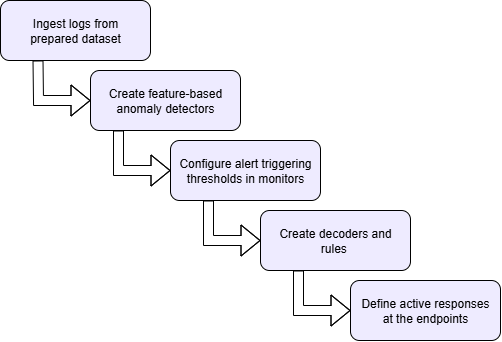
Signature-based detection flow
- Collection: the Wazuh agent forwards a raw log line to the manager, unmodified.
- Enrichment (only for scenarios that need it): the manager enriches the line — GeoIP, ASN, velocity — before it is decoded (SWD-030).
- Decoding: decoders parse the (possibly enriched) line into structured fields.
- Rule matching: rules evaluate the decoded fields; a match generates an alert at the rule's configured severity.
- Active response: the alert's active-response binding invokes
radar_ar.py, which scores the alert and dispatches the tier-appropriate response (SWD-027, SRS-061). The outcome is written to/var/ossec/logs/active-responses.log.
Anomaly-based detection flow
- Collection and, where applicable, enrichment: as above.
- Indexing: the manager forwards decoded logs to the OpenSearch indexer, into the scenario's index.
- Detection: on its configured interval, the anomaly detector queries the index, extracts feature values (per-entity, where a categorical field is configured), and computes an RCF anomaly score and confidence, storing both against the source entity and timestamp.
- Monitoring: on its own interval, a monitor evaluates the latest detector result against the scenario's
anomaly_grade_thresholdandconfidence_threshold. When both are exceeded, it sends an HTTP POST to the webhook. - Webhook: the webhook service parses the notification, formats it as a log line, and writes it to a file the Wazuh agent on the manager host itself monitors.
- Re-entry into the signature path: the manager decodes and evaluates that log line exactly as it would any other event. From here the flow is identical to steps 4–5 of the signature-based flow above: a rule match triggers
radar_ar.py, which scores and responds.
Parent links: HARC-004 RADAR architecture, SRS-050 RADAR scenario: DLP1 - insider data exfiltration, SRS-051 RADAR scenario: suspicious login, SRS-052 RADAR scenario: DDoS detection, SRS-053 RADAR scenario: malware C2 beaconing
Child links: SWD-042 RADAR deployment control plane
2.5 RADAR risk engine calculation flow LARC-021
The diagram below depicts the risk calculation flow implemented in the RADAR active response system. This flow combines three detection paradigms into a unified, normalized risk score that drives automated response actions.
Mathematical foundation
The risk calculation follows the formula:
$$R = w_A \cdot A + w_S \cdot S + w_T \cdot T$$
Where:
- A (Anomaly intensity) = $G \cdot C$, where G is anomaly grade and C is confidence from OpenSearch RCF or SONAR MVAD
- S (Signature risk) = $L \cdot I$, where L is likelihood and I is impact from rule-based detection
- T (CTI score) =
cti_score_T, the normalized score returned directly by the DECIPHER analyze endpoint (SWD-038), clamped to [0,1]. RADAR does not aggregate CTI indicators locally.
Default weights (configurable in ar.yaml):
- $\omega_a = 0.4$ (behavioral → high information value)
- $\omega_s = 0.4$ (signature → high precision)
- $\omega_T = 0.2$ (CTI → confirmatory)
Tier determination
Risk scores map to four response tiers via the scenario's tier1_min/tier1_max/tier2_max boundaries in ar.yaml (default 0.0/0.33/0.66); see SRS-061 for the normative response semantics of each tier:
- Tier 0 (R < tier1_min): Audit log only, no notification
- Tier 1 (tier1_min ≤ R < tier1_max): Email notification + Flowintel case creation
- Tier 2 (tier1_max ≤ R < tier2_max): Tier 1 actions +
mitigations_tier2(ifallow_mitigation) - Tier 3 (R ≥ tier2_max): Tier 1 actions +
mitigations_tier3(ifallow_mitigation)
Flow sequence
- Input collection: Extract AD outputs (G, C), signature values (L, I), the CTI score returned by DECIPHER
- Component calculation: Compute A, S, T from inputs
- Weighted combination: Apply weights to compute R
- Tier assignment: Map R to Tier 0–3 based on
ar.yamlboundaries - Action selection: Determine response actions based on tier and scenario configuration
See also: /radar/scenarios/active_responses/ar.yaml for configuration schema and SWD-026 for the normative implementation design and algorithm specification.
Parent links: HARC-012 RADAR risk engine architecture, SRS-050 RADAR scenario: DLP1 - insider data exfiltration, SRS-051 RADAR scenario: suspicious login, SRS-052 RADAR scenario: DDoS detection, SRS-053 RADAR scenario: malware C2 beaconing, SRS-054 RADAR automated test framework, SRS-055 RADAR scenario: Geo-IP AC via whitelisting, SRS-056 RADAR scenario: log size change, SRS-057 RADAR scenario: ransomware, SRS-058 RADAR scenario: DLP2 - network data exfiltration
Child links: SWD-026 RADAR risk engine implementation design
2.6 RADAR detector creation workflow LARC-022
The diagram below depicts the sequence of operations for creating and starting OpenSearch anomaly detectors via the detector.py module.
Workflow stages
1. Configuration loading
- Read scenario definition from
config.yaml - Load environment variables from
.env(OS_URL, OS_USER, OS_PASS, OS_VERIFY_SSL) - Validate scenario exists in configuration
2. Detector existence check
- Query OpenSearch AD API:
GET /_plugins/_anomaly_detection/detectors/_search - Search by name pattern:
{scenario}_DETECTOR - If found, return existing detector ID (idempotent operation)
3. Detector specification building
Construct detector JSON specification including:
- indices: Index pattern to monitor (e.g.,
wazuh-ad-log-volume-*) - time_field: Timestamp field for time-series analysis (
@timestamp) - feature_attributes: Aggregation queries from config (e.g.,
max(data.log_bytes)) - detection_interval: How often to run detection (minutes)
- window_delay: Buffer time for late-arriving data (minutes)
- category_field: Field for high-cardinality detection (e.g.,
agent.namefor per-endpoint baselines) - shingle_size: Temporal sequence window size for RCF algorithm
- result_index: Custom index for storing detection results
4. Detector creation
- POST detector specification to OpenSearch AD plugin
- Endpoint:
POST /_plugins/_anomaly_detection/detectors - Receive detector ID in response
5. Detector activation
- Start the detector to begin analysis
- Endpoint:
POST /_plugins/_anomaly_detection/detectors/{detector_id}/_start - Detector begins processing data at configured intervals
6. Output
- Return detector ID to stdout for pipeline chaining
- Used by monitor.py in subsequent workflow stage
Key functions
find_detector_id(detector_name: str) -> str | None
detector_spec(scenario_config: dict) -> dict
create_detector(spec: dict) -> str
start_detector(detector_id: str) -> None
Detector Creation Sequence

Implementation reference
See radar/anomaly_detector/detector.py for implementation details.
Parent links: HARC-004 RADAR architecture, HARC-012 RADAR risk engine architecture, SRS-050 RADAR scenario: DLP1 - insider data exfiltration, SRS-051 RADAR scenario: suspicious login, SRS-052 RADAR scenario: DDoS detection, SRS-056 RADAR scenario: log size change
Child links: SWD-028 RADAR detector module design
2.7 RADAR monitor and webhook workflow LARC-023
The diagram below depicts the sequence for creating OpenSearch monitors and webhook notification channels via monitor.py and webhook.py modules.
Workflow overview
The monitor workflow ensures anomaly detection results trigger automated responses when thresholds are exceeded. Monitors continuously evaluate detector outputs and send structured notifications to a webhook endpoint, which integrates with Wazuh's rule engine.
Workflow stages
1. Webhook destination setup
Execute ensure_webhook() from webhook.py:
- Query existing notification destinations:
GET /_plugins/_notifications/configs - Search for webhook by name pattern
-
If not found, create new webhook destination:
- Endpoint:
POST /_plugins/_notifications/configs - Configuration: Custom webhook type, POST method, webhook URL from environment
- Return webhook destination ID
- Endpoint:
2. Monitor existence check
- Query existing monitors:
GET /_plugins/_alerting/monitors/_search - Search by name pattern:
{scenario}_Monitor - If found, return existing monitor ID (idempotent operation)
3. Monitor specification building
Construct monitor JSON including:
- Schedule: Evaluation frequency (defaults to detector_interval if monitor_interval not specified)
- Inputs: Query detector's result index for recent anomalies
- Triggers: Condition evaluating anomaly scores
- Actions: Webhook notification when triggered
4. Trigger condition configuration
Default trigger logic:
anomaly_grade > threshold AND confidence > threshold
Where thresholds are defined in scenario configuration (typical values: 0.3-0.5 for balanced sensitivity/precision).
5. Webhook action specification
Notification payload includes:
{
  "monitor": {"name": "{{ctx.monitor.name}}"},
  "trigger": {"name": "{{ctx.trigger.name}}"},
  "entity": "{{ctx.results.0.hits.hits.0._source.entity.0.value}}",
  "periodStart": "{{ctx.periodStart}}",
  "periodEnd": "{{ctx.periodEnd}}"
}
6. Monitor creation
- Create monitor via OpenSearch Alerting API
- Endpoint:
POST /_plugins/_alerting/monitors - Monitor begins evaluating detector results at configured intervals
7. Output
- Return monitor ID to stdout
- Monitor continuously watches detector and triggers webhook on anomalies
Key functions
# webhook.py
notif_find_id(webhook_name: str) -> str | None
notif_create(webhook_url: str) -> str
ensure_webhook() -> str

# monitor.py
find_monitor_id(monitor_name: str) -> str | None
monitor_payload(detector_id: str, webhook_id: str, config: dict) -> dict
create_monitor(payload: dict) -> str
Integration flow
Monitor → Detector Results → Evaluate Threshold → Webhook POST → /var/log/ad_alerts.log → Wazuh Rules → Active Response
Monitor and Webhook Sequence

Implementation reference
See implementation details:
- radar/anomaly_detector/monitor.py - Monitor creation
- radar/anomaly_detector/webhook.py - Webhook management
- radar/webhook/ad_alerts_webhook.py - Webhook service implementation
Parent links: HARC-004 RADAR architecture, HARC-012 RADAR risk engine architecture, LARC-022 RADAR detector creation workflow, SRS-050 RADAR scenario: DLP1 - insider data exfiltration, SRS-051 RADAR scenario: suspicious login, SRS-052 RADAR scenario: DDoS detection, SRS-056 RADAR scenario: log size change
Child links: SWD-029 RADAR monitor and webhook module design, SWD-035 RADAR webhook service design
2.8 RADAR Ansible deployment pipeline flow LARC-024
The diagram below depicts the end-to-end deployment flow orchestrated by build-radar.sh and Ansible playbooks. The pipeline automates infrastructure setup, scenario configuration, and service initialization across multiple deployment modes.
Pipeline stages
1. Mode selection and validation
- Parse command-line arguments:
./build-radar.sh <scenario> --manager <local|remote> --agent <local|remote> - Validate deployment mode combination
- Set Ansible variables:
manager_mode,agent_mode,scenario_name - Load inventory configuration from
inventory.yaml
2. Volume resolution
The volume-first architecture maps Wazuh configuration directories to host paths:
- Parse
volumes.ymlDocker Compose configuration - Extract bind mount mappings (container path → host path)
-
Key volumes:
/var/ossec/etc→/radar-srv/wazuh/manager/etc/var/ossec/active-response/bin→/radar-srv/wazuh/manager/active-response/bin/etc/filebeat→/radar-srv/wazuh/manager/filebeat/etc
-
Derive host-side file paths for direct manipulation
3. Infrastructure deployment
-
Deploy Wazuh core stack (if manager_mode != existing):
- Wazuh Manager container
- Wazuh Indexer (OpenSearch)
- Wazuh Dashboard
-
Deploy Wazuh agents (if agent_mode == local):
- Agent Docker containers
- Register with manager
-
Install OpenSearch AD plugin in indexer
4. Scenario configuration injection
For the specified scenario, inject configurations via Ansible roles:
Decoders (/var/ossec/etc/decoders/):
- Copy scenario-specific XML decoders
- Marker-based appending to avoid duplicates
- Set ownership:
root:wazuh, permissions:640
Rules (/var/ossec/etc/rules/):
- Copy scenario-specific XML rules
- Use unique markers:
<!-- BEGIN RADAR {scenario} -->/<!-- END RADAR {scenario} --> - Idempotent insertion (skip if marker exists)
Active Response (/var/ossec/active-response/bin/):
- Copy
radar_ar.pyand dependencies - Set executable permissions:
750 - Copy
ar.yamlconfiguration
OSSEC Configuration (/var/ossec/etc/ossec.conf):
- Inject localfile, command, and active_response blocks
- Use marker-based insertion for idempotency
- Configure log monitoring and response commands
Filebeat Pipelines (if applicable):
- Configure ingest pipelines for data enrichment
- Set up index templates
5. RADAR Helper deployment (if scenario requires)
For geographic-enrichment scenarios (geoip_detection, suspicious_login):
- Copy
radar-helper.pyto/opt/radar/on agent hosts - Install Python dependencies (maxminddb)
- Copy MaxMind GeoLite2 databases to
/usr/share/GeoIP/ - Deploy systemd service:
radar-helper.service - Start and enable service
6. Service management
- Restart Wazuh Manager:
/var/ossec/bin/wazuh-control restart - Reload Filebeat configuration
- Verify service health
7. Build radar-cli container
- Build Docker image with detector.py, monitor.py, webhook.py
- Load environment variables from
.env - Image used by
run-radar.shfor detector/monitor setup
Idempotency mechanisms
- File checksums: Compare content before copying to avoid unnecessary operations
- Marker-based injection: Scenario-specific markers prevent duplicate configuration
- Conditional logic: Check for existing resources before creation
- State tracking: Ansible facts maintain deployment state
Diagram: Ansible deployment pipeline showing mode selection, infrastructure setup, scenario injection, and service management. See assets/RADAR-ansible-deployment-flow.md for detailed documentation.
Deployment modes
| manager_mode | agent_mode | Execution context |
|---|---|---|
| docker_local | N/A | Docker on controller host |
| docker_remote | N/A | Docker on remote host via SSH |
| host_remote | N/A | Bare metal installation via SSH |
All modes accept local or remote agents independently.
Note: Diagram placeholder - to be created in Phase 7 showing flowchart: mode selection → volume resolution → infrastructure → config injection → helper deploy → service restart.
See also:
/radar/roles/wazuh_manager/tasks/main.ymlfor playbook implementation/radar/build-radar.shfor orchestration script/docs/manual/radar_docs/radar-manager-ansible-playbook.mdfor detailed documentation
Parent links: HARC-006 RADAR deployment: Remote Agent and Remote Manager mode, HARC-007 RADAR deployment: Remote Agent and Local Manager mode, HARC-008 RADAR deployment: Local Agent and Local Manager mode, HARC-013 RADAR Ansible automation architecture
Child links: SWD-031, SWD-032 RADAR configuration management design
2.9 RADAR helper enrichment pipeline LARC-025
The diagram below depicts the real-time log enrichment pipeline implemented by the RADAR Helper service running on Wazuh agents.
Pipeline overview
The RADAR Helper is a multi-threaded Python daemon that monitors authentication logs, enriches them with geographic and behavioral context, and writes enhanced logs for Wazuh to ingest. This enrichment enables signature-based detection of geographic anomalies and impossible travel scenarios.
Pipeline stages
1. Log monitoring
AuthLogWatcher continuously monitors /var/log/auth.log:
- Implements tail-like following with rotation handling
- Detects SSH authentication events (success and failure)
- Extracts: username, source IP, timestamp (parsed from the log line via
parse_event_ts()), outcome
Note: The timestamp used for all subsequent behavioral calculations is parsed directly from the log line header, not taken from time at processing. This ensures accurate velocity estimates for replayed or delayed log streams.
2. Geographic enrichment
GeoLookup Service queries MaxMind GeoLite2 databases:
- City database:
/usr/share/GeoIP/GeoLite2-City.mmdb - ASN database:
/usr/share/GeoIP/GeoLite2-ASN.mmdb
Extracted fields:
country: ISO 3166-1 alpha-2 country coderegion: State/province namecity: City nameasn: Autonomous System Numberasn_placeholder_flag: True if ASN lookup failed- Geographic coordinates: latitude, longitude (for velocity calculation)
3. User state management
UserState maintains per-user historical data:
- Last login location (latitude, longitude)
- Last login timestamp (epoch seconds, sourced from the parsed event timestamp)
- ASN history (90-day sliding window)
State enables temporal and behavioral analysis:
- Velocity between consecutive logins
- ASN novelty detection
- Country change tracking
4. Behavioral calculations
Geographic velocity:
Algorithm: Calculate velocity between consecutive logins
  Input: previous_location (lat, lon, event_timestamp),
         current_location  (lat, lon, event_timestamp)

  distance_km ← haversine_distance(prev_lat, prev_lon, curr_lat, curr_lon)
  dt_h        ← abs(curr_event_ts - prev_event_ts) / 3600
  if abs(dt_h) < DT_EPS_H (1e-9):
      dt_h ← DT_EPS_H          // guard against near-simultaneous events
  velocity_kmh ← distance_km / dt_h

  Output: velocity_kmh
Note: Velocity is no longer capped at a fixed maximum. The previous 2000 km/h ceiling has been removed. The
DT_EPS_Hguard (1×10⁻⁹ hours) prevents division by zero for events with identical or near-identical timestamps without distorting physically plausible velocities.
Country change indicator:
Algorithm: Detect country transition
  country_change_i ← (curr_country ≠ prev_country) ? 1 : 0
ASN novelty indicator:
Algorithm: Check if ASN is novel within retention window
  asn_novelty_i ← (curr_asn ∉ user_asn_history[−90d]) ? 1 : 0
5. Enriched log writing
Formatted log line written to /var/log/suspicious_login.log:
timestamp hostname sshd[PID]: radar_outcome="success" radar_user="alice"
  radar_src_ip="203.0.113.42" radar_country="US" radar_region="California"
  radar_city="San Francisco" radar_asn="15169" radar_asn_placeholder_flag="false"
  radar_geo_velocity_kmh="450.23" radar_country_change_i="1"
  radar_asn_novelty_i="0"
6. Wazuh ingestion
Wazuh agent monitors /var/log/suspicious_login.log:
- Custom decoders extract radar_* fields
- Rules evaluate conditions (velocity > 900 km/h, country not in whitelist)
- Active responses trigger on rule matches
Algorithms
Haversine distance (great-circle distance):
Algorithm: Calculate great-circle distance between two geographic points
  Input: lat1, lon1, lat2, lon2 (in degrees)

  R    ← 6371.0088  // Earth mean radius in km
  Δlat ← radians(lat2 - lat1)
  Δlon ← radians(lon2 - lon1)

  a ← sin²(Δlat/2) + cos(radians(lat1)) × cos(radians(lat2)) × sin²(Δlon/2)
  c ← 2 × atan2(√a, √(1-a))
  distance ← R × c

  Output: distance (in kilometers)
ASN history maintenance:
Algorithm: Maintain time-windowed ASN history for user
  Input: user_state, retention_window_sec (default: 90 × 24 × 3600 = 7,776,000 s)

  cutoff_timestamp ← current_event_ts - retention_window_sec

  for each (asn, timestamp) in user_state.asn_history:
    if timestamp < cutoff_timestamp:
      remove (asn, timestamp) from user_state.asn_history
      if asn not referenced by any remaining entry:
        remove asn from user_state.asn_set

  Output: updated user_state with pruned history and set
Timestamp parsing (parse_event_ts):
Algorithm: Parse log line timestamp to Unix epoch float
  Input: ts_str (string)

  if ts_str matches ISO 8601 pattern (contains "T" and timezone offset):
    return datetime.fromisoformat(ts_str).timestamp()

  if ts_str matches syslog pattern (e.g., "Jan 15 10:30:00"):
    reconstruct datetime using current year and local timezone
    return datetime(...).timestamp()

  fallback:
    return time.time()

  Output: float (Unix epoch seconds)
Multi-threading design
- Main thread: Creates a
RadarLoggersingleton (RADAR_LOG) at startup, instantiatesAuthLogWatcherwith it, and manages the watcher lifecycle - RadarLogger: Encapsulates all logger setup; provides a shared debug logger and a factory method (
build_out_logger) for per-watcher output loggers - Watcher threads: One per log file;
AuthLogWatcheris active in production;AuditLogWatcheris defined as a stub for future use - Graceful shutdown: Stop event signaling and thread join with 5-second timeout on exit
Implementation reference
See radar/radar-helper/radar-helper.py for complete implementation.
See also
/docs/manual/radar_docs/radar-scenarios/geoip_detection_explained.mdfor usage in GeoIP scenario/docs/manual/radar_docs/radar-scenarios/suspicious_login_explained.mdfor usage in suspicious login scenario
Parent links: HARC-014 RADAR helper architecture, SRS-051 RADAR scenario: suspicious login, SRS-055 RADAR scenario: Geo-IP AC via whitelisting
Child links: SWD-030 RADAR manager-side enrichment module design, SWD-032 RADAR configuration management design
2.10 RADAR active response decision pipeline LARC-026
The diagram below depicts the comprehensive decision-making pipeline implemented in radar_ar.py, which orchestrates automated threat response based on risk-aware analysis.
This expands on LARC-016 (RADAR active response flow) with detailed implementation logic, scenario identification, context collection, and tiered action planning.
Pipeline stages
1. Alert intake
- Read Wazuh alert JSON from stdin
- Parse alert structure: rule ID, level, groups, agent info, timestamp, data fields
- Validate alert completeness
- Log alert reception
2. Scenario identification
ScenarioIdentifier maps rule IDs to scenarios:
- Load
ar.yamlconfiguration - Iterate through scenario definitions
- Match alert rule ID to configured rule mappings
- Determine detection type:
signatureorad(anomaly detection) - Return scenario context:
{name, detection, alert, config}
Exit if no scenario matches (no-op, log warning).
3. Scenario-specific behavior resolution
BaseScenario and subclasses determine:
Time window resolution:
- AD-based: Use
delta_ad_minutes(default: 10) from config - Signature-based: Use
delta_signature_minutes(default: 1) from config - Window:
[alert_timestamp - delta, alert_timestamp]
Effective agent resolution:
- AD-based: Return None (query all agents for per-entity baselines)
- Signature-based: Return
alert.agent.name(scope to triggering agent)
AD score extraction:
- Extract anomaly grade and confidence from alert data fields
- Handle scenario-specific field names
4. Context collection
Query OpenSearch for correlated events within time window:
Query specification:
  time_range: [alert_timestamp - window_delta, alert_timestamp]
  agent_filter: effective_agent (if signature-based) OR all agents (if AD-based)

Algorithm: Extract IOCs from alert and correlated events
  For each event:
    Extract IP addresses from: srcip, dstip, data.srcip, data.dstip
    Extract usernames from: srcuser, dstuser, data.srcuser, data.dstuser
    Extract hashes from: data.md5, data.sha256
    Extract domains from: data.url, data.hostname

  Return: deduplicated IOC collection
5. CTI enrichment (DECIPHER integration)
- Check DECIPHER health (cached for the remainder of this process; not retried, per SRS-061 §4(i))
- If healthy and the scenario has a mapped DECIPHER analyze endpoint: build the scenario-specific payload (
build_analyze_payload(), including extracted IOCs) and call the analyze endpoint - DECIPHER performs its own IOC lookups (e.g. via MISP) and returns a single normalized CTI score,
cti_score_T∈ [0,1], plus labels and confidence - If DECIPHER is unreachable, or the scenario has no analyze endpoint mapped:
cti_score_T = 0.0, logged as a WARNING - No local aggregation of individual IOC indicators occurs in
radar_ar.py— the score used by the risk engine (step 6) is exactly the value DECIPHER returned (or 0.0)
6. Risk calculation
Apply risk engine formula (see LARC-021):
Algorithm: Calculate composite risk score
  A ← anomaly_grade × confidence  // AD intensity
  S ← likelihood × impact         // Signature risk (from ar.yaml)
  T ← cti_score                   // CTI aggregation

  R ← w_A × A + w_S × S + w_T × T  // Weighted combination

  Where weights are loaded from scenario configuration
Weights loaded from scenario configuration in ar.yaml.
7. Decision ID generation
Create a unique identifier for audit correlation, per SRS-061 §6(i):
Algorithm: Generate deterministic decision ID
  components ← {alert_id, timestamp, rule_id, agent_id, scenario, detection, window, effective_agent}
  decision_id ← SHA256(JSON.dumps(components, sort_keys=True))   // full hex digest
The decision ID is used for audit-log correlation and as the DECIPHER incident reference — not for deduplication. radar_ar.py maintains no decision cache; re-delivery of the same alert is not itself suppressed by this script (SWD-027).
8. Tier assignment and action planning
Map risk score to tier using per-scenario boundaries from ar.yaml:
- Tier 0 (R < tier1_min): No actions; audit log entry only
- Tier 1 (tier1_min <= R < tier1_max): email + DECIPHER incident creation
- Tier 2 (tier1_max <= R < tier2_max): Tier 1 actions + mitigations_tier2 (if allow_mitigation)
- Tier 3 (R >= tier2_max): Tier 1 actions + mitigations_tier3 (if allow_mitigation)
DECIPHER incident creation (FlowIntel case) runs in run() before action planning, gated on tier >= 1 and DECIPHER health check.
Apply configuration flag from ar.yaml:
allow_mitigation: Enable mitigation execution at Tier 2 and Tier 3
Apply safety gates:
- Production environment check
- Whitelist verification
- Rate limiting (max actions per time window)
9. Action execution
Email notification:
- Format alert summary with risk score and tier
- Include IOCs and CTI hits
- Send via SMTP (credentials from .env)
DECIPHER incident creation (tier >= 1, if DECIPHER reachable):
- Call
DecipherClient.create_incident(decision) - DECIPHER creates FlowIntel case and returns
case_idandcase_url - Case URL included in email notification
Mitigation actions (via Wazuh API):
- Firewall drop:
PUT /active-response?agents_list={agent_id}with commandfirewall_dropand IP argument - Account disable: Active response command to disable compromised user
- Service termination: termination of process connected to malicious IP or termination of malicious service
10. Audit logging
Write structured JSON to /var/ossec/logs/active-responses.log:
{
  "timestamp": "...",
  "decision_id": "...",
  "scenario": "...",
  "rule_id": "...",
  "risk_score": 0.75,
  "tier": 2,
  "actions_planned": ["email", "case", "firewall_drop"],
  "actions_executed": ["email", "case", "firewall_drop"],
  "execution_results": {...},
  "iocs": [...],
  "cti_hits": [...]
}
11. Exit
Return exit code:
0: Success (scenario processed)1: No scenario match or alert invalid2: Critical exception
Error handling
- Transient failures: Retry with exponential backoff (OpenSearch, CTI queries)
- Non-critical failures: Log and continue (e.g., email send failure doesn't block case creation)
- Critical failures: Abort pipeline, log, return error code
Configuration schema (ar.yaml)
scenarios:
  geoip_detection:
    ad:
      rule_ids: []
    signature:
      rule_ids: ["100900", "100901"]
    w_ad: 0.0
    w_sig: 0.6
    w_cti: 0.4
    delta_signature_minutes: 1
    signature_impact: 0.6
    signature_likelihood: 0.8
    tiers:
      tier1_min: 0.0
      tier1_max: 0.33
      tier2_max: 0.66
    allow_mitigation: true
    mitigations_tier2:
      - firewall-drop
    mitigations_tier3:
      - firewall-drop
Active Response Sequence

Implementation reference
See radar/scenarios/active_responses/radar_ar.py for complete implementation.
See also
- SWD-027 for the normative software design specification of this pipeline
- LARC-016 for simplified flow diagram
Parent links: HARC-004 RADAR architecture, HARC-012 RADAR risk engine architecture, HARC-013 RADAR Ansible automation architecture, LARC-021 RADAR risk engine calculation flow, SRS-050 RADAR scenario: DLP1 - insider data exfiltration, SRS-051 RADAR scenario: suspicious login, SRS-052 RADAR scenario: DDoS detection, SRS-053 RADAR scenario: malware C2 beaconing, SRS-054 RADAR automated test framework, SRS-055 RADAR scenario: Geo-IP AC via whitelisting, SRS-056 RADAR scenario: log size change, SRS-057 RADAR scenario: ransomware, SRS-058 RADAR scenario: DLP2 - network data exfiltration
Child links: SWD-026 RADAR risk engine implementation design, SWD-027 RADAR active response script design, SWD-037 RADAR-SONAR integration design, SWD-038 RADAR-DECIPHER FlowIntel integration design
2.11 RADAR data ingestion pipeline LARC-027
The diagram below depicts the data ingestion workflow orchestrated by run-radar.sh and implemented by scenario-specific wazuh_ingest.py scripts.
Pipeline purpose
Data ingestion generates synthetic time-series data for training OpenSearch RCF anomaly detectors. Each behavior-based scenario requires historical baseline data to establish normal patterns before real-time detection begins.
Workflow stages
1. Script invocation
Execute from run-radar.sh:
Command: Execute scenario ingestion script in containerized environment
  Container: radar-cli:latest
  Environment: Load OS_URL, OS_USER, OS_PASS, OS_VERIFY_SSL from .env
  Volumes: Mount scenarios directory
  Script: /app/scenarios/ingest_scripts/{scenario}/wazuh_ingest.py
2. Baseline query (scenario-dependent)
Log volume scenario:
- Query last 10 minutes of existing data from
wazuh-ad-log-volume-* - Retrieve 2 most recent documents
- Calculate delta between log byte values
- Fallback: 20,000 bytes if insufficient data
Suspicious login scenario:
- Query user authentication patterns
- Analyze login frequency distribution
- Determine normal session intervals
3. Time series generation
Log volume algorithm:
Algorithm: Generate realistic time series baseline
  Input: baseline_value, delta, lookback_minutes, sampling_interval_seconds

  total_points ← (lookback_minutes × 60) / sampling_interval_seconds
  start_time ← current_time - lookback_minutes

  for i from 0 to total_points:
    timestamp ← start_time + (i × sampling_interval_seconds)
    value ← baseline_value + (delta × i / total_points)  // Linear progression

    document ← {
      "@timestamp": timestamp (ISO8601 format),
      "agent": {"name": agent_name, "id": agent_id},
      "data": {"log_path": path, "log_bytes": value},
      "predecoder": {"program_name": metric_name}
    }

    append document to bulk_data

  Output: bulk_data collection
Example generated data characteristics:
- Default parameters: 240 minutes lookback, 20-second sampling = 720 points
- Monotonic trend: Realistic growth from baseline to baseline+delta
- Proper timestamps: ISO8601 with consistent spacing
- Scenario-specific fields: Match detector configuration exactly
4. Bulk indexing
OpenSearch Bulk API specification:
- Endpoint:
POST /{index}/_bulk - Content-Type:
application/x-ndjson - Format: Newline-delimited JSON (NDJSON)
Example NDJSON structure:
{"index": {"_index": "wazuh-ad-log-volume-2026-02-16"}}
{"@timestamp": "2026-02-16T10:00:00Z", "agent": {...}, "data": {...}}
{"index": {"_index": "wazuh-ad-log-volume-2026-02-16"}}
{"@timestamp": "2026-02-16T10:00:20Z", "agent": {...}, "data": {...}}
Batch processing:
- Default batch size: 500-1000 documents per bulk request
- Error handling: Retry on transient failures (network, temporary unavailability)
- Progress logging: Document count, timestamp range after each batch
5. Verification
Algorithm: Verify successful ingestion
  1. Query document count in target index for time range
  2. Compare actual_count with expected_count
  3. Verify earliest and latest timestamps match expected range
  4. Validate field mappings (numeric fields are numbers, not strings)

  if all checks pass:
    return SUCCESS
  else:
    return FAILURE with diagnostic information
6. Output
- Log ingestion summary: document count, time range, index name
- Return success/failure exit code
- Output used by run-radar.sh to proceed to detector creation
Scenario-specific ingestion patterns
Log volume
- Index:
wazuh-ad-log-volume-* - Key field:
data.log_bytes(numeric) - Pattern: Monotonic increase with realistic deltas
- Volume: 720 points over 240 minutes
Suspicious login
- Index:
wazuh-archives-*or custom index - Key fields:
srcuser,srcip,@timestamp, enriched RADAR fields - Pattern: Normal login distribution with occasional geographic diversity
- Volume: Variable based on user count and session patterns
Insider threat (archived)
- Index:
wazuh-archives-* - Key fields: File access patterns, data transfer volumes
- Pattern: Baseline file activity with gradual increase
- Volume: Per-user baselines
Data quality considerations
- Timestamp accuracy: Proper ISO8601 format with timezone
- Field types: Numeric fields as numbers, not strings (critical for aggregations)
- Index patterns: Match detector configuration exactly
- Agent consistency: Use consistent agent.name for high-cardinality detection
- Realistic patterns: Avoid synthetic steps or unrealistic spikes that confuse training
Error handling
- Connection failures: Retry with exponential backoff
- Index creation: Auto-create if not exists (OpenSearch default)
- Mapping conflicts: Log error, fail fast
- Bulk API errors: Parse response, retry failed documents
Data Ingestion Sequence

Implementation reference
Scenario-specific implementations:
- radar/scenarios/ingest_scripts/log_volume/wazuh_ingest.py - Log volume implementation
- radar/scenarios/ingest_scripts/suspicious_login/wazuh_ingest.py - Login behavioral implementation
See also
/docs/manual/radar_docs/radar-run-ad.mdfor workflow documentation
Parent links: HARC-004 RADAR architecture, HARC-014 RADAR helper architecture, LARC-015 RADAR scenario setup flow, SRS-050 RADAR scenario: DLP1 - insider data exfiltration, SRS-051 RADAR scenario: suspicious login, SRS-052 RADAR scenario: DDoS detection, SRS-056 RADAR scenario: log size change
Child links: SWD-033 RADAR data ingestion module design, SWD-037 RADAR-SONAR integration design
2.12 RADAR GeoIP detection scenario flow LARC-028
The diagram below depicts the end-to-end flow for the GeoIP detection scenario, which uses signature-based detection to identify and block authentication attempts from non-whitelisted geographic locations.
Scenario overview
GeoIP detection is a signature-based scenario that does not use anomaly detection. It relies on:
- Real-time log enrichment via RADAR Helper
- Custom decoders for field extraction
- Rules with country whitelist matching
- Active response for automated notification and optional mitigation
Flow stages
1. Authentication event
- SSH authentication attempt recorded in
/var/log/auth.logon monitored endpoint - Event includes: timestamp, outcome (success/failure), username, source IP
2. RADAR Helper enrichment (see LARC-025)
- AuthLogWatcher detects new authentication event
- GeoLookup queries MaxMind databases for source IP
- Enrichment adds: country, region, city, ASN, geo_velocity_kmh, country_change_i, asn_novelty_i
- Writes enriched log to
/var/log/suspicious_login.log
3. Wazuh agent ingestion
- Wazuh agent monitors
/var/log/suspicious_login.log - Reads enriched log line
- Forwards to Wazuh Manager
4. Decoder extraction
- Custom decoder (
0310-ssh.xml) parses enriched log - Extracts structured fields:
radar_outcome,radar_country,radar_src_ip,radar_user, etc. - Populates alert data structure
5. Rule evaluation
Rule 100900: Connection from non-whitelist country (list-based)
- Condition:
radar_outcome="success"ANDradar_country NOT IN /var/ossec/etc/lists/whitelist_countries - Level: 10
- Groups:
authentication_success,geoip_detection
Rule 100901: Connection from non-whitelist country (hardcoded fallback)
- Condition:
authentication_successANDsrcgeoip NOT IN {predefined EU countries} - Level: 10
- Fallback if list-based check unavailable
6. Active response trigger
- Rule match triggers active response command:
radar-ar - Wazuh executes:
/var/ossec/active-response/bin/radar_ar.py - Alert JSON passed via stdin
7. Active response processing (see LARC-026)
- Scenario identification: Maps rule ID 100900/100901 →
geoip_detectionscenario - Context collection: Query recent authentication events for user
- CTI enrichment: Check source IP against threat intelligence
- Risk calculation: Primarily signature-based (w_sig = 0.7, w_cti = 0.3)
- Tier determination: Based on risk score and configuration
-
Action execution:
- Low/Medium tier: Email notification with alert details
- High tier (if mitigation enabled): Email + Flowintel case + firewall block
8. Audit logging
- Decision recorded in
/var/ossec/logs/active-responses.log - Includes: scenario, rule ID, risk score, tier, actions executed, IOCs, CTI hits
Configuration
Whitelist (/var/ossec/etc/lists/whitelist_countries):
US
CA
GB
DE
FR
...
ar.yaml configuration:
geoip_detection:
  rules:
    signature: ["100900", "100901"]
  detection_params:
    delta_signature_minutes: 1
  risk_params:
    likelihood: 0.4
    impact: 0.9
    weights: {w_ad: 0.0, w_sig: 0.7, w_cti: 0.3}
  tier_thresholds: {low: 0.33, high: 0.66}
  actions:
    email_enabled: true
    case_creation_enabled: true
    mitigation_enabled: false
Key characteristics
- Real-time: No training phase required
- Deterministic: Rule-based matching, no probabilistic scoring
- Low false positives: Whitelist approach ensures legitimate geographic regions allowed
- Operational flexibility: Whitelist easily updated without retraining
- Fast response: No detector delays, immediate rule evaluation
See also:
/docs/manual/radar_docs/radar-scenarios/geoip_detection_explained.mdfor detailed documentation/radar/scenarios/decoders/geoip_detection/for decoder implementations/radar/scenarios/rules/geoip_detection/for rule definitions
Parent links: HARC-004 RADAR architecture, HARC-014 RADAR helper architecture, LARC-025 RADAR helper enrichment pipeline, LARC-026 RADAR active response decision pipeline, SRS-053 RADAR scenario: malware C2 beaconing, SRS-055 RADAR scenario: Geo-IP AC via whitelisting
Child links: SWD-034 RADAR custom rule and decoder patterns
2.13 RADAR log volume detection scenario flow LARC-029
The diagram below depicts the end-to-end flow for the log volume detection scenario, which uses behavior-based anomaly detection (OpenSearch RCF) to identify abnormal increases in log generation that may indicate attacks, system issues, or data exfiltration.
Scenario overview
Log volume detection is a behavior-based scenario using OpenSearch Anomaly Detection:
- Monitors log file size growth on endpoints
- Uses RRCF (Robust Random Cut Forest) algorithm for anomaly detection
- Per-endpoint baselines via high-cardinality detection
- Webhook integration routes anomalies to Wazuh rule engine
- Active response executes tiered actions based on risk score
Flow stages
1. Log collection on agent
- Wazuh agent runs localfile command every 20 seconds:
xml <localfile> <log_format>command</log_format> <command>du -sb /var/log | awk '{print $1}'</command> <alias>log_volume_metric</alias> <frequency>20</frequency> </localfile> - Command output: log size in bytes for
/var/log
2. Log forwarding
- Agent forwards log to Wazuh Manager
- Manager applies decoder:
local_decoder.xmlextractsdata.log_bytesfield - Log indexed to OpenSearch:
wazuh-ad-log-volume-*index
3. Historical data ingestion (initial setup, see LARC-027)
run-radar.shexecuteswazuh_ingest.py- Generates 240 minutes of baseline data (720 points)
- Realistic time series with monotonic growth
- Bulk indexed to OpenSearch
4. Detector creation (see LARC-022)
run-radar.shexecutesdetector.py-
Creates OpenSearch AD detector with:
- Feature:
max(data.log_bytes) - Category field:
agent.name(per-endpoint baselines) - Shingle size: 8 (temporal sequence)
- Detection interval: 5 minutes
- Window delay: 1 minute
- Starts detector
- Feature:
5. Real-time anomaly detection
OpenSearch RCF detector runs every 5 minutes:
- Query index for recent data points per agent
- Extract feature values: max log bytes in interval
- Apply RCF model to detect outliers
- Compute anomaly grade (0-1) and confidence (0-1)
- Write results to
opensearch-ad-plugin-result-log-volumeindex
6. Monitor evaluation (see LARC-023)
OpenSearch monitor runs every 5 minutes:
- Query detector result index
- Evaluate trigger condition:
anomaly_grade > 0.3 AND confidence > 0.3 - If condition met, trigger webhook action
7. Webhook notification
- Monitor POSTs JSON payload to webhook endpoint:
http://manager:8080/notify - Payload includes: monitor name, trigger name, entity (agent name), period start/end times
8. Webhook service processing
- Flask service (
ad_alerts_webhook.py) receives POST request - Extracts alert details from payload
- Formats as syslog message
- Writes to
/var/log/ad_alerts.log:Feb 16 10:30:15 wazuh-manager opensearch_ad: LogVolume-Growth-Detected entity=edge.vm grade=0.85 confidence=0.92
9. Wazuh rule matching
Rule 100300: Generic OpenSearch AD alert
- Decoder:
opensearch_adextracts fields - Rule level: 5
- Matches any AD alert
Rule 100309: Log Volume Growth specific
- Parent: Rule 100300
- Condition:
trigger.name = "LogVolume-Growth-Detected" - Level: 12
- Groups:
log_volume,anomaly
10. Active response trigger
- Rule 100309 match triggers
radar-aractive response - Alert JSON passed to
radar_ar.pyvia stdin
11. Active response processing (see LARC-026)
- Scenario identification: Maps rule ID 100309 →
log_volumescenario - Time window: Last 10 minutes (delta_ad_minutes)
- Context collection: Query correlated events from all agents (high-cardinality)
- Extract AD scores: anomaly_grade, confidence from alert data
- CTI enrichment: Check for malicious activity indicators
- Risk calculation: Primarily AD-based (w_ad = 0.6, w_sig = 0.2, w_cti = 0.2)
A = grade × confidence = 0.85 × 0.92 = 0.782 S = likelihood × impact = 0.5 × 0.6 = 0.3 T = CTI aggregation (varies) R = 0.6 * 0.782 + 0.2 * 0.3 + 0.2 * T - Tier determination: Based on R value
- Action execution:
- Low tier (R < 0.3): Email only
- Medium tier (0.3 ≤ R < 0.7): Email + Flowintel case
- High tier (R ≥ 0.7): Email + case + investigation escalation
12. Audit logging
- Decision recorded with full context: scenario, risk score, tier, actions, anomaly details
Configuration
config.yaml:
log_volume:
  index_prefix: "wazuh-ad-log-volume-*"
  result_index: "opensearch-ad-plugin-result-log-volume"
  time_field: "@timestamp"
  categorical_field: "agent.name"
  detector_interval: 5
  delay_minutes: 1
  shingle_size: 8
  anomaly_grade_threshold: 0.3
  confidence_threshold: 0.3
  features:
    - feature_name: "log_volume_max"
      feature_enabled: true
      aggregation_query:
        log_volume_max:
          max:
            field: "data.log_bytes"
ar.yaml:
log_volume:
  rules:
    ad: ["100309"]
  detection_params:
    delta_ad_minutes: 10
  risk_params:
    likelihood: 0.5
    impact: 0.6
    weights: {w_ad: 0.6, w_sig: 0.2, w_cti: 0.2}
  tier_thresholds: {low: 0.3, high: 0.7}
  actions:
    email_enabled: true
    case_creation_enabled: true
    mitigation_enabled: false
Key characteristics
- Adaptive: Learns normal patterns per endpoint
- High-cardinality: Separate baselines per agent prevent statistical masking
- Streaming: Real-time detection without batch retraining
- Configurable sensitivity: Threshold tuning balances false positives vs. detection rate
- Multi-stage pipeline: Decouples detection (OpenSearch) from response (Wazuh)
Implementation reference
See implementation details:
- docs/manual/radar_docs/radar-scenarios/log_volume_explained.md - Detailed documentation
- radar/scenarios/decoders/log_volume/ - Decoder implementations
- radar/scenarios/rules/log_volume/ - Rule definitions
- radar/scenarios/ingest_scripts/log_volume/ - Data ingestion
Parent links: HARC-004 RADAR architecture, LARC-022 RADAR detector creation workflow, LARC-023 RADAR monitor and webhook workflow, LARC-026 RADAR active response decision pipeline, SRS-054 RADAR automated test framework, SRS-056 RADAR scenario: log size change
Child links: SWD-034 RADAR custom rule and decoder patterns, SWD-035 RADAR webhook service design
2.15 RADAR adversarial defense implementation flow LARC-031
The diagram below depicts the implementation flow for adversarial ML defense mechanisms in RADAR, protecting anomaly detection systems against data poisoning, evasion attacks, and model tampering.
Defense layers
Layer 1: Baseline initialization with clean data
Implementation:
- Clean period identification: Analyze historical data for known-clean periods (pre-incident, honeypot-free)
- Gold-standard datasets: Use verified attack-free data for initial training
- Digital clean room: Temporary system lockdown to capture pristine baselines
- Exclusion filtering: Remove time segments with suspected attacker presence
Configuration:
baseline_init:
  use_gold_standard: true
  clean_period_start: "2026-01-01T00:00:00Z"
  clean_period_end: "2026-01-15T00:00:00Z"
  excluded_hosts: ["suspected-compromised-01"]
Layer 2: Concept drift detection
Implementation:
- Baseline shift monitoring: Track mean, variance, and distribution shape changes
- Velocity thresholds: Alert when baseline shift rate exceeds historical norms
- Correlation analysis: Flag simultaneous shifts across multiple features
- Automated gating: Freeze model updates when anomalous drift detected
Algorithm:
Algorithm: Detect abnormal baseline shifts
  Input: current_stats, historical_stats, threshold (default: 0.2)

  // Calculate relative changes
  mean_shift ← |current_stats.mean - historical_stats.mean| / historical_stats.mean
  std_shift ← |current_stats.std - historical_stats.std| / historical_stats.std

  // Check correlation across features
  correlated_shifts ← count_features_with_simultaneous_shifts(current_stats, historical_stats)

  // Determine if drift is anomalous
  drift_detected ← (mean_shift > threshold) OR
                     (std_shift > threshold) OR
                     (correlated_shifts ≥ 3)

  drift_metrics ← {
    mean_shift: mean_shift,
    std_shift: std_shift,
    correlated_features: correlated_shifts
  }

  Output: drift_detected (boolean), drift_metrics (dictionary)
Configuration:
drift_detection:
  enabled: true
  check_interval_hours: 24
  threshold_percent: 20
  correlation_threshold: 3
  freeze_on_drift: true
  require_analyst_approval: true
Layer 3: Multi-layer validation (defense in depth)
Implementation: RADAR already implements this via hybrid detection:
- Signature-based (Wazuh, Suricata): Fast, deterministic, resistant to ML poisoning
- Multivariate AD (SONAR MVAD): Complex patterns, correlation-aware
- Streaming AD (OpenSearch RRCF): Real-time, distinct algorithm
- Cross-layer correlation: Flag events detected by multiple layers as high confidence
Validation algorithm:
Algorithm: Validate alert across detection layers
  Input: alert

  layers_triggered ← empty_list

  if signature_detection_fired(alert):
    append 'signature' to layers_triggered

  if mvad_detection_fired(alert):
    append 'mvad' to layers_triggered

  if rrcf_detection_fired(alert):
    append 'rrcf' to layers_triggered

  // Multi-layer agreement increases confidence
  confidence_boost ← count(layers_triggered) × 0.15
  high_confidence ← count(layers_triggered) ≥ 2

  Output: {
    layers: layers_triggered,
    confidence_boost: confidence_boost,
    high_confidence: high_confidence
  }
Layer 4: Human-in-the-loop (HITL) oversight
Implementation:
- Transparent reasoning: Expose model decisions (which points anomalous, why)
- Analyst review workflows: Dashboard for reviewing flagged baseline changes
- Feedback loops: Analysts flag incorrect classifications
- Approval gates: Model updates require manual approval when drift detected
Workflow:
- System detects concept drift or baseline shift
- Generate alert to SOC dashboard
- Analyst reviews: - Shift magnitude and velocity - Affecting features and entities - Timeline correlation with known events
- Analyst decision: - Approve: Legitimate change (new application, infrastructure update) - Reject: Suspected poisoning, freeze baseline - Investigate: Escalate to incident response
Layer 5: System hardening
Implementation:
Log integrity:
Process: Cryptographic hashing of log files
  1. Generate SHA-256 hash of log file
     Command: sha256sum /var/log/wazuh/alerts.json > /var/log/wazuh/alerts.json.sha256

  2. Enable append-only logging (immutable storage)
     Command: chattr +a /var/log/wazuh/alerts.json

  3. Forward-secure audit logs
     Mechanism: Time-stamped cryptographic signatures preventing retroactive tampering
Model security:
Process: Secure model file storage and versioning
  1. Set restrictive permissions
     Permissions: read-only for radar-ml group (mode 440)
     Owner: root:radar-ml

  2. Model versioning and integrity
     Version control: Git repository for model files
     Integrity: SHA-256 checksums for all model files

  3. Audit logging
     Log all model updates with: timestamp, user, model version
Access control specification: See RBAC configuration in YAML section below for role definitions and approval requirements.
Integration with RADAR workflows
Detector creation (LARC-022)
- Before training: Validate data cleanliness
- Contamination parameter: Configure RCF contamination tolerance
- Baseline documentation: Record training period and data sources
Monitor evaluation (LARC-023)
- Drift detection: Monitor checks for baseline shift before evaluating anomalies
- Multi-layer correlation: Cross-reference with signature-based rules
- Confidence adjustment: Boost detection confidence when multiple layers agree
Active response (LARC-026)
- Risk calculation: Include drift detection status in context
- Action planning: Require higher confidence when drift suspected
- Audit logging: Record all defense layer activations
Configuration (adversarial_defense.yaml)
adversarial_defense:
  baseline_initialization:
    use_verified_clean_data: true
    gold_standard_dataset: "/opt/radar/baseline/gold_standard.json"
    clean_period:
      start: "2026-01-01T00:00:00Z"
      end: "2026-01-15T00:00:00Z"

  drift_detection:
    enabled: true
    check_interval_hours: 24
    mean_shift_threshold: 0.20
    std_shift_threshold: 0.25
    correlation_threshold: 3
    freeze_on_drift: true

  multi_layer_validation:
    enabled: true
    require_layers: 2  # Minimum layers for high confidence
    confidence_boost_per_layer: 0.15

  hitl_oversight:
    enabled: true
    require_approval_for:
      - model_retraining
      - baseline_reset
      - significant_drift
    dashboard_url: "https://radar.example.com/oversight"

  system_hardening:
    log_integrity:
      enable_hashing: true
      hash_algorithm: "sha256"
      append_only_logs: true
    model_security:
      enable_versioning: true
      enable_checksums: true
      restrict_access: true
    access_control:
      enable_rbac: true
      roles:
        radar_viewer:
          permissions: [view_alerts, view_detectors]
        radar_operator:
          permissions: [view_alerts, view_detectors, create_detectors, create_monitors]
        radar_admin:
          permissions: ["*", model_training, model_deployment]
      approval_required:
        - model_training       # Requires radar_admin role
        - baseline_reset       # Requires radar_admin role + security_approval
        - model_deployment     # Requires radar_admin role + change_control
      audit_all_operations: true
Monitoring and alerting
Drift detection alerts:
- Email to SOC when drift exceeds threshold
- Dashboard visualization of baseline trends
-
Automated freeze of model updates
-
Access control alerts:
-
Failed authentication attempts to model files
- Unauthorized model update attempts
- Suspicious baseline reset requests
Adversarial Defense Implementation Flow

Implementation reference
See docs/manual/radar_docs/adversarial-ml-guidance.md for comprehensive defense guidance.
See also
- HARC-015 for overall adversarial defense architecture
Parent links: HARC-015 RADAR adversarial ML defense architecture, LARC-022 RADAR detector creation workflow
Child links: SWD-036 RADAR model security and adversarial defense implementation
3.0 ADBox v1 Low-Level Architecture (Maintenance)
Low-level architecture for ADBox v1 (MTAD-GAT legacy system) - maintenance mode only.
3.1 ADBox training pipeline flow LARC-001
Training pipeline flow diagram
The diagram summarizes the flow of the training pipeline orchestrated by the ADBox Engine.

Parent links: SRS-038 Joint Host-Network Training
Child links: SWD-001 ADBox training pipeline
3.1 ADBox Shipper LARC-014
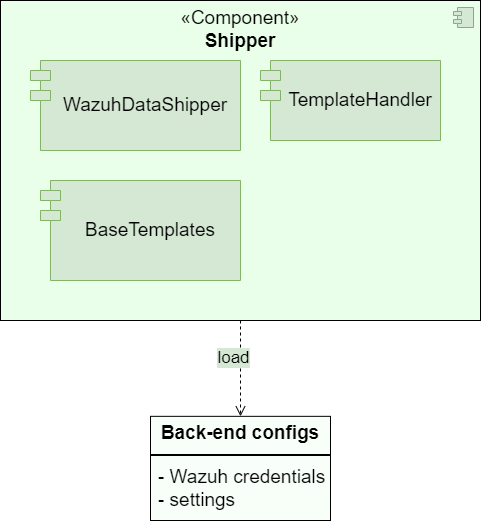
ADBox Shipper context diagram
The diagram below depicts the ADBox Shipper subpackage.
Parent links: SRS-042 Prediction Shipping Feature
Child links: SWD-015 ADBox Shipper and Template Handler, SWD-016 ADBox shipping of prediction data, SWD-017 ADBox creation of a detector stream
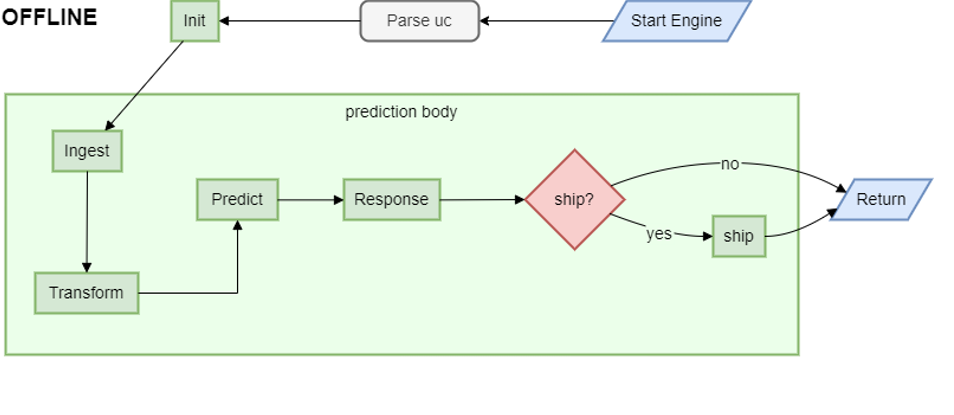
3.2 ADBox historical data prediction pipeline flow LARC-002
Prediction pipeline flow diagram for historical (offline) run mode
The diagram summarizes the flow of the predict pipeline for historical (offline) runmode orchestrated by the ADBox Engine.
Parent links: SRS-035 Offline Anomaly Detection
Child links: SWD-002 ADBox prediction pipeline, SWD-013 ADBox Prediction pipeline's inner body
3.3 ADBox preprocessing flow LARC-003
Preprocessing flow diagram of ADBox data transformer
The diagram summarizes the flow of the method Preprocessor.preprocessing by the ADBox Data Transformer.

Parent links: SRS-029 Host & Network Ingestion
Child links: SWD-010 ADBox data transformer, SWD-011 ADBox preprocessing
3.4 ADBox batch and real-time prediction flow LARC-008
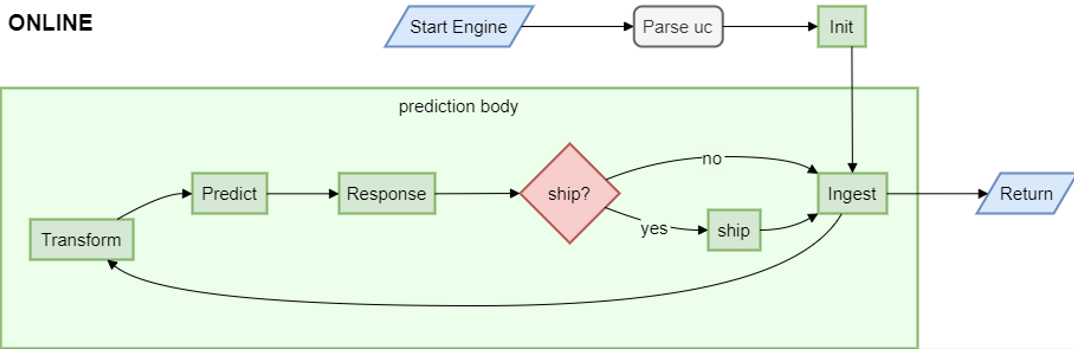
Batch and real-time ADBox run modes prediction flow diagrams
The diagram summarizes the flow of the prediction pipeline for online run modes orchestrated by the ADBox Engine.
Specifically,
-
batch mode runs the loop every batch interval,
-
real-time mode runs the loop every granularity interval.
Parent links: SRS-027 ML-Based Anomaly Detection
Child links: SWD-002 ADBox prediction pipeline, SWD-013 ADBox Prediction pipeline's inner body
3.5 ADBox machine learning package LARC-009
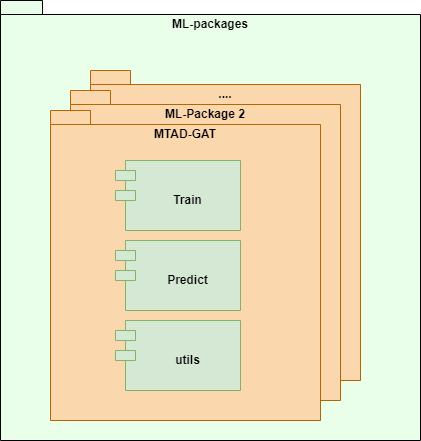
ADBox machine learning package diagram
ADBox ML-packages folder containing the machine learning packages called by the AD pipelines.
Parent links: SRS-039 Algorithm Selection Option
Child links: SWD-003 MTAD-GAT training, SWD-004 MTAD-GAT prediction, SWD-005 Peak-over-threshold (POT), SWD-006 ADBox Predictor score computation, SWD-007 ADBox MTAD-GAT anomaly prediction, SWD-008 ADBox MTAD-GAT Predictor
3.6 ADBox data manager LARC-010
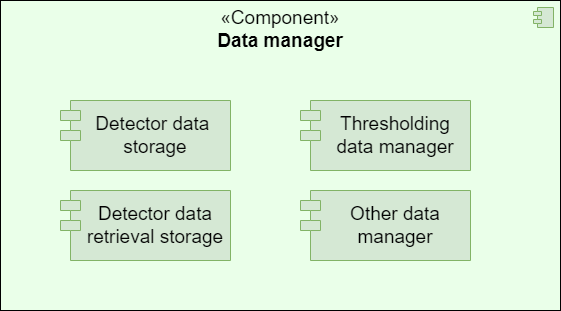
ADBox data manager diagram
The diagram below depicts the ADBox Data Manager.
Parent links: SRS-040 Data Management Subpackage
Child links: SWD-009 ADBox data managers
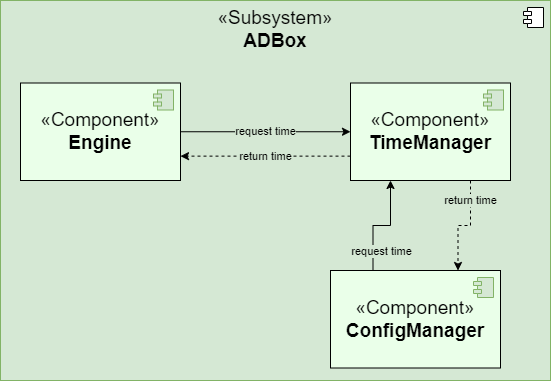
3.7 ADBox TimeManager LARC-011
ADBox TimeManager context diagram
The diagram below depicts the ADBox TimeManager.
Parent links: SRS-041 Time Management Package
Child links: SWD-012 ADBox TimeManager
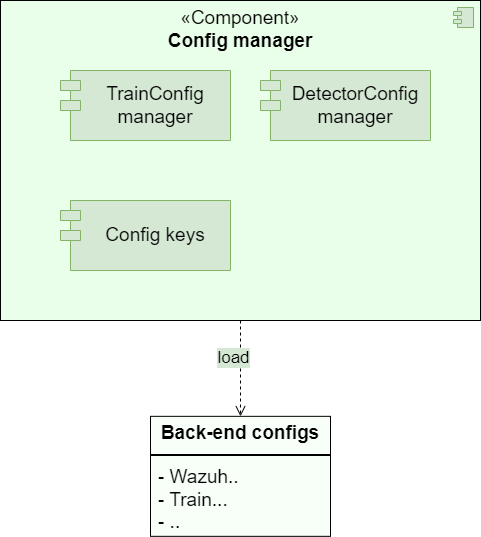
3.8 ADBox ConfigManager LARC-012
ADBox ConfigManager context diagram
The diagram below depicts the ADBox ConfigManager.
Parent links: SRS-018 ML Hyperparameter Tuning, SRS-021 Default Use Case Update
Child links: SWD-014 ADBox config managers
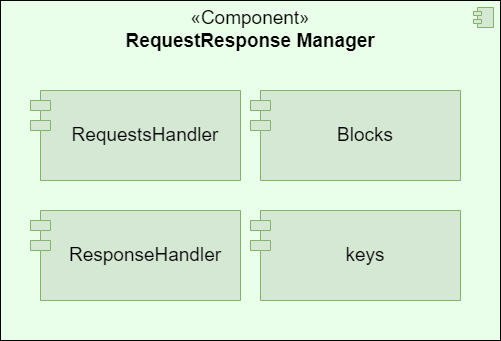
3.9 ADBox RequestResponseHandler LARC-013
ADBox RequestResponseHandler context diagram
The diagram below depicts the ADBox RequestResponse Handler subpackage.
Parent links: SRS-042 Prediction Shipping Feature
4.0 Infrastructure Low-Level Architecture
Low-level architecture for deployment, integration, and system-wide infrastructure.
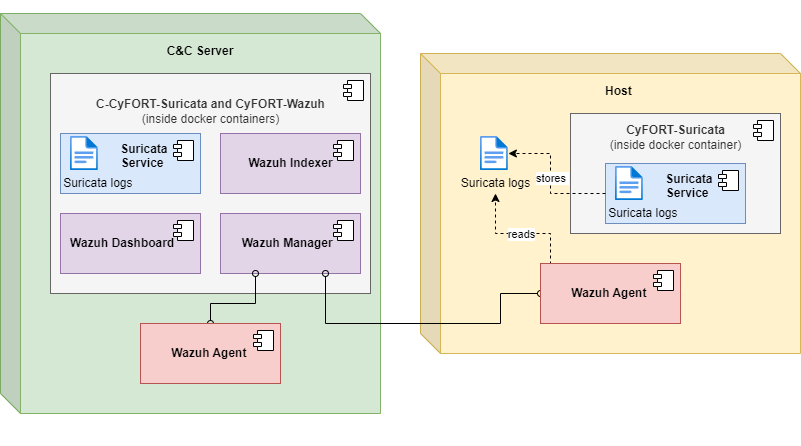
4.1 IDPS-ESCAPE end-point integrated arch. LARC-004
IDPS-ESCAPE end-point integrated architecture diagram
The diagram illustrates the architecture of IDPS-ESCAPE end-point integrated model.
Parent links: SRS-033 Remote Endpoint Deployment
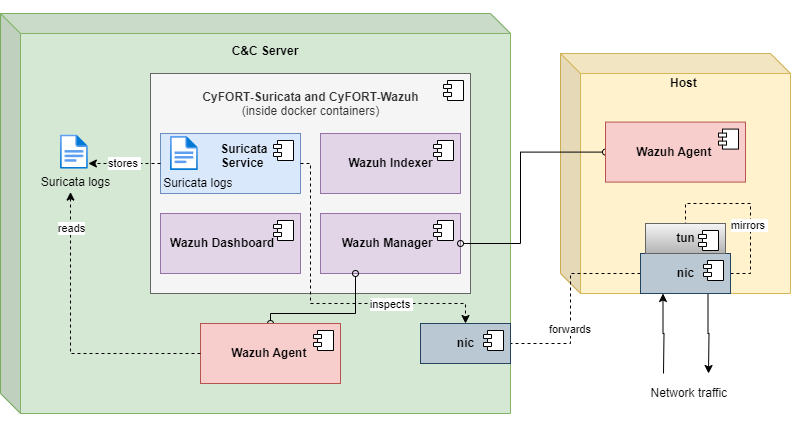
4.2 IDPS-ESCAPE end-point hybrid arch. LARC-005
IDPS-ESCAPE end-point hybrid model architecture diagram
The diagram illustrates the architecture of IDPS-ESCAPE end-point hybrid model.
Parent links: SRS-033 Remote Endpoint Deployment
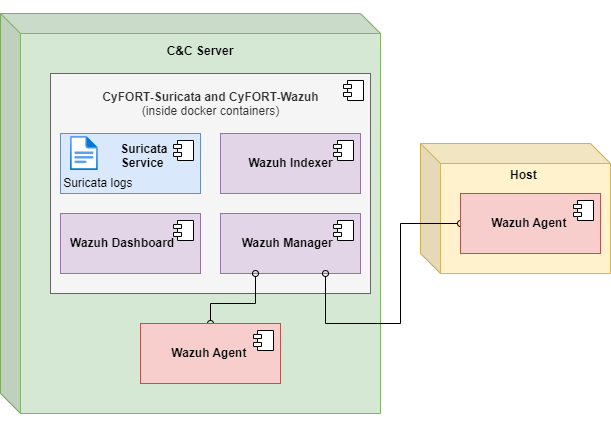
4.3 IDPS-ESCAPE end-point host-only IDS arch. LARC-006
IDPS-ESCAPE end-point host-only IDS model architecture diagram
The diagram illustrates the architecture of IDPS-ESCAPE end-point HIDS only model.
Parent links: SRS-033 Remote Endpoint Deployment
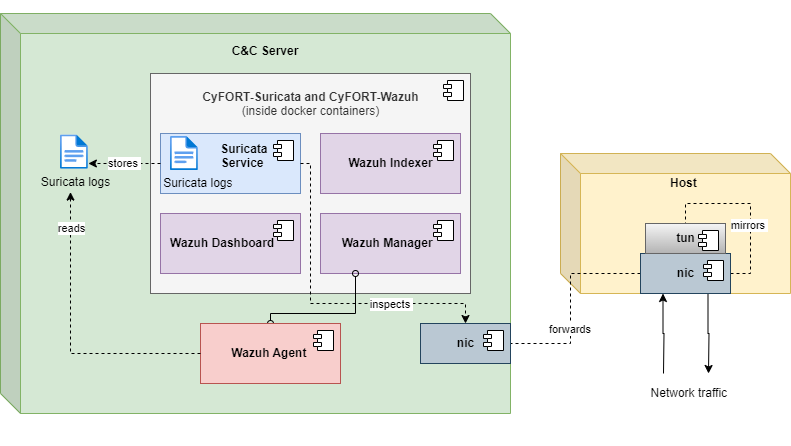
4.4 IDPS-ESCAPE end-point capture-only arch. LARC-007
IDPS-ESCAPE end-point capture-only model architecture diagram
The diagram illustrates the architecture of IDPS-ESCAPE end-point capture only model.
Parent links: SRS-033 Remote Endpoint Deployment