1.0 Deployment and knowledge base
System test cases for containerized deployment (x86-64 and arm64), post-quantum cryptography container, CC KB, and DocEngine.
1.1 TC: Test containerized deployment on x86-64 TCS-064
Test the C5-DEC initialization and setup scripts for containerized deployment.
Preconditions and setup actions
- A device/VM with an x86_64 hardware architecture
- Access to the C5-DEC deployment artifacts
- Docker Engine (or daemon or Docker Desktop) running with the right privileges for the testing user
- Microsoft Visual Studio Code installed (v1.98.2)
- Microsoft VS Code Dev Containers installed, i.e., the VS Code extension (v0.401.0)
Test steps
- Clone this repository:
git clone https://github.com/AbstractionsLab/c5dec.git
- Start Docker Desktop if not already running;
- Open the project folder in VS Code;
- Select the "Reopen in Container" option in the notification that pops up in VS Code; or launch the command palette (Cmd/Ctrl+Shift+P) and select "Dev Containers: Reopen in Container" from the list of available commands. You will then be prompted to select a dev container configuration: the
C5-DEC CAD dev containerprovides the bulk of the functionality, while theC5-DEC CAD cryptography dev containerprovides an environment with OpenSSL and the OQS-OpenSSL provider installed.

- Select the
C5-DEC CAD dev container. Once selected, wait for the container to build and start. This may take a few minutes, depending on your internet connection and the performance of your machine. - Once the container is up and running, you will see a terminal window open in VS Code, and you can start using C5-DEC CAD. If a terminal window does not open automatically, you can open a new terminal by selecting "Terminal" from the top menu and then "New Terminal". This will open a terminal window inside the container, with a Poetry shell activated. If the shell is not automatically activated upon reopening the project in a container, simply run
poetry shell
Expected outcome
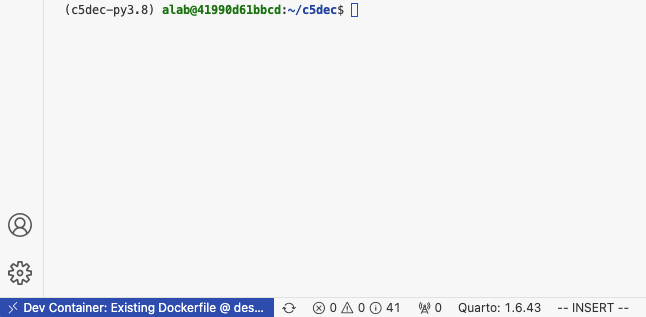
- Container creation done successfully, a new VS Code terminal session connecting to the C5-DEC container opened and Python environment via Poetry shell activated, e.g., similar to the view below:
Parent links: SRS-005 Containerized Deployment via Docker DevContainer
Child links: TRP-073 TCER: containerized deployment x86-64
| Attribute | Value |
|---|---|
| platform | GNU/Linux x86-64 (Dockerized C5-DEC deployment environment) |
| verification_method | Test (T) |
| release | stable |
| execution_type | Manual |
| complexity | 2 |
| test_data | see referenced files |
| version | 1.0 |
| source_prefix | TSS |
| source_uid | TSS-001 |
1.2 TC: Test containerized deployment on arm64 TCS-065
Test the C5-DEC initialization and setup scripts for containerized deployment.
Preconditions and setup actions
- A device/VM with an arm64 hardware architecture
- Access to the C5-DEC deployment artifacts
- Docker Engine (or daemon or Docker Desktop) running with the right privileges for the testing user
- Microsoft Visual Studio Code installed (v1.98.2)
- Microsoft VS Code Dev Containers installed, i.e., the VS Code extension (v0.401.0)
Test steps
- Clone this repository:
git clone https://github.com/AbstractionsLab/c5dec.git
- Open the project folder in VS Code;
- Select the "Reopen in Container" option in the notification that pops up in VS Code; or launch the command palette (Cmd/Ctrl+Shift+P) and select "Dev Containers: Reopen in Container" from the list of available commands. You will then be prompted to select a dev container configuration: the
C5-DEC CAD dev containerprovides the bulk of the functionality, while theC5-DEC CAD cryptography dev containerprovides an environment with OpenSSL and the OQS-OpenSSL provider installed.
- Select the
C5-DEC CAD dev container. Once selected, wait for the container to build and start. This may take a few minutes, depending on your internet connection and the performance of your machine. - Once the container is up and running, you will see a terminal window open in VS Code, and you can start using C5-DEC CAD. If a terminal window does not open automatically, you can open a new terminal by selecting "Terminal" from the top menu and then "New Terminal". This will open a terminal window inside the container, with a Poetry shell activated. If the shell is not automatically activated upon reopening the project in a container, simply run
poetry shell
Expected outcome
- Container creation done successfully, a new VS Code terminal session connecting to the C5-DEC container opened and Python environment via Poetry shell activated, e.g., similar to the view below:
Parent links: SRS-005 Containerized Deployment via Docker DevContainer
Child links: TRP-074 TCER: containerized deployment arm64
| Attribute | Value |
|---|---|
| platform | GNU/Linux arm64 (Dockerized C5-DEC deployment environment) |
| verification_method | Test (T) |
| release | stable |
| execution_type | Manual |
| complexity | 2 |
| test_data | see referenced files |
| version | 1.0 |
| source_prefix | TSS |
| source_uid | TSS-002 |
1.3 TC: Test PQ cryptography container TCS-066
Test the C5-DEC cryptography dev container deployment.
Preconditions and setup actions
- Access to the C5-DEC deployment artifacts
- Docker Engine (or daemon or Docker Desktop) running with the right privileges for the testing user
- Microsoft Visual Studio Code installed (v1.98.2)
- Microsoft VS Code Dev Containers installed, i.e., the VS Code extension (v0.401.0)
Test steps
- Clone this repository:
git clone https://github.com/AbstractionsLab/c5dec.git
- Open the project folder in VS Code;
- Select the
C5-DEC cryptography dev container, to create and connect to the OQS-OpenSSL provider, i.e., select the "Reopen in Container" option in the notification that pops up in VS Code; or launch the command palette (Cmd/Ctrl+Shift+P) and select "Dev Containers: Reopen in Container" from the list of available commands. Then, selectC5-DEC cryptography dev container, which provides an environment with OpenSSL and the OQS-OpenSSL provider installed.

This allows you to use post-quantum cryptography algorithms while benefitting from direct access to your host file system, thanks to volume mounting. To use the OQS-OpenSSL provider, we recommend consulting the OQS-OpenSSL usage documentation.
- To get a list of the available quantum-safe signature algorithms, run the following command in the VS Code terminal:
openssl list -signature-algorithms -provider oqsprovider
- To get a list of the available quantum-safe KEM algorithms, run:
openssl list -kem-algorithms -provider oqsprovider
Expected outcome
- The command should return a list of the available quantum-safe signature algorithms:
{ 1.2.840.113549.1.1.1, 2.5.8.1.1, RSA, rsaEncryption } @ default
  { 1.2.840.10040.4.1, 1.3.14.3.2.12, DSA, DSA-old, dsaEncryption, dsaEncryption-old } @ default
  { 1.2.840.10040.4.3, 1.3.14.3.2.27, DSA-SHA, DSA-SHA-1, DSA-SHA1, DSA-SHA1-old, dsaWithSHA, dsaWithSHA1, dsaWithSHA1-old } @ default
  { 1.3.101.112, ED25519 } @ default
  { 1.3.101.113, ED448 } @ default
  { 1.2.156.10197.1.301, SM2 } @ default
  { 2.16.840.1.101.3.4.3.1, DSA-SHA2-224, DSA-SHA224, dsa_with_SHA224 } @ default
  { 2.16.840.1.101.3.4.3.2, DSA-SHA2-256, DSA-SHA256, dsa_with_SHA256 } @ default
  { 1.2.840.1.101.3.4.3.3, DSA-SHA2-384, DSA-SHA384, dsa_with_SHA384, id-dsa-with-sha384 } @ default
  { 1.2.840.1.101.3.4.3.4, DSA-SHA2-512, DSA-SHA512, dsa_with_SHA512, id-dsa-with-sha512 } @ default
  { 2.16.840.1.101.3.4.3.5, DSA-SHA3-224, dsa_with_SHA3-224, id-dsa-with-sha3-224 } @ default
  { 2.16.840.1.101.3.4.3.6, DSA-SHA3-256, dsa_with_SHA3-256, id-dsa-with-sha3-256 } @ default
  { 2.16.840.1.101.3.4.3.7, DSA-SHA3-384, dsa_with_SHA3-384, id-dsa-with-sha3-384 } @ default
  { 2.16.840.1.101.3.4.3.8, DSA-SHA3-512, dsa_with_SHA3-512, id-dsa-with-sha3-512 } @ default
  { 1.3.36.3.3.1.2, ripemd160WithRSA, RSA-RIPEMD160 } @ default
  { 1.2.840.113549.1.1.5, RSA-SHA-1, RSA-SHA1, sha1WithRSAEncryption } @ default
  { 1.2.840.113549.1.1.14, RSA-SHA2-224, RSA-SHA224, sha224WithRSAEncryption } @ default
  { 1.2.840.113549.1.1.11, RSA-SHA2-256, RSA-SHA256, sha256WithRSAEncryption } @ default
  { 1.2.840.113549.1.1.12, RSA-SHA2-384, RSA-SHA384, sha384WithRSAEncryption } @ default
  { 1.2.840.113549.1.1.13, RSA-SHA2-512, RSA-SHA512, sha512WithRSAEncryption } @ default
  { 1.2.840.113549.1.1.15, RSA-SHA2-512/224, RSA-SHA512-224, sha512-224WithRSAEncryption } @ default
  { 1.2.840.113549.1.1.16, RSA-SHA2-512/256, RSA-SHA512-256, sha512-256WithRSAEncryption } @ default
  { 2.16.840.1.101.3.4.3.13, id-rsassa-pkcs1-v1_5-with-sha3-224, RSA-SHA3-224 } @ default
  { 2.16.840.1.101.3.4.3.14, id-rsassa-pkcs1-v1_5-with-sha3-256, RSA-SHA3-256 } @ default
  { 2.16.840.1.101.3.4.3.15, id-rsassa-pkcs1-v1_5-with-sha3-384, RSA-SHA3-384 } @ default
  { 2.16.840.1.101.3.4.3.16, id-rsassa-pkcs1-v1_5-with-sha3-512, RSA-SHA3-512 } @ default
  { 1.2.156.10197.1.504, RSA-SM3, sm3WithRSAEncryption } @ default
  ED25519ph @ default
  ED25519ctx @ default
  ED448ph @ default
  ECDSA @ default
  { 1.2.840.10045.4.1, ECDSA-SHA-1, ECDSA-SHA1, ecdsa-with-SHA1 } @ default
  { 1.2.840.10045.4.3.1, ECDSA-SHA2-224, ECDSA-SHA224, ecdsa-with-SHA224 } @ default
  { 1.2.840.10045.4.3.2, ECDSA-SHA2-256, ECDSA-SHA256, ecdsa-with-SHA256 } @ default
  { 1.2.840.10045.4.3.3, ECDSA-SHA2-384, ECDSA-SHA384, ecdsa-with-SHA384 } @ default
  { 1.2.840.10045.4.3.4, ECDSA-SHA2-512, ECDSA-SHA512, ecdsa-with-SHA512 } @ default
  { 2.16.840.1.101.3.4.3.9, ECDSA-SHA3-224, ecdsa_with_SHA3-224, id-ecdsa-with-sha3-224 } @ default
  { 2.16.840.1.101.3.4.3.10, ECDSA-SHA3-256, ecdsa_with_SHA3-256, id-ecdsa-with-sha3-256 } @ default
  { 2.16.840.1.101.3.4.3.11, ECDSA-SHA3-384, ecdsa_with_SHA3-384, id-ecdsa-with-sha3-384 } @ default
  { 2.16.840.1.101.3.4.3.12, ECDSA-SHA3-512, ecdsa_with_SHA3-512, id-ecdsa-with-sha3-512 } @ default
  HMAC @ default
  SIPHASH @ default
  POLY1305 @ default
  CMAC @ default
  dilithium2 @ oqsprovider
  p256_dilithium2 @ oqsprovider
  rsa3072_dilithium2 @ oqsprovider
  dilithium3 @ oqsprovider
  p384_dilithium3 @ oqsprovider
  dilithium5 @ oqsprovider
  p521_dilithium5 @ oqsprovider
  mldsa44 @ oqsprovider
  p256_mldsa44 @ oqsprovider
  rsa3072_mldsa44 @ oqsprovider
  mldsa44_pss2048 @ oqsprovider
  mldsa44_rsa2048 @ oqsprovider
  mldsa44_ed25519 @ oqsprovider
  mldsa44_p256 @ oqsprovider
  mldsa44_bp256 @ oqsprovider
  mldsa65 @ oqsprovider
  p384_mldsa65 @ oqsprovider
  mldsa65_pss3072 @ oqsprovider
  mldsa65_rsa3072 @ oqsprovider
  mldsa65_p256 @ oqsprovider
  mldsa65_bp256 @ oqsprovider
  mldsa65_ed25519 @ oqsprovider
  mldsa87 @ oqsprovider
  p521_mldsa87 @ oqsprovider
  mldsa87_p384 @ oqsprovider
  mldsa87_bp384 @ oqsprovider
  mldsa87_ed448 @ oqsprovider
  falcon512 @ oqsprovider
  p256_falcon512 @ oqsprovider
  rsa3072_falcon512 @ oqsprovider
  falconpadded512 @ oqsprovider
  p256_falconpadded512 @ oqsprovider
  rsa3072_falconpadded512 @ oqsprovider
  falcon1024 @ oqsprovider
  p521_falcon1024 @ oqsprovider
  falconpadded1024 @ oqsprovider
  p521_falconpadded1024 @ oqsprovider
  sphincssha2128fsimple @ oqsprovider
  p256_sphincssha2128fsimple @ oqsprovider
  rsa3072_sphincssha2128fsimple @ oqsprovider
  sphincssha2128ssimple @ oqsprovider
  p256_sphincssha2128ssimple @ oqsprovider
  rsa3072_sphincssha2128ssimple @ oqsprovider
  sphincssha2192fsimple @ oqsprovider
  p384_sphincssha2192fsimple @ oqsprovider
  sphincsshake128fsimple @ oqsprovider
  p256_sphincsshake128fsimple @ oqsprovider
  rsa3072_sphincsshake128fsimple @ oqsprovider
  mayo1 @ oqsprovider
  p256_mayo1 @ oqsprovider
  mayo2 @ oqsprovider
  p256_mayo2 @ oqsprovider
  mayo3 @ oqsprovider
  p384_mayo3 @ oqsprovider
  mayo5 @ oqsprovider
  p521_mayo5 @ oqsprovider
  CROSSrsdp128balanced @ oqsprovider
- The command should return a list of the available quantum-safe KEM algorithms:
{ 1.2.840.113549.1.1.1, 2.5.8.1.1, RSA, rsaEncryption } @ default
  { 1.2.840.10045.2.1, EC, id-ecPublicKey } @ default
  { 1.3.101.110, X25519 } @ default
  { 1.3.101.111, X448 } @ default
  frodo640aes @ oqsprovider
  p256_frodo640aes @ oqsprovider
  x25519_frodo640aes @ oqsprovider
  frodo640shake @ oqsprovider
  p256_frodo640shake @ oqsprovider
  x25519_frodo640shake @ oqsprovider
  frodo976aes @ oqsprovider
  p384_frodo976aes @ oqsprovider
  x448_frodo976aes @ oqsprovider
  frodo976shake @ oqsprovider
  p384_frodo976shake @ oqsprovider
  x448_frodo976shake @ oqsprovider
  frodo1344aes @ oqsprovider
  p521_frodo1344aes @ oqsprovider
  frodo1344shake @ oqsprovider
  p521_frodo1344shake @ oqsprovider
  kyber512 @ oqsprovider
  p256_kyber512 @ oqsprovider
  x25519_kyber512 @ oqsprovider
  kyber768 @ oqsprovider
  p384_kyber768 @ oqsprovider
  x448_kyber768 @ oqsprovider
  x25519_kyber768 @ oqsprovider
  p256_kyber768 @ oqsprovider
  kyber1024 @ oqsprovider
  p521_kyber1024 @ oqsprovider
  mlkem512 @ oqsprovider
  p256_mlkem512 @ oqsprovider
  x25519_mlkem512 @ oqsprovider
  mlkem768 @ oqsprovider
  p384_mlkem768 @ oqsprovider
  x448_mlkem768 @ oqsprovider
  X25519MLKEM768 @ oqsprovider
  SecP256r1MLKEM768 @ oqsprovider
  mlkem1024 @ oqsprovider
  p521_mlkem1024 @ oqsprovider
  p384_mlkem1024 @ oqsprovider
  bikel1 @ oqsprovider
  p256_bikel1 @ oqsprovider
  x25519_bikel1 @ oqsprovider
  bikel3 @ oqsprovider
  p384_bikel3 @ oqsprovider
  x448_bikel3 @ oqsprovider
  bikel5 @ oqsprovider
  p521_bikel5 @ oqsprovider
  hqc128 @ oqsprovider
  p256_hqc128 @ oqsprovider
  x25519_hqc128 @ oqsprovider
  hqc192 @ oqsprovider
  p384_hqc192 @ oqsprovider
  x448_hqc192 @ oqsprovider
  hqc256 @ oqsprovider
  p521_hqc256 @ oqsprovider
Parent links: SRS-008 Post-Quantum Cryptography Container Deployment
Child links: TRP-075 TCER: PQ cryptography container
| Attribute | Value |
|---|---|
| platform | GNU/Linux (Dockerized C5-DEC deployment environment) |
| verification_method | Test (T) |
| release | stable |
| execution_type | Manual |
| complexity | 1 |
| test_data | see referenced files |
| version | 1.0 |
| source_prefix | TSS |
| source_uid | TSS-003 |
1.4 TC: Test DocEngine TCS-067
Test the DocEngine compilation of the report template.
Preconditions and setup actions
- Access to the C5-DEC deployment artifacts
- Docker Engine (or daemon or Docker Desktop) running with the right privileges for the testing user
- Microsoft Visual Studio Code installed (v1.98.2)
- Microsoft VS Code Dev Containers installed, i.e., the VS Code extension (v0.401.0)
Test dependencies
- TCS-064 executed successfully
Test steps
- Open a VS Code terminal connecting to the
C5-DEC CAD dev containerand ensure the Poetry shell environment is activated, otherwise runpoetry shell. - Change directory to
c5dec:
cd ~/c5dec
- Run
quarto render ./c5dec/assets/report/index.qmd --to pdf
Expected outcome
- Quarto compilation finished successfully, with all pre and post-rending scripts executed successfully and final PDF file created:
/home/alab/c5dec/c5dec/assets/report/_output/C5-DEC-CAD-DocEngine.pdf.
Parent links: SRS-007 DocEngine Report and Presentation Template Creation
Child links: TRP-076 TCER: Test DocEngine
| Attribute | Value |
|---|---|
| platform | GNU/Linux (Dockerized C5-DEC deployment environment) |
| verification_method | Test (T) |
| release | stable |
| execution_type | Manual |
| complexity | 1 |
| test_data | see referenced files |
| version | 1.0 |
| source_prefix | TSS |
| source_uid | TSS-004 |
1.5 TC: Test DocEngine CRA technical documentation template TCS-076
Verify that the c5dec docengine cra-tech-doc command correctly scaffolds a
CRA Annex V technical documentation template and that the Quarto render pipeline
produces a valid PDF output.
Preconditions and setup actions
- C5-DEC CAD dev container running (see TCS-064 or TCS-065)
- Quarto is installed and available in PATH inside the container
- A LaTeX distribution (TeX Live) is installed (required for PDF output)
- A Poetry shell is activated inside the container
Test dependencies
- TCS-064 or TCS-065 executed successfully
- TCS-067 executed successfully (DocEngine baseline verified)
Test steps
- Scaffold a new CRA technical documentation template:
sh c5dec docengine cra-tech-doc -n my-product-cra - Verify the command completes without errors (exit code 0).
- Confirm the directory
./docengine/my-product-cra/has been created. - Inspect the directory contents and confirm the following files are present:
-
_quarto.yml-_variables.yml-c5dec_config_v2.yml-index.qmd-references.bib-ieee.csl-chapters/01-product-description.qmd-chapters/02-design-development.qmd-chapters/03-risk-assessment.qmd-chapters/04-applied-standards.qmd-chapters/05-eu-declaration.qmd-chapters/06-sbom.qmd-scripts/generate_doc.py-scripts/custom_vars_v2.py - Edit
c5dec_config_v2.ymlto populate theproject.titleandorganization.namefields. - Navigate to the template directory and render the document:
sh cd docengine/my-product-cra quarto render - Confirm that
quarto rendercompletes without compilation errors. - Verify that a PDF output file is produced in the
_output/subdirectory. - Open the PDF and confirm it contains all six chapter sections with their headings.
Expected outcome
c5dec docengine cra-tech-docproduces a complete Quarto template directory with all CRA Annex V chapter files.quarto renderproduces a non-empty PDF document aligned with C5-DEC styling.- All six chapter headings corresponding to CRA Annex V obligations are present in the rendered output.
Parent links: SRS-007 DocEngine Report and Presentation Template Creation
Child links: TRP-105 TCER: DocEngine CRA technical documentation template
| Attribute | Value |
|---|---|
| platform | GNU/Linux (Dockerized C5-DEC deployment environment) |
| verification_method | Test (T) |
| release | stable |
| execution_type | Manual |
| complexity | 2 |
| test_data | N/A |
| version | 1.0 |
| source_prefix | TSS |
| source_uid | TSS-013 |
1.6 TC: Test DocEngine presentation template TCS-077
Verify that the c5dec docengine presentation command correctly scaffolds a
Quarto reveal.js presentation template and that the Quarto render pipeline
produces valid HTML slide output.
Preconditions and setup actions
- C5-DEC CAD dev container running (see TCS-064 or TCS-065)
- Quarto is installed and available in PATH inside the container
- A Poetry shell is activated inside the container
Test dependencies
- TCS-064 or TCS-065 executed successfully
- TCS-067 executed successfully (DocEngine baseline verified)
Test steps
- Scaffold a new presentation template:
sh c5dec docengine presentation -n my-presentation - Verify the command completes without errors (exit code 0).
- Confirm the directory
./docengine/my-presentation/has been created. - Inspect the directory contents and confirm the following files are present:
-
_quarto.yml-index.qmd - Navigate to the template directory and render the presentation:
sh cd docengine/my-presentation quarto render - Confirm that
quarto rendercompletes without errors. - Verify that an HTML output file is produced in the output directory.
- Open the HTML file in a browser and confirm it loads as a reveal.js slideshow with at least one slide visible.
Expected outcome
c5dec docengine presentationproduces a Quarto template directory with the required configuration and content files.quarto renderproduces a valid HTML reveal.js presentation file.- The rendered presentation loads and displays slides correctly in a browser.
Parent links: SRS-007 DocEngine Report and Presentation Template Creation
Child links: TRP-080 TCER: DocEngine presentation template
| Attribute | Value |
|---|---|
| platform | GNU/Linux (Dockerized C5-DEC deployment environment) |
| verification_method | Test (T) |
| release | stable |
| execution_type | Manual |
| complexity | 1 |
| test_data | N/A |
| version | 1.0 |
| source_prefix | TSS |
| source_uid | TSS-014 |
1.7 Test interconnection of Knowledge Base TCS-007
Setup
- None
Test steps
- follow steps in SRS
- repeat for multiple Knowledge Articles
c5dec/assets/database/KnowledgeBase/0_MapofContent.md
Parent links: SRS-016 Interconnected Framework and Seamless Navigation
Child links: TRP-007 Interconnection of the knowledge base
| Attribute | Value |
|---|---|
| platform | WSL/GNU/Linux Ubuntu 20/Linux Ubuntu 22.04 |
| expected_outcome | None |
| verification_method | Review |
| release | alpha |
| source_prefix | TST |
| source_uid | TST-007 |
1.8 Test currency of Knowledge Base TCS-008
Setup
- None
Test steps
- follow steps in SRS
- repeat for multiple Knowledge Articles
c5dec/assets/database/KnowledgeBase/0_MapofContent.md
Parent links: SRS-017 Availability of Pragmatic Guidance and Best Practices
Child links: TRP-008 Currency of the knowledge base
| Attribute | Value |
|---|---|
| platform | WSL/GNU/Linux Ubuntu 20/Linux Ubuntu 22.04 |
| expected_outcome | None |
| verification_method | Review |
| release | alpha |
| source_prefix | TST |
| source_uid | TST-008 |
1.9 Test cosmetic features of Knowledge Base TCS-009
Setup
- None
Test steps
- follow steps in SRS'
- repeat for multiple Knowledge Articles
c5dec/assets/database/KnowledgeBase/0_MapofContent.md
Parent links: SRS-019 Integration of Multimedia Elements in Knowledge Articles, SRS-020 Integrating Links to FAQ Section, SRS-021 Provision of General Link to a CC-Specific Forum
Child links: TRP-009 Cosmetic features of the knowledge base
| Attribute | Value |
|---|---|
| platform | WSL/GNU/Linux Ubuntu 20/Linux Ubuntu 22.04 |
| expected_outcome | None |
| release | alpha |
| source_prefix | TST |
| source_uid | TST-009 |
1.10 Inspect CC Database-DTD mapping TCS-010
Setup
- None
Test steps
- Inspect source code 'cct.py' and verify that each '!ELEMENT' in the CC DTD is correctly implemented, i.e, verify that:
- each '!ELEMENT' is implemented as a class object,
- '#REQUIRED' attributes are implemented as object attributes and populated with the object's _build_attributes() method.
- child elements of each '!ELEMENT' are implemented as object attributes and populated with the object's _build_children() method.
- each object's is_valid() method validates that the required attributes (labelled as '#REQUIRED' in the DTD) are (correctly) populated.
- semantic relationships between CC concepts are preserved in the implementation, i.e., hierarchical and dependency relationships between CC concepts are appropriately implemented, e.g., as parent-child relations.
c5dec/core/cct.py(line 630)c5dec/assets/database/SecurityControls/cc3R5.xml
Parent links: SRS-022 Data Storage and Format Mapping
Child links: TRP-010 CC database-DTD mapping inspection
| Attribute | Value |
|---|---|
| platform | WSL/GNU/Linux Ubuntu 20/Linux Ubuntu 22.04 |
| expected_outcome | None |
| verification_method | Inspection |
| release | alpha |
| source_prefix | TST |
| source_uid | TST-010 |
1.11 Test correctness of CC Database TCS-011
Setup
-
Use the CLI to export CC objects using
$ poetry run c5dec view <ID> #to print to console$ poetry run c5dec view <ID> > <filepath>/<filename>.md # to export to markdown -
Use the TUI to view CC objects
- navigate to '3 - CCT: Common Criteria Toolbox' > 'Common Criteria Browser'
Test steps
- Export or view mulitple CC objects either via CLI or TUI and check that content and relationships correspond to the Common Criteria PDF.
Parent links: SRS-022 Data Storage and Format Mapping
Child links: TRP-011 Correctness of the CC database
| Attribute | Value |
|---|---|
| platform | WSL/GNU/Linux Ubuntu 20/Linux Ubuntu 22.04 |
| expected_outcome | Exported or viewed data correctly reflects content and relationships as defined in the CC PDF. |
| verification_method | Test |
| release | alpha |
| source_prefix | TST |
| source_uid | TST-011 |
1.12 Run the GUI from the CLI with option --gui TCS-035
Test steps
- In the CLI run
c5dec --gui
Child links: TRP-038 Running GUI from CLI with --gui option
| Attribute | Value |
|---|---|
| platform | Any of MacOS, Windows, GNU/Linux |
| precondition | c5dec has been successfully installed |
| expected_outcome | The GUI of the CCT module opens in the default browser |
| verification_method | Test |
| release | beta |
| source_prefix | TST |
| source_uid | TST-035 |
1.13 Test accessing and browsing the CC Database TCS-001
Setup
- boot C5-DEC CAD
- navigate to '3 - CCT: Common Criteria toolbox' > 'Browse Common Criteria'
Test Steps
- follow steps in SRS
- on a random basis check (for at least 3 elements) that the displayed data corresponds to the associated Common Criteria element in the official PDFs of version 3.1 R5: CC Part 2 or CC Part 3.
c5dec/assets/database/KnowledgeBase/0_MapofContent.md
Parent links: SRS-001 Access and Browse Database for CC Security Components
Child links: TRP-001 Accessing and browsing the CC database
| Attribute | Value |
|---|---|
| platform | WSL/GNU/Linux Ubuntu 20/Linux Ubuntu 22.04 |
| precondition | c5dec installed |
| expected_outcome | (i) No errors encountered while browsing the database. (ii) Randomly sampled selection data corresponds to description in the respective Common Criteria PDF. |
| verification_method | Test |
| release | alpha |
| source_prefix | TST |
| source_uid | TST-001 |
1.14 Test exporting Security Components TCS-003
Setup
- In the TUI, go to '3 - CCT: Common Criteria toolbox'
- Select 'Browse Common Criteria' or 'Create Evaluation Checklist'
Test Steps
- follow steps in SRS
- repeat multiple times and change selection and export settings.
- on a random basis check that the exported Security Requirements match respective Security Requirements in Common Criteria PDF (version 3R5).
c5dec/assets/database/KnowledgeBase/0_MapofContent.md
Parent links: SRS-003 Export Security Components
Child links: TRP-003 Exporting security components
| Attribute | Value |
|---|---|
| platform | WSL/GNU/Linux Ubuntu 20/Linux Ubuntu 22.04 |
| precondition | a working doorstop repository |
| expected_outcome | File containing respective Security Requirements correctly exported according to specified settings. |
| verification_method | Test |
| release | alpha |
| source_prefix | TST |
| source_uid | TST-003 |
1.15 Test query the CC Database TCS-002
Setup
- boot C5-DEC CAD
- navigate to '3 - CCT: Common Criteria toolbox' > 'Common Criteria Browser'
Test Steps:
- follow the steps in SRS
- repeat steps multiple times for different queries (at least 5) and match displayed content with respective Common Criteria PDF (version 3R5).
c5dec/assets/database/KnowledgeBase/0_MapofContent.md
Parent links: SRS-002 Query the Database of Security Components.
Child links: TRP-002 Querying the CC database
| Attribute | Value |
|---|---|
| platform | WSL/GNU/Linux Ubuntu 20/Linux Ubuntu 22.04 |
| precondition | C5Dec installed |
| expected_outcome | None |
| verification_method | Test |
| release | alpha |
| source_prefix | TST |
| source_uid | TST-002 |
1.16 Test navigating the Knowledge Base TCS-005
Setup
- None
Test steps
- follow steps in SRS
- repeat for multiple Knowledge Articles
c5dec/assets/database/KnowledgeBase/0_MapofContent.md
Parent links: SRS-014 Access and Navigation Through Knowledge Base
Child links: TRP-005 Navigating the knowledge base
| Attribute | Value |
|---|---|
| platform | WSL/GNU/Linux Ubuntu 20/Linux Ubuntu 22.04 |
| expected_outcome | None |
| verification_method | Review |
| release | alpha |
| source_prefix | TST |
| source_uid | TST-005 |
1.17 Test comprehensiveness of Knowledge Base TCS-006
Setup
- None
Test steps
- follow steps in SRS
- repeat for multiple Knowledge Articles
c5dec/assets/database/KnowledgeBase/0_MapofContent.md
Parent links: SRS-016 Interconnected Framework and Seamless Navigation
Child links: TRP-006 Comprehensiveness of the knowledge base
| Attribute | Value |
|---|---|
| platform | WSL/GNU/Linux Ubuntu 20/Linux Ubuntu 22.04 |
| expected_outcome | None |
| verification_method | Review |
| release | alpha |
| source_prefix | TST |
| source_uid | TST-006 |
1.18 Test tailoring Security Requirements TCS-004
See linked SRS.
c5dec/assets/database/KnowledgeBase/0_MapofContent.md
Parent links: SRS-004 Tailor Security Requirements
Child links: TRP-004 Tailoring security requirements
| Attribute | Value |
|---|---|
| platform | WSL/GNU/Linux Ubuntu 20/Linux Ubuntu 22.04 |
| expected_outcome | None |
| release | alpha |
| source_prefix | TST |
| source_uid | TST-004 |
2.0 Foundations and data sources
System test cases for creating and running a new C5-DEC-based project.
2.1 TC: Test the creation of an empty C5-DEC-based project TCS-068
Verify that the c5dec new command creates a project structured in agreement with the C5-DEC model.
Preconditions and setup actions
- Access to the C5-DEC deployment artifacts obtained from the Git repository
- Docker Engine (or daemon or Docker Desktop) running with the right privileges for the testing user
- A terminal running a shell (e.g., bash, zsh)
Test dependencies
Test steps
- Go to the C5-DEC project folder. E.g., in the path where C5-DEC was cloned from GitHub:
cd c5dec. - Run
./c5dec.sh new. - Run
lsor equivalent and verify that a zip folder namedmyproject.ziphas been created. - Unzip the file and access its contents (e.g., via a shell command, in a system explorer or in VS Code).
Expected outcome
- The ZIP file
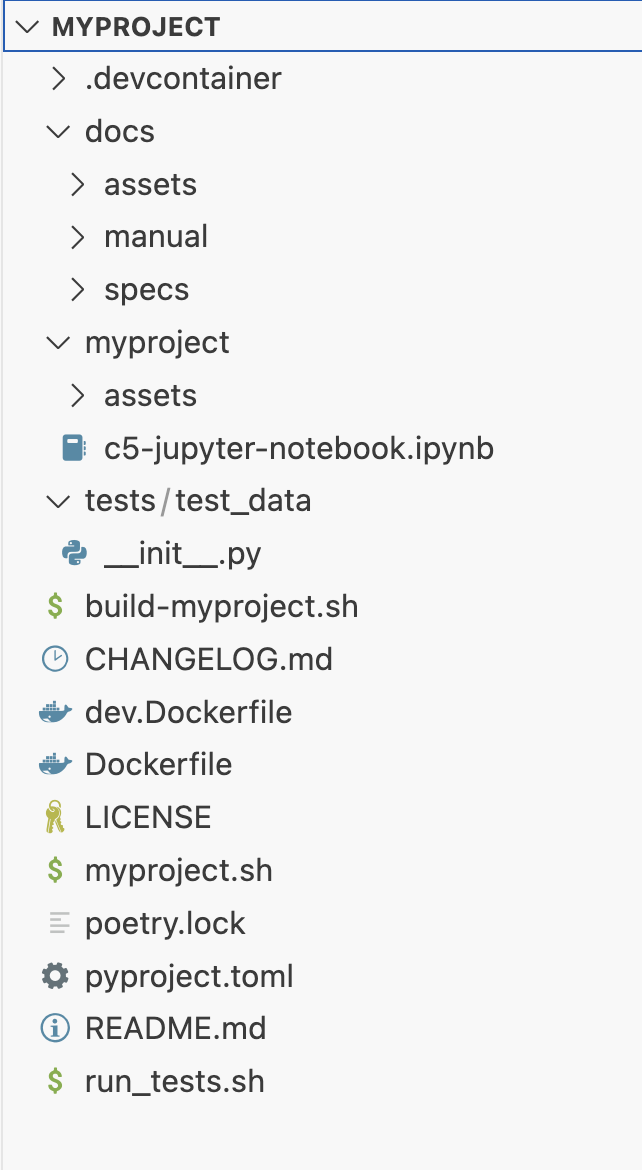
myproject.zipexists at the current path. - The project folder has the structure shown below:
Parent links: SRS-006 SSDLC New Project Scaffolding
Child links: TRP-077 TCER: creation of empty C5-DEC-based project
| Attribute | Value |
|---|---|
| platform | GNU/Linux, Windows |
| verification_method | Test (T), Inspection (I) |
| release | stable |
| execution_type | Manual |
| complexity | 1 |
| test_data | N/A |
| version | 1.0 |
| source_prefix | TSS |
| source_uid | TSS-005 |
2.2 TC: Test build and run of new project via scripts TCS-069
Verify that the scripts of a new project created by c5dec successfully build an image of the new project and can run a default interactive session.
Preconditions
- Access to the C5-DEC deployment artifacts obtained from the Git repository
- Docker Engine (or daemon or Docker Desktop) running with the right privileges for the testing user
- A terminal running a shell (e.g., bash, zsh)
Test dependencies
- TCS-068 executed successfully
Setup actions
To keep a clean separation of the tested artifact, copy or move the unzipped project created during the execution of TCS-068 to a location of your choice outside the C5-DEC project folder. This location will be referred as the test_root folder.
Test steps
- Go to the
test_rootfolder and then tomyproject:cd test_root/myproject - Build the project using the build script:
./build-myproject.sh
- Verify that the images
myproject:v1.0andmyproject-dev:v1.0have been created
docker images
- Run the help menu of the project
./myproject.sh help
- Create a container of the image built in 3 and open an interactive shell.
./myproject.sh session
- Verify that doorstop is installed
doorstop -V
- Exit the container session
exit
Expected outcome
- The command execution finishes showing a log without errors.
- The docker images
myproject-devandmyproject-devwith tagv1.0appear in the list of images. - An informative text with the available commands is shown in the terminal.
- An interactive shell inside a docker container is opened.
Doorstop v3.0b9is shown as the output.- The system shell appears back in the terminal.
Parent links: SRS-006 SSDLC New Project Scaffolding
Child links: TRP-078 TCER: build and run an empty created project
| Attribute | Value |
|---|---|
| platform | GNU/Linux |
| verification_method | Test (T) |
| release | stable |
| execution_type | Manual |
| complexity | 2 |
| test_data | N/A |
| version | 1.0 |
| source_prefix | TSS |
| source_uid | TSS-006 |
2.3 TC: Test new project in VS Code TCS-070
Validate that the empty C5-DEc-based project opens correctly in VS Code.
Preconditions
- Access to the C5-DEC deployment artifacts obtained from the Git repository
- Docker Engine running with the right privileges for the testing user
- Microsoft Visual Studio Code installed (v1.98.2)
- Microsoft VS Code Dev Containers installed, i.e., the VS Code extension (v0.401.0)
Test dependencies
- TCS-068 executed successfully
Setup actions
To keep a clean separation of the tested artifact, copy or move the unzipped project created during the execution of TCS-068 to a location of your choice outside the C5-DEC project folder.
Test steps
- Open
myprojectin VS Code. - Select the "Reopen in Container" option in the notification that pops up. Alternatively, launch the command palette (Cmd/Ctrl+Shift+P) and select "Dev Containers: Reopen in Container" from the list of available commands.
- Open a terminal in VS Code if it none is open and run
poetry shell
- To verify that dependencies are installed, check the version of quarto. You can try other dependencies of your choice (e.g doorstop, kryptor, etc.)
quarto -V
Expected outcome
- A
myprojectshell is created
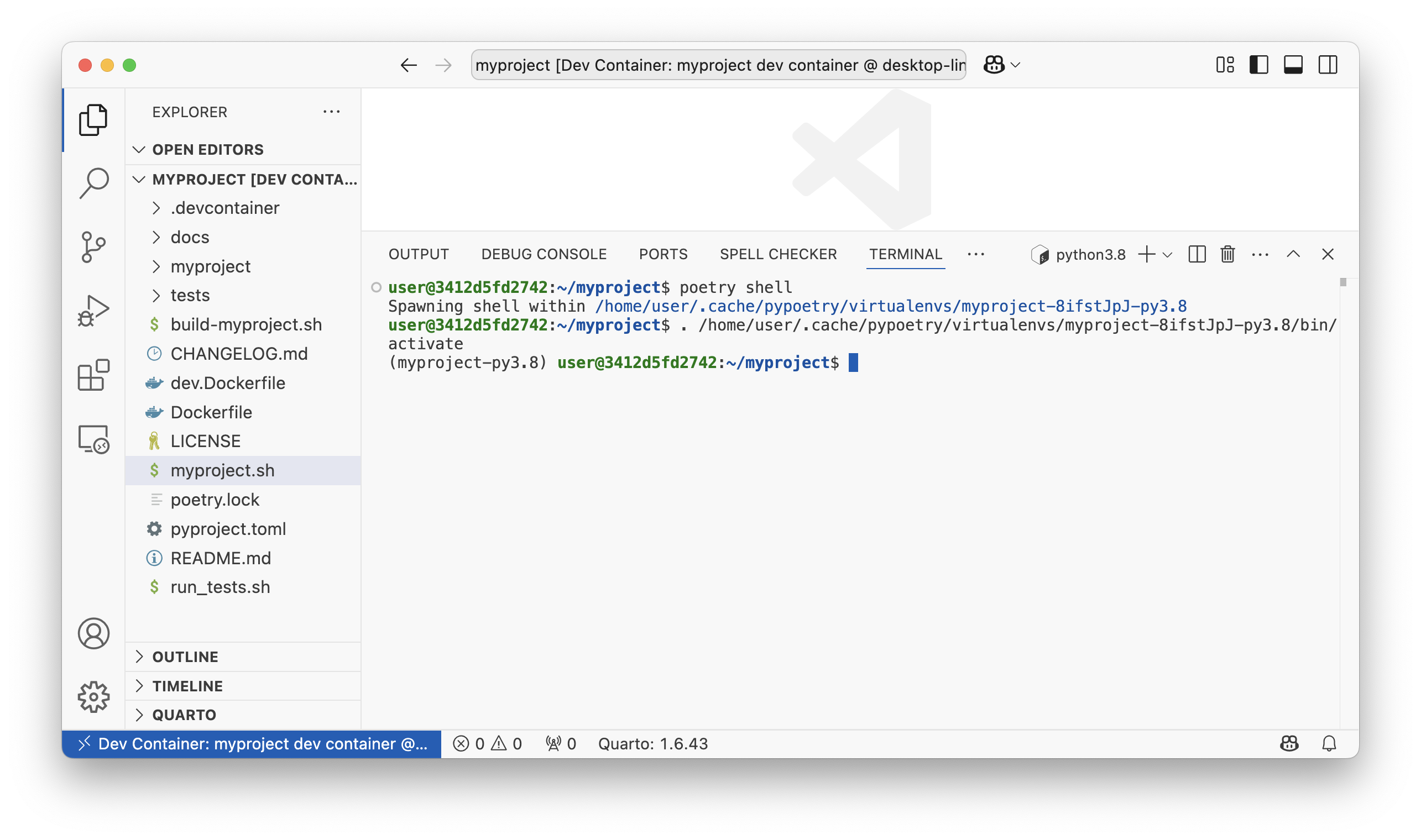
1.6.43is shown as the output.
Parent links: SRS-006 SSDLC New Project Scaffolding
Child links: TRP-079 TCER: New project in VS Code
| Attribute | Value |
|---|---|
| platform | GNU/Linux (Dockerized C5-DEC deployment environment) |
| verification_method | Test (T) |
| release | stable |
| execution_type | Manual |
| complexity | 2 |
| test_data | N/A |
| version | 1.0 |
| source_prefix | TSS |
| source_uid | TSS-007 |
2.4 Test availabilty of CSA Article 51 defined Security Objectives TCS-015
Setup
- None
Test steps
- follow steps in SRS.
Parent links: SRS-026 Storing Generic Security Objectives of CSA Article 51
Child links: TRP-015 CSA Article 51 security objectives availability
| Attribute | Value |
|---|---|
| platform | WSL/GNU/Linux Ubuntu 20/Linux Ubuntu 22.04 |
| expected_outcome | None |
| verification_method | Test |
| release | alpha |
| source_prefix | TST |
| source_uid | TST-015 |
2.5 Test uniformity of storage mechanisms in CCT module TCS-016
Setup
- None
Test steps
- follow steps in SRS
- repeat for multiple items.
Parent links: SRS-027 Unified Storage Mechanism for CC Artifacts and Security Elements
Child links: TRP-016 Uniformity of storage mechanisms in CCT module
| Attribute | Value |
|---|---|
| platform | WSL/GNU/Linux Ubuntu 20/Linux Ubuntu 22.04 |
| expected_outcome | All internally stored CC artefacts are stored in C5-DEC document-based data storage format and can be managed centrally. |
| verification_method | Test |
| release | alpha |
| source_prefix | TST |
| source_uid | TST-016 |
2.6 Test validity and conistency of bidirectional transformation TCS-012
Setup:
- None
Test steps:
- Export CC Document stored in the internal data representation to XML (cc_export1.xml)
- Validate the exported XML against the CC DTD.
- Load the exported and validated XML into the internal data representation.
- Again export the loaded CC Document to XML (cc_export2.xml) and validate against the CC DTD.
- Repeat if desired.
- Verify that all exported XMLs are identical.
Note: Exported XML files will differ from the official CC XML since irrelevant information (e.g., patchinfos legalnotice, pagebreaks, biblioentries, glossentries, etc.) are ignored.
c5dec/assets/database/SecurityControls/cc3R5.dtdc5dec/assets/database/SecurityControls/cc3R5.xml
Parent links: SRS-022 Data Storage and Format Mapping, SRS-023 Bidirectional Transformation and Consistency
Child links: TRP-012 Validity and consistency of bidirectional transformation
| Attribute | Value |
|---|---|
| platform | WSL/GNU/Linux Ubuntu 20/Linux Ubuntu 22.04 |
| precondition | Validate any/all CC XML independently against the DTD file (./c5dec/assets/database/SecurityControls/cc3 |
| expected_outcome | All exported CC XML files are valid and identical. |
| verification_method | Test |
| release | alpha |
| source_prefix | TST |
| source_uid | TST-012 |
2.7 Test threats, risks, and countermeasures database TCS-013
Setup
- None
Test steps
- follow steps in SRS.
Parent links: SRS-024 Threats, Risks, and Countermeasures Database
Child links: TRP-013 Threats, risks, and countermeasures database
| Attribute | Value |
|---|---|
| platform | WSL/GNU/Linux Ubuntu 20/Linux Ubuntu 22.04 |
| expected_outcome | None |
| verification_method | Test |
| release | alpha |
| source_prefix | TST |
| source_uid | TST-013 |
2.8 Test EUCC support TCS-014
Setup
- None
Test steps
- follow steps in SRS.
Parent links: SRS-025 Support Mechanism for EUCC Additional Evaluation Evidence
Child links: TRP-014 EUCC support
| Attribute | Value |
|---|---|
| platform | WSL/GNU/Linux Ubuntu 20/Linux Ubuntu 22.04 |
| expected_outcome | None |
| verification_method | Test |
| release | alpha |
| source_prefix | TST |
| source_uid | TST-014 |
2.9 User manual contains guides for functionality added in Beta TCS-037
Test steps
- Open the user manual
- Verify that the information in the "Quick start" section corresponds to the Beta release.
- Validate the information corresponding to the Beta release in the "CCT" section.
- Validate the information corresponding to the Beta release in the "SSDLC" section.
- Validate the information corresponding to the Beta release in the "Transformer" section.
Child links: TRP-068, TRP-040 User manual coverage for beta release functionality
| Attribute | Value |
|---|---|
| platform | Any of MacOS, Windows, GNU/Linux |
| expected_outcome | The information in the user manual is correct and reflects the updates made for the Beta release. |
| verification_method | Review |
| release | beta |
| source_prefix | TST |
| source_uid | TST-037 |
3.0 CRA, SBOM, CCT and PRM
System test cases for the PM time-report, CCT, ISMS, SBOM, and CRA tool modules.
3.1 TC: Test time report conversion from OpenProject CSV TCS-071
Verify that the c5dec timerep command correctly converts an OpenProject-exported
CSV time report to the IAL tabular format.
Preconditions and setup actions
- C5-DEC CAD dev container running (see TCS-064 or TCS-065)
- An OpenProject CSV export file containing at least 5 time entries available at
c5dec/assets/tshparams/openproject_params.csvor a test equivalent - A Poetry shell is activated inside the container
Test dependencies
Test steps
- Inside the container, run:
sh c5dec timerep -i <path_to_openproject_csv> -o /tmp/timerep_output - Verify the command completes without errors.
- Inspect the output file at
/tmp/timerep_output. - Confirm the output contains all time entries from the input CSV.
- Confirm each row has the expected IAL columns: user, date (YYYY-MM-DD), hours, project, and work package.
- Run with an invalid CSV path and confirm a descriptive error is printed.
Expected outcome
- The command completes with exit code 0 for a valid input.
- The output file is non-empty and contains all time entries in IAL format.
- All date fields are in YYYY-MM-DD format.
- An invalid input path produces a clear error message with exit code non-zero.
Parent links: SRS-009 Project Management Time Report Conversion
Child links: TRP-100 TCER: Time report conversion from OpenProject CSV
| Attribute | Value |
|---|---|
| platform | GNU/Linux (Dockerized C5-DEC deployment environment) |
| verification_method | Test (T) |
| release | stable |
| execution_type | Manual |
| complexity | 1 |
| test_data | see referenced files |
| version | 1.0 |
| source_prefix | TSS |
| source_uid | TSS-008 |
3.2 TC: Test timesheet consolidation and cost report generation TCS-072
Verify that c5dec consolidate and c5dec costrep correctly consolidate multiple
IAL timesheets and produce a cost report.
Preconditions and setup actions
- C5-DEC CAD dev container running (see TCS-064 or TCS-065)
- At least two IAL-format timesheet files available in a test input directory
- Personnel cost parameters file (
tshparams/openproject_params.csv) available - A Poetry shell is activated inside the container
Test dependencies
- TCS-071 executed successfully (produces at least one IAL timesheet)
Test steps
- Place at least two IAL-format timesheet files in a test directory
/tmp/tsh_input/. - Run the consolidation command:
sh c5dec consolidate -i /tmp/tsh_input -o /tmp/tsh_consolidated.csv - Verify the command completes without errors.
- Confirm the consolidated output contains all entries from both input files.
- Run the cost report command:
sh c5dec costrep -i /tmp/tsh_consolidated.csv -o /tmp/costrep_output - Verify the cost report completes without errors.
- Confirm the cost report output contains per-person cost rows and a total row.
Expected outcome
c5dec consolidateproduces a non-empty merged timesheet with all entries.- No entries are duplicated or lost during consolidation.
c5dec costrepproduces a cost report with per-person cost breakdowns and a grand total.- Both commands exit with code 0 for valid inputs.
Parent links: SRS-010 Project Management Timesheet Consolidation and Cost Reporting
Child links: TRP-101 TCER: Timesheet consolidation and cost report generation
| Attribute | Value |
|---|---|
| platform | GNU/Linux (Dockerized C5-DEC deployment environment) |
| verification_method | Test (T) |
| release | stable |
| execution_type | Manual |
| complexity | 1 |
| test_data | see referenced files |
| version | 1.0 |
| source_prefix | TSS |
| source_uid | TSS-009 |
3.3 TC: Test ISMS folder content verification TCS-073
Verify that the C5-DEC ISMS folder verification feature correctly identifies matching, missing, and unexpected documents against a reference list.
Preconditions and setup actions
- C5-DEC CAD dev container running (see TCS-064 or TCS-065)
- A test ISMS folder structure available at
tests/content/c5dec-isms-test/ - ISMS parameters configured in
c5dec/assets/c5dec_params.yml - A Poetry shell is activated inside the container
Test dependencies
Test steps
- Navigate to the test ISMS folder:
tests/content/c5dec-isms-test/ - Confirm the folder contains a reference document list configuration.
- Run the ISMS verification via the Python API or CLI:
sh poetry run python -c " from c5dec.core.isms import DocListAssistant a = DocListAssistant('<path_to_config>') a.verify() " - Confirm the output includes: - A list of documents present and matching the reference list. - A list of documents missing from the folder (if any test missing files). - A list of unexpected documents not in the reference list (if any test extras).
- Add a dummy file to the ISMS folder and re-run; confirm it appears as unexpected.
- Remove a required file and re-run; confirm it appears as missing.
Expected outcome
- The verifier correctly identifies all matching, missing, and unexpected documents.
- Adding an extra file causes it to appear in the unexpected list.
- Removing a required file causes it to appear in the missing list.
- A fully compliant folder reports zero discrepancies.
Parent links: SRS-011 ISMS Folder Content Verification
Child links: TRP-102 TCER: ISMS folder content verification
| Attribute | Value |
|---|---|
| platform | GNU/Linux (Dockerized C5-DEC deployment environment) |
| verification_method | Test (T), Inspection (I) |
| release | stable |
| execution_type | Manual |
| complexity | 1 |
| test_data | see referenced files |
| version | 1.0 |
| source_prefix | TSS |
| source_uid | TSS-010 |
3.4 TC: Test SBOM generation, import, diff, and validation TCS-074
Verify that the c5dec sbom subcommands correctly generate, import, compare,
and validate Software Bill of Materials (SBOM) documents.
Preconditions and setup actions
- C5-DEC CAD dev container running (see TCS-064 or TCS-065)
- Syft is installed and available in PATH inside the container
- A target directory for SBOM generation is available (e.g.,
c5dec/) - A Poetry shell is activated inside the container
Test dependencies
Test steps
- Generate an SBOM in CycloneDX format:
sh c5dec sbom generate -t c5dec/ -f cyclonedx-json -o /tmp/sbom_v1.json - Verify the output file is non-empty and valid JSON.
- Validate the generated SBOM:
sh c5dec sbom validate -i /tmp/sbom_v1.json - Confirm validation reports success (exit code 0).
- Generate a second SBOM after making a minor change (e.g., add a dependency):
sh c5dec sbom generate -t c5dec/ -f cyclonedx-json -o /tmp/sbom_v2.json - Run the diff command:
sh c5dec sbom diff -a /tmp/sbom_v1.json -b /tmp/sbom_v2.json -o /tmp/sbom_diff.txt - Inspect the diff report and confirm it lists any changed components.
Expected outcome
c5dec sbom generateproduces a valid CycloneDX JSON SBOM file.c5dec sbom validatereports success for a schema-conformant SBOM.c5dec sbom diffproduces a human-readable report identifying component differences.- All commands exit with code 0 on success.
Parent links: SRS-012 SBOM Generation, Import, Diff, and Validation
Child links: TRP-103 TCER: SBOM generation, import, diff, and validation
| Attribute | Value |
|---|---|
| platform | GNU/Linux (Dockerized C5-DEC deployment environment) |
| verification_method | Test (T) |
| release | stable |
| execution_type | Manual |
| complexity | 2 |
| test_data | N/A |
| version | 1.0 |
| source_prefix | TSS |
| source_uid | TSS-011 |
3.5 TC: Test CRA compliance checklist generation and export TCS-075
Verify that the c5dec cra-checklist command correctly generates and exports
a CRA Annex I/V compliance checklist for a software product.
Preconditions and setup actions
- C5-DEC CAD dev container running (see TCS-064 or TCS-065)
- A Poetry shell is activated inside the container
- The CRA database is accessible at
c5dec/assets/database/CRA/
Test dependencies
Test steps
- Run the CRA checklist generation command:
sh c5dec cra-checklist -o /tmp/cra_checklist.xlsx - Verify the command completes without errors (exit code 0).
- Confirm the output file
/tmp/cra_checklist.xlsxexists and is a valid Excel workbook. - Open the workbook (or inspect with
openpyxl) and confirm it contains: - A worksheet with CRA requirement rows. - Columns for requirement ID, category, description, and compliance status. - At least one row per CRA Annex I category. - Generate a second checklist with a linked SBOM:
sh c5dec cra-checklist --sbom /tmp/sbom_v1.json -o /tmp/cra_checklist_sbom.xlsx - Confirm SBOM-linked requirements are auto-marked as verified in the output.
- Attempt to generate with a missing output path to confirm a descriptive error.
Expected outcome
c5dec cra-checklistproduces a non-empty Excel checklist covering all CRA Annex I categories.- The checklist
compliance_statuscolumn is populated for SBOM-linked requirements when--sbomis provided. - The output file is a valid Excel workbook readable by standard spreadsheet tools.
- An invalid argument produces a descriptive error and non-zero exit code.
Parent links: SRS-013 CRA Annex I and V Compliance Checklist Generation and Export
Child links: TRP-104 TCER: CRA compliance checklist generation and export
| Attribute | Value |
|---|---|
| platform | GNU/Linux (Dockerized C5-DEC deployment environment) |
| verification_method | Test (T) |
| release | stable |
| execution_type | Manual |
| complexity | 2 |
| test_data | N/A |
| version | 1.0 |
| source_prefix | TSS |
| source_uid | TSS-012 |
3.6 TC: Test CRA checklist category filtering TCS-078
Verify that c5dec cra --create correctly filters CRA Annex I requirements
when a product category other than default is specified, and that re-running
creation for an existing prefix does not destroy existing verdicts.
Preconditions and setup actions
- C5-DEC CAD dev container running (see TCS-064 or TCS-065)
- A C5-DEC project initialised in a temporary working directory
(
c5dec newor a manually created directory with a Doorstop root document) - A Poetry shell is activated inside the container
- The CRA database is accessible at
c5dec/assets/database/CRA/
Test dependencies
Test steps
- Initialise a fresh temporary project:
sh mkdir /tmp/cra-filter-test && cd /tmp/cra-filter-test c5dec new --prefix MRS - Create a CRA checklist for
class_iproducts:sh c5dec cra --create --category class_i --prefix CRAC_I - Verify the command completes without errors (exit code 0).
- Count the items in the resulting
CRAC_IDoorstop document:sh doorstop list CRAC_I | wc -lRecord the count asN_class_i. - Create a checklist for
class_iiproducts:sh c5dec cra --create --category class_ii --prefix CRAC_II - Count the items in
CRAC_II; record asN_class_ii. - Confirm
N_class_ii >= N_class_i(Class II must include at least the Class I requirements plus additional ones). - Create a checklist for
criticalproducts:sh c5dec cra --create --category critical --prefix CRAC_CR - Count items in
CRAC_CR; record asN_critical. - Confirm
N_critical >= N_class_ii. - Manually set the verdict of one
CRAC_Iitem topassby editing the Doorstop YAML file directly. - Re-run
c5dec cra --create --category class_i --prefix CRAC_I. - Confirm the previously set
passverdict is preserved (not overwritten withnot_assessed).
Expected outcome
c5dec cra --create --category class_iproduces a non-empty Doorstop document containing only requirements applicable to Class I products.- Each higher category (
class_ii,critical) produces a superset of items compared to the lower category. - Re-running
--createfor an existing prefix does not destroy user-set verdicts on existing items. - All commands exit with code 0.
Parent links: SRS-013 CRA Annex I and V Compliance Checklist Generation and Export
Child links: TRP-081 TCER: CRA checklist category filtering
| Attribute | Value |
|---|---|
| platform | GNU/Linux (Dockerized C5-DEC deployment environment) |
| verification_method | Test (T) |
| release | stable |
| execution_type | Manual |
| complexity | 2 |
| test_data | N/A |
| version | 1.0 |
| source_prefix | TSS |
| source_uid | TSS-015 |
3.7 TC: Test CRA SBOM auto-verification TCS-079
Verify that c5dec cra --verify correctly sets the verdict of the SBOM
traceability requirement (cra_ii_1_1) to pass when an SBOM Doorstop
document is present in the project, and to fail when it is absent.
Preconditions and setup actions
- C5-DEC CAD dev container running (see TCS-064 or TCS-065)
- Syft is installed and available in PATH inside the container
- A C5-DEC project with a
CRACDoorstop checklist (created by TCS-078) is available in the working directory - A Poetry shell is activated inside the container
Test dependencies
Test steps
- Confirm no SBOM Doorstop document exists in the project yet:
sh
   doorstop list | grep SBOM
Expected: no output (no SBOM document found). - Run the auto-verification with no SBOM present:
sh c5dec cra --verify --prefix CRAC - Inspect the verdict of item
cra_ii_1_1in theCRACDoorstop document:sh cat .doorstop/CRAC/CRAC-*.md | grep -A1 "cra_id: cra_ii_1_1" | grep verdictConfirm the verdict isfail. - Generate an SBOM in CycloneDX format and import it to Doorstop:
sh c5dec sbom generate -t c5dec/ -f cyclonedx-json -o /tmp/sbom.json c5dec sbom import /tmp/sbom.json --prefix SBOM - Re-run the auto-verification:
sh c5dec cra --verify --prefix CRAC - Re-inspect the verdict of
cra_ii_1_1:sh cat .doorstop/CRAC/CRAC-*.md | grep -A1 "cra_id: cra_ii_1_1" | grep verdictConfirm the verdict has changed topass. - Export the checklist to Excel and confirm the SBOM requirement row shows
passin the compliance status column:sh c5dec cra --export /tmp/cra_verified.xlsx --prefix CRAC - Open
/tmp/cra_verified.xlsxand verify thecra_ii_1_1row has verdictpassand a non-empty evidence field.
Expected outcome
c5dec cra --verifysetscra_ii_1_1verdict tofailwhen no SBOM Doorstop document is found in the project.- After importing an SBOM,
c5dec cra --verifyupdates the verdict topass. - The Excel export produced by
c5dec cra --exportreflects the verified verdict correctly. - All commands exit with code 0.
Parent links: SRS-013 CRA Annex I and V Compliance Checklist Generation and Export
Child links: TRP-082 TCER: CRA SBOM auto-verification
| Attribute | Value |
|---|---|
| platform | GNU/Linux (Dockerized C5-DEC deployment environment) |
| verification_method | Test (T) |
| release | stable |
| execution_type | Manual |
| complexity | 2 |
| test_data | N/A |
| version | 1.0 |
| source_prefix | TSS |
| source_uid | TSS-016 |
3.8 TC: Test SBOM import to Doorstop and validate completeness TCS-080
Verify that c5dec sbom import correctly creates Doorstop items for each
component in a CycloneDX SBOM file, populating all required metadata fields,
and that c5dec sbom validate reports success for a conformant Doorstop SBOM
document.
Preconditions and setup actions
- C5-DEC CAD dev container running (see TCS-064 or TCS-065)
- A C5-DEC project initialised in a temporary working directory
- A Poetry shell is activated inside the container
- A sample CycloneDX JSON SBOM file with at least three components is
available (create manually or use a fixture from
tests/content/)
Test dependencies
Test steps
- Prepare a sample CycloneDX SBOM JSON file
/tmp/sample_sbom.jsonwith at least three components, each carryingname,version,type,purl, andlicensesfields. - Initialise a fresh temporary project:
sh mkdir /tmp/sbom-import-test && cd /tmp/sbom-import-test c5dec new --prefix MRS - Import the SBOM into a Doorstop document:
sh c5dec sbom import /tmp/sample_sbom.json --prefix SBOM - Verify the command completes without errors (exit code 0).
- Confirm the Doorstop document
SBOMhas been created:sh doorstop list SBOM - Inspect the first Doorstop item and confirm all required metadata attributes
are present:
-
component_name-component_version-component_type-license-purl - Run
c5dec sbom validate --prefix SBOMand confirm it exits with code 0 and reports all items as valid. - Import the same SBOM again with a version label:
sh c5dec sbom import /tmp/sample_sbom.json --prefix SBOM --version v1.0 - Confirm a new Doorstop document
SBOM-v1.0(or equivalent versioned prefix) is created without overwriting the previousSBOMdocument.
Expected outcome
c5dec sbom importcreates one Doorstop item per SBOM component.- Each item contains all required metadata fields (
component_name,component_version,component_type,license,purl). c5dec sbom validatereports success for a fully populated SBOM document.- The
--versionflag produces a distinct versioned Doorstop document. - All commands exit with code 0.
Parent links: SRS-012 SBOM Generation, Import, Diff, and Validation
Child links: TRP-083 TCER: SBOM import to Doorstop and validate completeness
| Attribute | Value |
|---|---|
| platform | GNU/Linux (Dockerized C5-DEC deployment environment) |
| verification_method | Test (T) |
| release | stable |
| execution_type | Manual |
| complexity | 2 |
| test_data | tests/content/ (sample CycloneDX JSON) |
| version | 1.0 |
| source_prefix | TSS |
| source_uid | TSS-017 |
3.9 TC: Test SBOM SPDX format and Syft-not-installed error path TCS-081
Verify that c5dec sbom generate produces a valid SPDX-format SBOM when the
-f spdx flag is used, and that the command emits a descriptive error message
and non-zero exit code when Syft is not available on PATH.
Preconditions and setup actions
- C5-DEC CAD dev container running (see TCS-064 or TCS-065)
- Syft is installed and available in PATH inside the container for Part A
- A Poetry shell is activated inside the container
Test dependencies
- TCS-064 or TCS-065 executed successfully
- TCS-074 executed successfully (CycloneDX SBOM baseline verified)
Test steps
Part A — SPDX format generation
- Generate an SBOM in SPDX format from the
c5dec/directory:sh c5dec sbom generate -t c5dec/ -f spdx -o /tmp/sbom_spdx.json - Verify the command completes without errors (exit code 0).
- Confirm
/tmp/sbom_spdx.jsonexists and is non-empty. - Inspect the top-level keys of the JSON output:
sh python3 -c "import json; d=json.load(open('/tmp/sbom_spdx.json')); print(list(d.keys()))" - Confirm the output contains the key
spdxVersion(required SPDX 2.x field). - Confirm the value of
spdxVersionstarts withSPDX-.
Part B — Syft-not-installed error path
- Temporarily rename the Syft binary to simulate its absence:
sh SYFT_PATH=$(which syft) sudo mv "$SYFT_PATH" "${SYFT_PATH}.bak" - Attempt to generate an SBOM:
sh c5dec sbom generate -t c5dec/ -f cyclonedx-json -o /tmp/sbom_nosyft.json echo "Exit code: $?" - Confirm the exit code is non-zero.
- Confirm the error output includes a message referencing Syft (e.g., "Syft is not installed" or similar).
- Restore the Syft binary:
sh
    sudo mv "${SYFT_PATH}.bak" "$SYFT_PATH"
Expected outcome
c5dec sbom generate -f spdxproduces a valid SPDX JSON file with the requiredspdxVersiontop-level field.c5dec sbom generatewith Syft absent exits with a non-zero code and emits a descriptive error message mentioning Syft.- The Syft binary is fully restored after the test.
Parent links: SRS-012 SBOM Generation, Import, Diff, and Validation
Child links: TRP-084 TCER: SBOM SPDX format and Syft-not-installed error path
| Attribute | Value |
|---|---|
| platform | GNU/Linux (Dockerized C5-DEC deployment environment) |
| verification_method | Test (T) |
| release | stable |
| execution_type | Manual |
| complexity | 2 |
| test_data | N/A |
| version | 1.0 |
| source_prefix | TSS |
| source_uid | TSS-018 |
3.10 Test Work Unit-Artifact linking TCS-026
Setup
- when using the TUI navigate to '3 - CCT: Common Criteria Toolbox' > 'Evaluation Checklist'
-
when using the CLI run the following commands
$ poetry run c5dec checklist <prefix> -s# returns current status$ poetry run c5dec checklist <prefix> -l# returns list of Evaluation items.$ poetry run c5dec checklist <prefix> --edit <item ID># edit Evaluation Item$ poetry run c5dec view <item ID>
Test steps
- follow steps in SRS.
Parent links: SRS-037 Work Unit Artifact Linking
Child links: TRP-026 Work unit-artifact linking
| Attribute | Value |
|---|---|
| platform | WSL/GNU/Linux Ubuntu 20/Linux Ubuntu 22.04 |
| precondition | Run TST-024 prior to have access to an Evaluation Checklist. |
| expected_outcome | None |
| verification_method | Test |
| release | alpha |
| source_prefix | TST |
| source_uid | TST-026 |
3.11 Test automated generation of Observation Reports TCS-027
Setup
- None
Test steps
- follow steps in SRS.
Parent links: SRS-038 Automated OR Generation
Child links: TRP-027 Automated generation of observation reports
| Attribute | Value |
|---|---|
| platform | WSL/GNU/Linux Ubuntu 20/Linux Ubuntu 22.04 |
| precondition | Run TST-024 prior to have access to an Evaluation Checklist. |
| expected_outcome | None |
| verification_method | Test |
| release | alpha |
| source_prefix | TST |
| source_uid | TST-027 |
3.12 Test automated generation of Evaluation Technical Report TCS-028
Setup
- None
Test steps
- follow steps in SRS.
Parent links: SRS-039 Automated ETR Generation
Child links: TRP-028 Automated generation of evaluation technical report
| Attribute | Value |
|---|---|
| platform | WSL/GNU/Linux Ubuntu 20/Linux Ubuntu 22.04 |
| precondition | Run TST-024 prior to have access to an Evaluation Checklist. |
| expected_outcome | None |
| verification_method | Test |
| release | alpha |
| source_prefix | TST |
| source_uid | TST-028 |
3.13 Test flagging failed Work Units and affected artifacts TCS-029
Setup
- None
Test steps
- follow steps in SRS.
Parent links: SRS-040 Flagging and Addressing Failed Work Units with Cascading Flags
Child links: TRP-029 Flagging failed work units and affected artifacts
| Attribute | Value |
|---|---|
| platform | WSL/GNU/Linux Ubuntu 20/Linux Ubuntu 22.04 |
| precondition | Run TST-024 prior to have access to an Evaluation Checklist. |
| expected_outcome | None |
| verification_method | Test |
| release | alpha |
| source_prefix | TST |
| source_uid | TST-029 |
3.14 Test auditability of Evaluation Items TCS-030
Setup
-
when using the TUI navigate to '3 - CCT: Common Criteria Toolbox' > 'Evaluation Checklist'
- Load Evaluation Checklist
- randomly select Evaluation Items and edit these to set a verdict.
-
when using the CLI
-
run the following command for several Evaluation Items and edit their verdicts
$ poetry run c5dec checklist <prefix> --edit <item ID> [--editor code] -
manually update the Evaluation Checklist with
$ poetry run c5dec checklist <prefix> --update
-
Test steps
- Verify that index.json
./evaluations/<prefix>/index.jsoncorrectly reflects the changes, i.e., hash value and verdict matches the 'reviewed' and 'verdict' value of the corresponding item. - Verify that changes are correctly reflected in corresponding Doorstop items.
- Logging inherently covered by git, e.g., by using
$ git log --follow -p -- ./path/to/file.ext
Parent links: SRS-041 Logging evaluated Work Units
Child links: TRP-030 Auditability of evaluation items
| Attribute | Value |
|---|---|
| platform | WSL/GNU/Linux Ubuntu 20/Linux Ubuntu 22.04 |
| precondition | Run TST-024 prior to have access to an Evaluation Checklist. |
| expected_outcome | None |
| verification_method | Test |
| release | alpha |
| source_prefix | TST |
| source_uid | TST-030 |
3.15 Test extended data model TCS-031
Setup
- None
Test steps
- follow steps in SRS.
Parent links: SRS-042 Extend Data Model Across Entire CC Ecosystem
Child links: TRP-031 Extended data model
| Attribute | Value |
|---|---|
| platform | WSL/GNU/Linux Ubuntu 20/Linux Ubuntu 22.04 |
| expected_outcome | None |
| verification_method | Test |
| release | alpha |
| source_prefix | TST |
| source_uid | TST-031 |
3.16 Test CC templates TCS-032
Setup
- None
Test steps
- follow steps in SRS.
Parent links: SRS-043 Provide CC Document Templates
Child links: TRP-032 CC templates
| Attribute | Value |
|---|---|
| platform | WSL/GNU/Linux Ubuntu 20/Linux Ubuntu 22.04 |
| expected_outcome | None |
| verification_method | Test |
| release | alpha |
| source_prefix | TST |
| source_uid | TST-032 |
3.17 Test hierarchies and dependencies of Security Component sets TCS-033
Setup
- In the TUI navigate to '3 - CCT: Common Criteria Toolbox' > 'Create Evaluation Checklist'
Test steps
- Select items from the following component sets and validate that the expectations in the SRS are met:
- valid: ACO_COR.1 ACO_DEV.1 ACO_REL.1 ALC_CMS.1 ALC_CMC.1
- valid (EAL2): ADV_ARC.1 ADV_FSP.2 ADV_TDS.1 AGD_OPE.1 AGD_PRE.1 ALC_CMC.2 ALC_DEL.1 ASE_INT.1 ASE_CCL.1 ASE_SPD.1 ASE_OBJ.2 ASE_ECD.1 ASE_REQ.2 ASE_TSS.1 ATE_COV.1 ATE_FUN.1 ATE_IND.2 AVA_VAN.2
- invalid: ADV_ARC.1 ADV_FSP.2 ADV_TDS.1 AGD_OPE.1 AVA_VAN.2 corrected: ADV_ARC.1 ADV_FSP.2 ADV_TDS.1 AGD_OPE.1 AGD_PRE.1 AVA_VAN.2
- invalid: ACO_COR.1 ACO_DEV.1 ACO_REL.1 corrected: see first set
Parent links: SRS-044 Validate Hierarchies and Dependencies in Security Components
Child links: TRP-033 Validation of hierarchies and dependencies of security component sets
| Attribute | Value |
|---|---|
| platform | WSL/GNU/Linux Ubuntu 20/Linux Ubuntu 22.04 |
| expected_outcome | - Valid selections are detected as valid selections.\n - invalid selection are detected to be invalid and the potentially valid set matches the\ respective corrected set |
| verification_method | Test |
| release | alpha |
| source_prefix | TST |
| source_uid | TST-033 |
3.18 Test generation of Impact Analysis Report TCS-034
Setup
- None
Test steps
- follow steps in SRS.
Parent links: SRS-045 Generate Impact Analysis Reports for Certification Maintenance.
Child links: TRP-034 Generation of impact analysis report
| Attribute | Value |
|---|---|
| platform | WSL/GNU/Linux Ubuntu 20/Linux Ubuntu 22.04 |
| expected_outcome | None |
| verification_method | Test |
| release | alpha |
| source_prefix | TST |
| source_uid | TST-034 |
3.19 Test automated rationale and traceability matrix generation TCS-017
Setup
- None
Test steps
- follow steps in SRS.
Parent links: SRS-028 Automated Rationale and Traceability Matrix Generation
Child links: TRP-017 Automated rationale and traceability matrix generation
| Attribute | Value |
|---|---|
| platform | WSL/GNU/Linux Ubuntu 20/Linux Ubuntu 22.04 |
| expected_outcome | None |
| verification_method | Test |
| release | alpha |
| source_prefix | TST |
| source_uid | TST-017 |
3.20 Test verificaiton of rationales and traceability matrices TCS-018
Setup
- None
Test steps
- follow steps in SRS
Parent links: SRS-029 Verification of Rationales and Traceability Matrices
Child links: TRP-018 Verification of rationales and traceability matrices
| Attribute | Value |
|---|---|
| platform | WSL/GNU/Linux Ubuntu 20/Linux Ubuntu 22.04 |
| expected_outcome | None |
| verification_method | Test |
| release | alpha |
| source_prefix | TST |
| source_uid | TST-018 |
3.21 Test automated consistency and completeness checks TCS-019
Setup
- None
Test steps
- follow steps in SRS
Parent links: SRS-030 Detailed Consistency and Completeness Checks
Child links: TRP-019 Automated consistency and completeness checks
| Attribute | Value |
|---|---|
| platform | WSL/GNU/Linux Ubuntu 20/Linux Ubuntu 22.04 |
| expected_outcome | None |
| verification_method | Test |
| release | alpha |
| source_prefix | TST |
| source_uid | TST-019 |
3.22 Test automated validation TCS-020
Setup
- None
Test steps
- follow steps in SRS.
Parent links: SRS-031 Automated Validation of Relationships, Attributes, and Dependencies
Child links: TRP-020 Automated validation
| Attribute | Value |
|---|---|
| platform | WSL/GNU/Linux Ubuntu 20/Linux Ubuntu 22.04 |
| expected_outcome | None |
| verification_method | Test |
| release | alpha |
| source_prefix | TST |
| source_uid | TST-020 |
3.23 Test aggregation of SARs and Work Units TCS-021
Setup
1.a Using the TUI navigate to '3 - CCT: Common Criteria toolbox' > 'Evaluation Checklist' and load an Evaluation Checklist.
1.b Using the CLI run the following command to list all Evaluation items.
`$ poetry run c5dec checklist <prefix> -l`

To select an Item run:
`$ poetry run c5dec checklist <prefix> --edit <item-id> [--editor code]`
Test steps
- Follow steps in SRS.
- Repeat for multiple SARs.
Parent links: SRS-032 Seamless Aggregation and Presentation of SARs and Work Units
Child links: TRP-021 Aggregation of SARs and work units
| Attribute | Value |
|---|---|
| platform | WSL/GNU/Linux Ubuntu 20/Linux Ubuntu 22.04 |
| precondition | Evaluation checklist created and stored. |
| expected_outcome | None |
| verification_method | Test |
| release | alpha |
| source_prefix | TST |
| source_uid | TST-021 |
3.24 Test API provision for threat import TCS-022
Setup
- None
Test steps
- follow steps in SRS.
Parent links: SRS-033 API Provision for Threat Importation
Child links: TRP-022 API provision for threat import
| Attribute | Value |
|---|---|
| platform | WSL/GNU/Linux Ubuntu 20/Linux Ubuntu 22.04 |
| expected_outcome | None |
| verification_method | Test |
| release | alpha |
| source_prefix | TST |
| source_uid | TST-022 |
3.25 Test transforming imported threats to CC-conformant format TCS-023
Setup
- None
Test steps
- follow steps in SRS.
Parent links: SRS-034 Transformation of Imported Threats to CC-conformant Format
Child links: TRP-023 Transforming imported threats to CC-conformant format
| Attribute | Value |
|---|---|
| platform | WSL/GNU/Linux Ubuntu 20/Linux Ubuntu 22.04 |
| expected_outcome | None |
| verification_method | Test |
| release | alpha |
| source_prefix | TST |
| source_uid | TST-023 |
3.26 Test automated creation of Evaluation Checklist TCS-024
Setup
- when using the TUI navigate to '3 - CCT: Common Criteria Toolbox' > 'Create Evaluation Checklist'
-
when using the CLI run the following command
foo@bar$ poetry run c5dec checklist -c <prefix> --id <Component/Package Ids>
Valid set: ACO_COR.1, ACO_DEV.1, ACO_REL.1, ALC_CMC.1, ALC_CMS.1
Invalid Set: ACO_COR.1, ACO_DEV.1, ALC_CMC.1, ALC_CMS.1
Augmented Set: EAL 1, ACO_DEV.1, ACO_REL.1
Test steps
- follow steps in SRS for the selections above.
- OPTIONAL: follow steps in SRS for a randomly selected set of components.
Parent links: SRS-035 Automated Evaluation Checklist Creation
Child links: TRP-024 Automated creation of evaluation checklist
| Attribute | Value |
|---|---|
| platform | WSL/GNU/Linux Ubuntu 20/Linux Ubuntu 22.04 |
| expected_outcome | (i) Successfully created Evaluation Checklist for the valid set (ii) Invalid set successfully detected to be invalid. (iii) Successfully created Evaluation Checklist for the augmented set (iv) Evaluation Evidence Documentation Index created for valid sets and stored under ./evaluations/<prefix> |
| verification_method | Test |
| release | alpha |
| source_prefix | TST |
| source_uid | TST-024 |
3.27 Test evaluation progress tracking TCS-025
Setup
- when using the TUI navigate to '3 - CCT: Common Criteria Toolbox' > 'Evaluation Checklist'
-
when using the CLI run the following commands
$ poetry run c5dec checklist <prefix> -s# returns current status$ poetry run c5dec checklist <prefix> -l# returns list of Evaluation items.$ poetry run c5dec checklist <prefix> --edit <item ID># edit Evaluation Item
Test steps
- follow steps in SRS.
- repeat for multiple Evaluation Items.
Parent links: SRS-036 Evaluation Progress Tracking
Child links: TRP-025 Evaluation progress tracking
| Attribute | Value |
|---|---|
| platform | WSL/GNU/Linux Ubuntu 20/Linux Ubuntu 22.04 |
| precondition | Run TST-024 prior to have access to an Evaluation Checklist. |
| expected_outcome | None |
| verification_method | Test |
| release | alpha |
| source_prefix | TST |
| source_uid | TST-025 |
3.28 Run the GUI from the CLI with option -g TCS-036
Test steps
- In the CLI, press
ctrl+cto quit the command run in TCS-035. - Run
c5dec -g
Child links: TRP-039 Running GUI from CLI with -g option
| Attribute | Value |
|---|---|
| platform | Any of MacOS, Windows, GNU/Linux |
| precondition | Run this test immediatly after TST-035 |
| expected_outcome | The GUI of the CCT module opens in the default browser |
| verification_method | Test |
| release | beta |
| source_prefix | TST |
| source_uid | TST-036 |
3.29 Browse the CC database in the GUI TCS-038
Test steps
-
In the home page of the GUI, select "SAR" in the dropdown list "Requirement type".
- Expected outcome: the "Class" dropdown list gets populated with the CC assurance classes (ASE,ALC,ADV,AGD,ATE,AVA,ACO,APE,ACE)
-
Select "ALC" in the dropdown list of "Class"
- Expected outcome: all the families mentioned in the content text area are shown in the "Familiy" dropdown list
-
Select "Family: ALC_LCD"
- Expected outcome: The "Component" dropdown list gets populated with "ALC_LCD.1" and "ALC_LCD.2"
-
Select "Component: ALC_LCD.2"
- Expected outcome: The "Element" dropdown list gets populated with elements corresponding to the component "ALC_LCD.2"
Child links: TRP-041 Browsing CC database in GUI
| Attribute | Value |
|---|---|
| platform | Any of MacOS, Windows, GNU/Linux |
| precondition | The GUI has been launched from the terminal |
| expected_outcome | Upon selection of an item, the subsequent dropdown list is updated automatically as described in the test steps. |
| verification_method | Test |
| release | beta |
| source_prefix | TST |
| source_uid | TST-038 |
3.30 The CC browser displays the content of the selected items TCS-039
Test steps
- In the home page of the GUI, click on the "Toggle preview" button.
- Select items from diverse classes, families, components and elements.
Child links: TRP-042 CC browser display of selected item content
| Attribute | Value |
|---|---|
| platform | Any of MacOS, Windows, GNU/Linux |
| precondition | The GUI has been launched from the terminal |
| expected_outcome | (i)The content displayed in the text area provides information about the selected items. (ii) The content in the toggle area corresponds to the text displayed in the text area. |
| verification_method | Test |
| release | beta |
| source_prefix | TST |
| source_uid | TST-039 |
4.0 Cryptography, CCT and SSDLC
System test cases for the C5-DEC cryptography module (SHA-256 file integrity, Shamir's Secret Sharing, GPG-based signing/encryption, and NaCl Ed25519 signing), the Common Criteria Toolbox (CCT) and SSDLC features.
4.1 TC: Test SHA-256 hash computation and verification TCS-082
Verify that c5dec crypto hash correctly computes the SHA-256 digest of a
file and that c5dec crypto verify-hash correctly validates or rejects a
digest against a file.
Traceability note: No dedicated SRS item exists for
c5dec crypto hashandverify-hash. These commands satisfy MRS-025 (file integrity), which is most directly traced through SRS-012 (SBOM toolchain). This link is used as the closest traceable SRS parent until a dedicated SRS item is created.
Preconditions and setup actions
- C5-DEC CAD dev container running (see TCS-064 or TCS-065)
- A Poetry shell is activated inside the container
Test dependencies
Test steps
- Create a test file with known content:
sh echo "c5dec integrity test" > /tmp/test_integrity.txt - Compute the SHA-256 digest:
sh c5dec crypto hash /tmp/test_integrity.txt - Record the printed hex digest as
DIGEST. - Verify the file against the recorded digest:
sh c5dec crypto verify-hash /tmp/test_integrity.txt "$DIGEST" - Confirm the output contains
OKand the exit code is 0. - Cross-check the digest independently using the system SHA-256 utility:
sh
   sha256sum /tmp/test_integrity.txt
Confirm both digests are identical. - Modify the file content:
sh echo "tampered" >> /tmp/test_integrity.txt - Re-run the verification with the original digest:
sh c5dec crypto verify-hash /tmp/test_integrity.txt "$DIGEST" - Confirm the output contains
MISMATCHand the exit code is non-zero.
Expected outcome
c5dec crypto hashprints a 64-character lowercase hex SHA-256 digest.- The digest matches the output of the system
sha256sumutility for the same file. c5dec crypto verify-hashoutputsOK(exit code 0) for a matching digest.c5dec crypto verify-hashoutputsMISMATCH(non-zero exit code) for a digest that no longer matches the file content.
Parent links: SRS-012 SBOM Generation, Import, Diff, and Validation
Child links: TRP-085 TCER: SHA-256 hash computation and verification
| Attribute | Value |
|---|---|
| platform | GNU/Linux (Dockerized C5-DEC deployment environment) |
| verification_method | Test (T) |
| release | stable |
| execution_type | Manual |
| complexity | 1 |
| test_data | N/A |
| version | 1.0 |
| source_prefix | TSS |
| source_uid | TSS-019 |
4.2 TC: Test Shamir's Secret Sharing split and recovery TCS-083
Verify that c5dec crypto shamir-split splits a hex secret into the specified
number of shares and that c5dec crypto shamir-recover correctly reconstructs
the original secret from any k-of-n subset of shares, while a subset
smaller than k does not reconstruct the correct secret.
Preconditions and setup actions
- C5-DEC CAD dev container running (see TCS-064 or TCS-065)
- A Poetry shell is activated inside the container
- No external binaries required (pure Python implementation)
Test dependencies
Test steps
- Split a known hex secret into 5 shares requiring any 3 for recovery:
sh c5dec crypto shamir-split deadbeef01234567 -n 5 -k 3 - Verify the command completes without errors (exit code 0).
- Confirm exactly 5 share strings are printed (one per line).
- Record all 5 shares as
SHARE_1throughSHARE_5. - Recover the secret using shares 1, 3, and 5 (any 3):
sh c5dec crypto shamir-recover "$SHARE_1" "$SHARE_3" "$SHARE_5" - Confirm the recovered secret is
deadbeef01234567. - Recover the secret using a different combination — shares 2, 4, and 5:
sh c5dec crypto shamir-recover "$SHARE_2" "$SHARE_4" "$SHARE_5" - Confirm the recovered secret is again
deadbeef01234567. - Attempt recovery using only 2 shares (below the threshold):
sh c5dec crypto shamir-recover "$SHARE_1" "$SHARE_2" - Confirm the output either produces an incorrect/random value or the command
exits with a non-zero code (the secret must NOT be reconstructible below
threshold
k). - Test with a larger secret (128-bit hex string):
sh SECRET="0102030405060708090a0b0c0d0e0f10" c5dec crypto shamir-split "$SECRET" -n 3 -k 2 - Record both shares and recover with shares 1 and 3 (or any 2):
sh c5dec crypto shamir-recover "$SHARE_A" "$SHARE_C" - Confirm the recovered secret matches the original
$SECRET.
Expected outcome
c5dec crypto shamir-splitproduces exactlynshares for a valid hex secret.- Any
k-of-nsubset of shares correctly reconstructs the original secret. - A subset smaller than
kdoes not reconstruct the correct secret. - All commands exit with code 0 on success.
Parent links: SRS-054 Shamir's secret sharing split and recovery
Child links: TRP-086 TCER: Shamir's Secret Sharing split and recovery
| Attribute | Value |
|---|---|
| platform | GNU/Linux (Dockerized C5-DEC deployment environment) |
| verification_method | Test (T) |
| release | stable |
| execution_type | Manual |
| complexity | 2 |
| test_data | N/A |
| version | 1.0 |
| source_prefix | TSS |
| source_uid | TSS-020 |
4.3 TC: Test GPG file signing and signature verification TCS-084
Verify that c5dec crypto sign produces a detached GPG signature for a file
and that c5dec crypto verify-sig correctly validates or rejects the signature
against the original file.
Preconditions and setup actions
- C5-DEC CAD dev container running (see TCS-064 or TCS-065)
- GnuPG (
gpg) is installed and available in PATH inside the container - A Poetry shell is activated inside the container
GPG test key setup
Before running the test steps, generate a temporary GPG key pair with no passphrase:
cat > /tmp/gpg_batch.txt <<EOF
%no-protection
Key-Type: RSA
Key-Length: 2048
Name-Real: C5DEC Test
Name-Email: c5dec-test@localhost
Expire-Date: 0
%commit
EOF
gpg --batch --gen-key /tmp/gpg_batch.txt
GPG_KEYID=$(gpg --list-keys --with-colons c5dec-test@localhost \
  | awk -F: '/^pub/{print $5}')
Test dependencies
Test steps
- Create a test file:
sh echo "c5dec signing test $(date -Iseconds)" > /tmp/sign_test.txt - Sign the file using the test key:
sh c5dec crypto sign /tmp/sign_test.txt --key "$GPG_KEYID" - Verify the command completes without errors (exit code 0).
- Confirm a detached signature file has been created (e.g.,
/tmp/sign_test.txt.sigor the path printed by the command). Record the signature path asSIG_PATH. - Verify the signature:
sh c5dec crypto verify-sig /tmp/sign_test.txt "$SIG_PATH" - Confirm the output contains
VALIDand the exit code is 0. - Tamper with the signed file:
sh echo "tampered" >> /tmp/sign_test.txt - Re-run the verification:
sh c5dec crypto verify-sig /tmp/sign_test.txt "$SIG_PATH" - Confirm the output contains
INVALIDand the exit code is non-zero.
Teardown
Remove the temporary GPG key after the test:
gpg --batch --yes --delete-secret-and-public-key "$GPG_KEYID"
rm -f /tmp/gpg_batch.txt /tmp/sign_test.txt "$SIG_PATH"
Expected outcome
c5dec crypto signproduces a detached signature file without errors.c5dec crypto verify-sigoutputsVALID(exit code 0) for an unmodified file and its corresponding signature.c5dec crypto verify-sigoutputsINVALID(non-zero exit code) when the file has been modified after signing.
Parent links: SRS-055 GPG-based file signing, verification, and encryption
Child links: TRP-087 TCER: GPG file signing and signature verification
| Attribute | Value |
|---|---|
| platform | GNU/Linux (Dockerized C5-DEC deployment environment) |
| verification_method | Test (T) |
| release | stable |
| execution_type | Manual |
| complexity | 2 |
| test_data | N/A |
| version | 1.0 |
| source_prefix | TSS |
| source_uid | TSS-021 |
4.4 TC: Test GPG file encryption and decryption TCS-085
Verify that c5dec crypto encrypt produces a GPG-encrypted output file and
that c5dec crypto decrypt correctly recovers the original plaintext content.
Preconditions and setup actions
- C5-DEC CAD dev container running (see TCS-064 or TCS-065)
- GnuPG (
gpg) is installed and available in PATH inside the container - The temporary test GPG key from TCS-084 has been generated, or a new temporary key pair is generated following the same batch-key setup described in TCS-084
- A Poetry shell is activated inside the container
GPG test key setup (if not already done in TCS-084)
cat > /tmp/gpg_batch.txt <<EOF
%no-protection
Key-Type: RSA
Key-Length: 2048
Name-Real: C5DEC Test
Name-Email: c5dec-test@localhost
Expire-Date: 0
%commit
EOF
gpg --batch --gen-key /tmp/gpg_batch.txt
GPG_KEYID=$(gpg --list-keys --with-colons c5dec-test@localhost \
  | awk -F: '/^pub/{print $5}')
Test dependencies
- TCS-064 or TCS-065 executed successfully
- TCS-084 executed successfully (GPG key infrastructure verified)
Test steps
- Create a test plaintext file with known content:
sh PLAINTEXT="c5dec encryption test $(date -Iseconds)" echo "$PLAINTEXT" > /tmp/encrypt_test.txt - Encrypt the file for the test recipient:
sh c5dec crypto encrypt /tmp/encrypt_test.txt -r "$GPG_KEYID" \ -o /tmp/encrypt_test.txt.gpg - Verify the command completes without errors (exit code 0).
- Confirm
/tmp/encrypt_test.txt.gpgexists and is non-empty. - Confirm the encrypted file is not human-readable (binary or ASCII-armoured
GPG stream — not the original plaintext):
sh
   grep -q "c5dec encryption test" /tmp/encrypt_test.txt.gpg && \
     echo "PLAINTEXT LEAKED" || echo "Content is encrypted"
Confirm output isContent is encrypted. - Decrypt the file:
sh c5dec crypto decrypt /tmp/encrypt_test.txt.gpg \ -o /tmp/encrypt_test_recovered.txt - Verify the command completes without errors (exit code 0).
- Confirm the decrypted content matches the original:
sh diff /tmp/encrypt_test.txt /tmp/encrypt_test_recovered.txtConfirmdiffproduces no output (files are identical).
Teardown
gpg --batch --yes --delete-secret-and-public-key "$GPG_KEYID"
rm -f /tmp/gpg_batch.txt /tmp/encrypt_test.txt \
      /tmp/encrypt_test.txt.gpg /tmp/encrypt_test_recovered.txt
Expected outcome
c5dec crypto encryptproduces a GPG-encrypted file that does not contain the original plaintext in readable form.c5dec crypto decryptrecovers the exact original content of the encrypted file.- Both commands exit with code 0 on success.
Parent links: SRS-055 GPG-based file signing, verification, and encryption
Child links: TRP-088 TCER: GPG file encryption and decryption
| Attribute | Value |
|---|---|
| platform | GNU/Linux (Dockerized C5-DEC deployment environment) |
| verification_method | Test (T) |
| release | stable |
| execution_type | Manual |
| complexity | 2 |
| test_data | N/A |
| version | 1.0 |
| source_prefix | TSS |
| source_uid | TSS-022 |
4.5 TC: Test NaCl Ed25519 key generation, signing, and verification TCS-086
Verify that c5dec crypto nacl-keygen generates a valid Ed25519 key pair,
that c5dec crypto nacl-sign produces a signed message using the signing key,
and that c5dec crypto nacl-verify correctly recovers the original message
from the signed output using the verify key.
Preconditions and setup actions
- C5-DEC CAD dev container running (see TCS-064 or TCS-065)
PyNaClis installed in the active Python environment (included inpyproject.tomldependencies)- A Poetry shell is activated inside the container
- No external binaries required (pure PyNaCl/libsodium implementation)
Test dependencies
Test steps
- Generate a new Ed25519 key pair:
sh c5dec crypto nacl-keygen - Verify the command completes without errors (exit code 0).
- Confirm the output contains two lines:
- A line beginning with
verify_key:followed by a hex string. - A line beginning withsigning_key:followed by a hex string. - Record the values as
VERIFY_KEYandSIGNING_KEYrespectively. - Sign a known message using the signing key:
sh c5dec crypto nacl-sign "hello c5dec" "$SIGNING_KEY" - Verify the command completes without errors (exit code 0).
- Record the printed hex output as
SIGNED_HEX. - Verify the signed message using the verify key:
sh c5dec crypto nacl-verify "$SIGNED_HEX" "$VERIFY_KEY" - Confirm the output is exactly
hello c5decand the exit code is 0. - Attempt verification with a corrupted signed message (flip one character):
sh CORRUPT_HEX="${SIGNED_HEX:0:-1}0" c5dec crypto nacl-verify "$CORRUPT_HEX" "$VERIFY_KEY" || echo "Verification failed" - Confirm the command fails (non-zero exit code) or prints an error — the original message must NOT be returned for a corrupted signature.
- Attempt verification using the wrong verify key (generate a second key pair):
sh
    c5dec crypto nacl-keygen
Record the newWRONG_VERIFY_KEY.sh c5dec crypto nacl-verify "$SIGNED_HEX" "$WRONG_VERIFY_KEY" || echo "Verification failed" - Confirm verification fails for the mismatched key pair.
Expected outcome
c5dec crypto nacl-keygenproduces a uniqueverify_keyandsigning_keyhex pair on each invocation.c5dec crypto nacl-signproduces a hex-encoded signed message.c5dec crypto nacl-verifyrecovers and prints the exact original message when given a valid signed message and matching verify key.- Verification fails for a corrupted signed message or a mismatched key pair.
- All successful operations exit with code 0.
Parent links: SRS-056 NaCl/Ed25519 key generation, signing, and verification
Child links: TRP-089 TCER: NaCl Ed25519 key generation, signing, and verification
| Attribute | Value |
|---|---|
| platform | GNU/Linux (Dockerized C5-DEC deployment environment) |
| verification_method | Test (T) |
| release | stable |
| execution_type | Manual |
| complexity | 2 |
| test_data | N/A |
| version | 1.0 |
| source_prefix | TSS |
| source_uid | TSS-023 |
4.6 Copy content in markdown from the CC browser text area TCS-040
Test steps
- Select any class, family, component and/or element from the dropdown lists.
- Click on the "Copy" button below the text area.
- Open a text editor.
- Paste the content (e.g., with
ctrl+v)
Child links: TRP-043 Copying content in markdown from CC browser
| Attribute | Value |
|---|---|
| platform | Any of MacOS, Windows, GNU/Linux |
| precondition | The GUI has been launched from the terminal |
| expected_outcome | The copied text is pasted into the text editor. |
| verification_method | Test |
| release | beta |
| source_prefix | TST |
| source_uid | TST-040 |
4.7 Expand text including info of all descendents of selected item TCS-041
Test steps
- Select requirement type "SFR", class "FMT" and family "FMT_REV" in the dropdown lists.
- Click the toggle button to verify that the content corresponds to the description of the FAU Security audit family.
- Click on the button "Expand selection"
- Verify that the displayed content has been updated including information related to the family's components and elements, i.e., FMT_REV.1, FMT_REV.1.1 and FMT_REV.1.2.
Child links: TRP-044 Expanding item content with descendant information
| Attribute | Value |
|---|---|
| platform | Any of MacOS, Windows, GNU/Linux |
| expected_outcome | All the descendants (families, components, elements) of a selected item are displayed |
| verification_method | Test |
| release | beta |
| source_prefix | TST |
| source_uid | TST-041 |
4.8 GUI: create spreadsheet eval checklist - SAR class of CCv3.1R5 TCS-042
Test steps
- Go to the "Common Criteria Laboratory" tab.
- Select CC version: "3R5", Assurance class: "ALC" (selection of different classes is possible).
- Click on the "Create checklist" button.
Update 18-07-2024
The expected outcome is updated as follows:
(ii) A file with name format chklist-<aaaammdd>-<hhmmss>.xlsx is created at
$C5DEC_ROOT/c5dec/export; this file captures all the work units from the ALC class.
(iii) A success message appears in the GUI informing of the assurance class and CC version exported, as well as the export output folder.
Child links: TRP-066, TRP-045 GUI evaluation checklist creation for CCv3.1R5 assurance class
| Attribute | Value |
|---|---|
| platform | Any of MacOS, Windows, GNU/Linux |
| precondition | The GUI has been launched from the terminal |
| expected_outcome | (i) A folder containing markdown files corresponding to the checklist items of ALC is created at $C5DEC_ROOT/evaluation. (ii) A file with name format chklist-<aaaammdd>-<hhmmss>-export-<aaaammdd>-<hhmmss>.xlsx is created at $C5DEC_ROOT/c5dec; this file captures all the work units from the ALC class. (iii) A success message appears in the GUI. |
| verification_method | Test, Review |
| release | beta |
| source_prefix | TST |
| source_uid | TST-042 |
4.9 GUI: create spreadsheet eval checklist - all classes of CCv3.1R5 TCS-043
Test steps
- Go to the "Common Criteria Laboratory" tab.
- Select CC version: "3R5", Assurance class: "ALL-CLASSES".
- Click on the "Create checklist" button.
Update 18-07-2024
The expected outcome is updated as follows:
(ii) A file with name format chklist-<aaaammdd>-<hhmmss>.xlsx is created at
$C5DEC_ROOT/c5dec/export; this file captures all the work units in CCv3.1R5.
(iii) A success message appears in the GUI informing of the assurance class and CC version exported, as well as the export output folder.
Child links: TRP-046 GUI evaluation checklist creation for all CCv3.1R5 classes, TRP-067 GUI all CCv3.1R5 classes checklist creation (re-test after fix)
| Attribute | Value |
|---|---|
| platform | Any of MacOS, Windows, GNU/Linux |
| precondition | The GUI has been launched from the terminal |
| expected_outcome | (i) A folder containing markdown files corresponding to the checklist items of all the classes in CCv3.1R5 is created at $C5DEC_ROOT/evaluation. (ii) A file with name format chklist-<aaaammdd>-<hhmmss>-export-<aaaammdd>-<hhmmss>.xlsx is created at $C5DEC_ROOT/c5dec; this file captures all the work units in CCv3.1R5. (iii) A success message appears in the GUI. |
| verification_method | Test, Review |
| release | beta |
| source_prefix | TST |
| source_uid | TST-043 |
4.10 GUI: create spreadsheet eval checklist - SAR class CCv2022R1 TCS-044
Test steps
- Go to the "Common Criteria Laboratory" tab.
- Select CC version: "2022R1", Assurance class: "ALC" (test for different classes if desired).
- Click on the "Create checklist" button.
Child links: TRP-047 GUI evaluation checklist creation for CCv2022R1 assurance class
| Attribute | Value |
|---|---|
| platform | Any of MacOS, Windows, GNU/Linux |
| precondition | The GUI has been launched from the terminal |
| expected_outcome | (i) A folder containing markdown files corresponding to the checklist items of ALC is created at $C5DEC_ROOT/evaluation. (ii) A file with name format chklist-<aaaammdd>-<hhmmss>-export-<aaaammdd>-<hhmmss>.xlsx is created at $C5DEC_ROOT/c5dec; this file captures all the work units from the ALC class. (iii) A success message appears in the GUI. |
| verification_method | Test, Review |
| release | beta |
| source_prefix | TST |
| source_uid | TST-044 |
4.11 GUI: create spreadsheet eval checklist - all classes of CC2022R1 TCS-045
Test steps
- Go to the "Common Criteria Laboratory" tab.
- Select CC version: "2022R1", Assurance class: "ALL-CLASSES".
- Click on the "Create checklist" button.
Child links: TRP-048 GUI evaluation checklist creation for all CCv2022R1 classes
| Attribute | Value |
|---|---|
| platform | Any of MacOS, Windows, GNU/Linux |
| precondition | The GUI has been launched from the terminal |
| expected_outcome | (i) A folder containing markdown files corresponding to the checklist items of all the classes in CCv2022R1 is created at $C5DEC_ROOT/evaluation. (ii) A file with name format chklist-<aaaammdd>-<hhmmss>-export-<aaaammdd>-<hhmmss>.xlsx is created at $C5DEC_ROOT/c5dec; this file captures all the work units in CCv2022R1. (iii) A success message appears in the GUI. |
| verification_method | Test, Review |
| release | beta |
| source_prefix | TST |
| source_uid | TST-045 |
4.12 Navigate using the links in the GUI TCS-046
Test steps
- Click on the three buttons in the footer (CC Browser, CC Lab and C5DEC on GitHub).
- Go to the "Common Criteria Tab"
- Click on all the links in the CC Browser.
- Go to the "Common Critera Laboratory" tab.
- Click on all the links in the CC Lab.
- Go to the "Documentation" tab.
- Click on all the links in the tab.
- Go to the "About" tab.
- Click on all the links in tab.
Child links: TRP-049 GUI link navigation
| Attribute | Value |
|---|---|
| platform | Any of MacOS, Windows, GNU/Linux |
| expected_outcome | All the links are valid and link to the expected websites or pages as per the description (text of the link). |
| verification_method | Test |
| release | beta |
| source_prefix | TST |
| source_uid | TST-046 |
4.13 CLI export spreadsheet eval form - all SAR classes CCv3.1R5 TCS-047
Test steps
-
Run
c5dec export -h- Expected outcome: usage information for the export command is displayed
-
Run
c5dec export trp-047-ev 3R5- Expected outcome: a spreadsheet containing all the work units in CCv3.1R5 is created at
$C5DEC_ROOT/c5dec/trp-047-ev-<yyyymmdd>-<hhmmss>
- Expected outcome: a spreadsheet containing all the work units in CCv3.1R5 is created at
Child links: TRP-065, TRP-050 CLI evaluation checklist export for all CCv3.1R5 classes
| Attribute | Value |
|---|---|
| platform | Any of MacOS, Windows, GNU/Linux |
| precondition | c5dec has been succesfully installed |
| expected_outcome | All the expected outcomes described in the test steps are observed. |
| verification_method | Test |
| release | beta |
| source_prefix | TST |
| source_uid | TST-047 |
4.14 CLI export spreadsheet eval form - all SAR classes CC2022R1 TCS-048
Test steps
- Run
c5dec export checklist 2022R1
Child links: TRP-051 CLI evaluation checklist export for all CCv2022R1 classes, TRP-064
| Attribute | Value |
|---|---|
| platform | Any of MacOS, Windows, GNU/Linux |
| precondition | c5dec has been succesfully installed |
| expected_outcome | A spreadsheet containing all the work units in CCv2022R1 is created at $C5DEC_ROOT/c5dec/checklist-<yyyymmdd>-<hhmmss> |
| verification_method | Test |
| release | beta |
| source_prefix | TST |
| source_uid | TST-048 |
4.15 CLI export spreadsheet eval form - some SAR classes CCv3.1R5 TCS-049
Test steps
- Run
c5dec export chcklst3R5 3R5 -c ACE AVA
Child links: TRP-052 CLI evaluation checklist export for selected CCv3.1R5 classes
| Attribute | Value |
|---|---|
| platform | Any of MacOS, Windows, GNU/Linux |
| expected_outcome | The evaluation checklist for classes ACE and AVA of CCv3.1R5 is created in a spreadsheet at '$C5DEC_ROOT/c5dec' |
| verification_method | Test |
| release | beta |
| source_prefix | TST |
| source_uid | TST-049 |
4.16 CLI export spreadsheet eval form - some SAR classes CC2022R1 TCS-050
Test steps
- Run
c5dec export chcklst2022R1 2022R1 -c ACE AVA
Child links: TRP-053 CLI evaluation checklist export for selected CCv2022R1 classes
| Attribute | Value |
|---|---|
| platform | Any of MacOS, Windows, GNU/Linux |
| expected_outcome | The evaluation checklist for classes ACE and AVA of CC2022R1 is created in a spreadsheet at '$C5DEC_ROOT/c5dec' |
| verification_method | Test |
| release | beta |
| source_prefix | TST |
| source_uid | TST-050 |
4.17 Export command: messages for invalid input TCS-051
Test steps
Run the following commands and validate that the output is a message informing of the corresponding erroneous situation:
c5dec export chcklst2022R1 other: the selected version is invalidc5dec export tst1 3R5 -p ACO_REL: the input argument must be an assurance componentc5dec export tst1 3R5 -c ACO_REL.2: the input argument must be an assurance classc5dec export tst1 3R5 -p ACO_REL.7: invalid assurance componentc5dec export tst1 3R5 -c ACO_RER: invalid assurance class
Note: the messages displayed do not have to be an exact match, but to inform about the described situation.
Child links: TRP-063, TRP-054 Export command invalid input error messages
| Attribute | Value |
|---|---|
| platform | Any of MacOS, Windows, GNU/Linux |
| expected_outcome | All the commands display an error message informing the user about the cause of the error |
| verification_method | Test |
| release | beta |
| source_prefix | TST |
| source_uid | TST-051 |
4.18 CLI: export spreadsheet eval form - set SAR comp. CCv3.1R5 TCS-052
Test steps
Run the following commands and validate the corresponding described output:
c5dec export chckComp3R5 3R5 -p ACO_REL.1: the evaluation checklist for component ACO_REL.1 of CCv3.1R5 is created in a spreadsheet at$C5DEC_ROOT/c5decc5dec export chckComp3R5 3R5 -p ALC_COMP.1: ALC_COMP.1 does not exist in CCv3.1R5, thus an error message is shown.
Child links: TRP-055 CLI evaluation checklist export for CCv3.1R5 components
| Attribute | Value |
|---|---|
| platform | Any of MacOS, Windows, GNU/Linux |
| expected_outcome | The expected outcomes described in the steps are observed |
| verification_method | Test |
| release | beta |
| source_prefix | TST |
| source_uid | TST-052 |
4.19 CLI export spreadsheet eval form - set SAR comp. CCv2022R1 TCS-053
Test steps
- Run
c5dec export chckComp2022 2022R1 -p ACO_REL.1 ALC_COMP.1
Child links: TRP-056 CLI evaluation checklist export for CCv2022R1 components
| Attribute | Value |
|---|---|
| platform | Any of MacOS, Windows, GNU/Linux |
| expected_outcome | An evaluation checklists for components ACO_REL.1 and ALC_COMP.1 of CCv2022R1 is created in a spreadsheet at $C5DEC_ROOT/c5dec |
| verification_method | Test |
| release | beta |
| source_prefix | TST |
| source_uid | TST-053 |
4.20 Generate default parts of an ETR document TCS-054
Test steps
-
Run
c5dec etr -h- Expected output: a help information about the 'etr' command is displayed
-
Run
c5dec etr- Expected output: the files
Acronyms-table.md,CMC-analysis.qmd,DocStruct-table.mdandGlossary-table.mdare created at$C5DEC_ROOT/c5dec/assets/etr/output
- Expected output: the files
Child links: TRP-057 Default ETR document parts generation
| Attribute | Value |
|---|---|
| platform | Any of MacOS, Windows, GNU/Linux |
| precondition | c5dec has been successfully installed |
| expected_outcome | The expected outcomes described in the steps are observed |
| verification_method | Test |
| release | beta |
| source_prefix | TST |
| source_uid | TST-054 |
4.21 Generate specific parts of an ETR document TCS-055
Test steps
- Run
c5dec etr -f <assurance_class>with random families of the ALC class. - Run
c5dec etr -t Acronyms
Child links: TRP-058 Specific ETR document parts generation
| Attribute | Value |
|---|---|
| platform | Any of MacOS, Windows, GNU/Linux |
| expected_outcome | (i)A file named <family>-analysis.qmd is created per each selected family, with the content corresponding to the evaluation checklist of the assurance family. (ii) The file Acronyms-table.md is created too. All the files are stored in the folder $C5DEC_ROOT/c5dec/assets/etr/output. |
| verification_method | Test |
| release | beta |
| source_prefix | TST |
| source_uid | TST-055 |
4.22 Generate ETR report template using C5-DEC DocEngine TCS-056
Test steps
- Open the folder
$c5DEC_ROOT/c5dec/assets/etr/in VS Code - In a VS Code terminal run:
quarto render etr_template/chapters/intro.qmd
Child links: TRP-059 ETR report template generation via DocEngine
| Attribute | Value |
|---|---|
| platform | Any of MacOS, Windows, GNU/Linux |
| precondition | The VS Code extension for Quarto must be installed |
| expected_outcome | The following output is created at the folder $c5DEC_ROOT/c5dec/assets/etr/etr_template/_output: (i) Single-Evaluation-Technical-Report.pdf (ii) Single-Evaluation-Technical-Report.docx (iii) html files corresponding to the report in HTML format |
| verification_method | Test |
| release | beta |
| source_prefix | TST |
| source_uid | TST-056 |
4.23 Generate parts of ETR report with exported evaluation checklist TCS-057
Test steps
- Run
poetry run c5dec export etrInput 3R5 -c ALC ADV - Copy the output spreadsheet from
$C5DEC_ROOT/c5decto$C5DEC_ROOT/c5dec/assets/etr/ - Rename the file as
etrInput-tst-057.xlsx(for simplicity) - Open the file
$C5DEC_ROOT/c5dec/assets/c5dec_params.yml - Modify the file as follows and then save it:
  etr:
    eval-wu-id: "WU-ID"
    #eval-file-name: "etr-eval-checklist"
    #eval-wu-sheet: "WU"
    #eval-awi-sheet: "AWI"
    eval-file-name: "etrInput-tst-057"
- Run
poetry run c5dec etr -f LCD
Child links: TRP-062, TRP-060 ETR generation from exported evaluation checklist
| Attribute | Value |
|---|---|
| platform | Any of MacOS, Windows, GNU/Linux |
| expected_outcome | Generated Markdown files with data from ALC_LCD are stored at $C5DEC_ROOT/c5dec/assets/etr/output |
| verification_method | Test |
| release | beta |
| source_prefix | TST |
| source_uid | TST-057 |
4.24 Publish the project assets in HTML and Markdown TCS-058
Note: The
c5dec publishcommand is currently disabled via the@common.feature_flag("OFF")decorator inc5dec/frontend/cli/main.py. Runningc5dec publishproduces no output and exits silently. These test steps are suspended pending re-enablement of the feature flag. Seec5dec/frontend/cli/main.py(_publishfunction) for the current state.
Test steps (suspended — command disabled)
- ~~Run
c5dec publish -h: the help text is displayed~~ - ~~Run
c5dec publish: html files are generated at$C5DEC_ROOT/c5dec/docs/publish~~ - ~~Delete the folder created in step 2.~~
- ~~Run:
c5dec publish -f .html: html files are generated at$C5DEC_ROOT/c5dec/docs/publish~~ - ~~Run:
c5dec publish -f .md: markdown files are generated at$C5DEC_ROOT/c5dec/docs/publish~~
Re-enablement checklist
When the feature flag is switched back ON, before re-activating this test case:
- Set active: true in this item's YAML front-matter.
- Restore the expected_outcome and success_criteria fields.
- Verify that Doorstop assets exist at the precondition path.
Child links: TRP-061 Publishing project assets in HTML and Markdown
| Attribute | Value |
|---|---|
| platform | Any of MacOS, Windows, GNU/Linux |
| precondition | Assets have been created with Doorstop |
| expected_outcome | N/A - command currently disabled (feature_flag OFF) |
| verification_method | Test |
| release | beta |
| source_prefix | TST |
| source_uid | TST-058 |
5.0 CPSSA — cyber-physical system security analysis
System test cases for the C5-DEC CPSSA module: threat model generation, CPSSA Markdown report, PlantUML data flow diagram, FAIR risk input template, and quantitative risk analysis.
5.1 TC: Test CPSSA threat model generation — Threagile format TCS-087
Verify that c5dec cpssa create-threat-model --format threagile correctly
reads architecture items from a C5-DEC Doorstop ARC document and produces a
valid Threagile-compatible YAML threat model, including technical assets, trust
boundaries, and communication links derived from the architecture items.
Preconditions and setup actions
- C5-DEC CAD dev container running (see TCS-064 or TCS-065)
- A Poetry shell is activated inside the container
pyyamlis available in the Python environment (included inpyproject.tomldependencies)
Minimal ARC project setup
Before running the test steps, prepare a minimal project with two architecture items in an ARC Doorstop document:
mkdir /tmp/cpssa-test && cd /tmp/cpssa-test
c5dec new --prefix MRS
doorstop create ARC MRS --sep -
Create ARC/ARC-001.md:
---
active: true
header: Web Application Server
type: process
zone: dmz
protocol: https
flows:
- ARC-002
text: |
  Primary application processing server in the DMZ zone.
---
Create ARC/ARC-002.md:
---
active: true
header: Database Server
type: datastore
zone: internal
protocol: tcp
text: |
  Backend relational database server in the internal zone.
---
Test dependencies
Test steps
- Generate a Threagile-format threat model from the ARC document:
sh c5dec cpssa create-threat-model --format threagile \ --project /tmp/cpssa-test \ -o /tmp/cpssa-test/threat-model.yml - Verify the command completes without errors (exit code 0).
- Confirm
/tmp/cpssa-test/threat-model.ymlexists and is non-empty. - Parse the YAML and confirm the following top-level keys are present:
sh python3 -c " import yaml with open('/tmp/cpssa-test/threat-model.yml') as f: d = yaml.safe_load(f) for key in ['title', 'technical_assets', 'trust_boundaries']: assert key in d, f'Missing key: {key}' print('All required keys present') " - Confirm
technical_assetscontains at least one entry. - Confirm
trust_boundariescontains at least one entry (one per uniquezonevalue in the ARC items). - Confirm member assets in each trust boundary correspond to the expected ARC items by zone.
- If
communication_linksis present in at least one technical asset, confirm it references the second ARC item.
Expected outcome
c5dec cpssa create-threat-model --format threagileproduces a YAML file with all required Threagile top-level keys:title,technical_assets, andtrust_boundaries.- Each ARC item is represented as a technical asset.
- Trust boundaries are created per unique
zoneattribute value. - The command exits with code 0.
Parent links: SRS-046 Create threat model from Doorstop architecture artifacts, SRS-047 Doorstop architecture item format for threat model input
Child links: TRP-090 TCER: CPSSA threat model generation — Threagile format
| Attribute | Value |
|---|---|
| platform | GNU/Linux (Dockerized C5-DEC deployment environment) |
| verification_method | Test (T) |
| release | stable |
| execution_type | Manual |
| complexity | 3 |
| test_data | N/A |
| version | 1.0 |
| source_prefix | TSS |
| source_uid | TSS-024 |
5.2 TC: Test CPSSA threat model generation — pytm formats TCS-088
Verify that c5dec cpssa create-threat-model produces correct output in both
pytm-python and pytm-json formats, each containing the expected structural
elements derived from the ARC architecture items.
Preconditions and setup actions
- C5-DEC CAD dev container running (see TCS-064 or TCS-065)
- A Poetry shell is activated inside the container
- The minimal ARC project from TCS-087 (
/tmp/cpssa-test) is available
Test dependencies
- TCS-064 or TCS-065 executed successfully
- TCS-087 executed successfully (ARC project and Threagile baseline verified)
Test steps
Part A — pytm-python format
- Generate a pytm Python script from the ARC document:
sh c5dec cpssa create-threat-model --format pytm-python \ --project /tmp/cpssa-test \ -o /tmp/cpssa-test/threat-model.py - Verify the command completes without errors (exit code 0).
- Confirm
/tmp/cpssa-test/threat-model.pyexists and is non-empty. - Inspect the content and confirm it contains the following elements:
sh
   grep -q "tm = TM(" /tmp/cpssa-test/threat-model.py && echo "TM found"
   grep -q "Boundary(" /tmp/cpssa-test/threat-model.py && echo "Boundary found"
Both checks must succeed. - Confirm valid Python syntax:
sh
   python3 -m py_compile /tmp/cpssa-test/threat-model.py && echo "Syntax OK"
Part B — pytm-json format
- Generate a pytm JSON file from the ARC document:
sh c5dec cpssa create-threat-model --format pytm-json \ --project /tmp/cpssa-test \ -o /tmp/cpssa-test/threat-model-pytm.json - Verify the command completes without errors (exit code 0).
- Confirm the output is valid JSON:
sh python3 -m json.tool /tmp/cpssa-test/threat-model-pytm.json > /dev/null \ && echo "Valid JSON" - Confirm the JSON contains a
dataflowskey:sh python3 -c " import json with open('/tmp/cpssa-test/threat-model-pytm.json') as f: d = json.load(f) assert 'dataflows' in d, 'Missing dataflows key' print('dataflows key present') "
Expected outcome
c5dec cpssa create-threat-model --format pytm-pythonproduces a syntactically valid Python file containingTM(andBoundary(class instantiations.c5dec cpssa create-threat-model --format pytm-jsonproduces a valid JSON file with adataflowstop-level key.- All commands exit with code 0.
c5dec/core/cpssa/cpssa.pyc5dec/core/cpssa/__init__.py
Parent links: SRS-046 Create threat model from Doorstop architecture artifacts
Child links: TRP-091 TCER: CPSSA threat model generation — pytm formats
| Attribute | Value |
|---|---|
| platform | GNU/Linux (Dockerized C5-DEC deployment environment) |
| verification_method | Test (T) |
| release | stable |
| execution_type | Manual |
| complexity | 2 |
| test_data | N/A |
| version | 1.0 |
| source_prefix | TSS |
| source_uid | TSS-025 |
5.3 TC: Test CPSSA Markdown report generation TCS-089
Verify that c5dec cpssa generate-report produces a Markdown report from a
Threagile-format threat model YAML file containing all eight required report
sections.
Preconditions and setup actions
- C5-DEC CAD dev container running (see TCS-064 or TCS-065)
- A Poetry shell is activated inside the container
- The Threagile YAML threat model
/tmp/cpssa-test/threat-model.ymlfrom TCS-087 is available
Test dependencies
Test steps
- Generate the CPSSA Markdown report from the Threagile threat model:
sh c5dec cpssa generate-report \ --model /tmp/cpssa-test/threat-model.yml \ -o /tmp/cpssa-test/cpssa-report.md - Verify the command completes without errors (exit code 0).
- Confirm
/tmp/cpssa-test/cpssa-report.mdexists and is non-empty. - Verify all eight expected section headings are present in the report:
sh SECTIONS=( "Executive Summary" "System Description" "Technical Assets" "Security Requirements" "Abuse Cases" "Trust Boundaries" "Threat Actors" "Assumptions" ) for section in "${SECTIONS[@]}"; do grep -qi "$section" /tmp/cpssa-test/cpssa-report.md \ && echo "FOUND: $section" \ || echo "MISSING: $section" done - Confirm all eight sections are reported as
FOUND. - Confirm the report contains at least one entry under the
Technical Assetssection (corresponding to the ARC items used in TCS-087). - Confirm the report file is valid Markdown (no unclosed code fences or obviously malformed syntax).
Expected outcome
c5dec cpssa generate-reportproduces a non-empty Markdown file.- All eight expected sections are present in the report: Executive Summary, System Description, Technical Assets, Security Requirements, Abuse Cases, Trust Boundaries, Threat Actors, and Assumptions.
- At least one technical asset entry appears in the report.
- The command exits with code 0.
Parent links: SRS-048 Generate CPSSA Markdown report from threat model
Child links: TRP-092 TCER: CPSSA Markdown report generation
| Attribute | Value |
|---|---|
| platform | GNU/Linux (Dockerized C5-DEC deployment environment) |
| verification_method | Test (T) |
| release | stable |
| execution_type | Manual |
| complexity | 2 |
| test_data | N/A |
| version | 1.0 |
| source_prefix | TSS |
| source_uid | TSS-026 |
5.4 TC: Test PlantUML DFD generation from ARC items TCS-090
Verify that c5dec cpssa generate-dfd produces a valid PlantUML source file
representing the data flow diagram derived from the architecture items, with
correct zone groupings and data flow arrows.
Preconditions and setup actions
- C5-DEC CAD dev container running (see TCS-064 or TCS-065)
- A Poetry shell is activated inside the container
- The minimal ARC project from TCS-087 (
/tmp/cpssa-test) is available - PlantUML (
plantuml) is optionally available for syntax validation
Test dependencies
- TCS-064 or TCS-065 executed successfully
- TCS-087 executed successfully (ARC project and minimal architecture items available)
Test steps
- Generate the PlantUML DFD from the ARC document:
sh c5dec cpssa generate-dfd \ --project /tmp/cpssa-test \ -o /tmp/cpssa-test/dfd.puml - Verify the command completes without errors (exit code 0).
- Confirm
/tmp/cpssa-test/dfd.pumlexists and is non-empty. - Confirm the file starts with
@startumland ends with@enduml:sh head -1 /tmp/cpssa-test/dfd.puml | grep -q "@startuml" && echo "OK" tail -1 /tmp/cpssa-test/dfd.puml | grep -q "@enduml" && echo "OK" - Confirm the DFD contains at least one
rectangleblock (representing a zone trust boundary):sh grep -q "rectangle" /tmp/cpssa-test/dfd.puml && echo "Zone boundary found" - Confirm the DFD contains at least one data flow arrow (
-->):sh grep -q "\-\->" /tmp/cpssa-test/dfd.puml && echo "Flow arrow found" - Confirm both ARC item names (or their sanitised identifiers) appear in the
DFD:
sh grep -qi "web.application\|webapp\|ARC.001\|ARC001" /tmp/cpssa-test/dfd.puml \ && echo "First asset found" grep -qi "database\|ARC.002\|ARC002" /tmp/cpssa-test/dfd.puml \ && echo "Second asset found" - If
plantumlis available, validate PlantUML syntax:sh command -v plantuml && \ plantuml -syntax /tmp/cpssa-test/dfd.puml && echo "PlantUML syntax valid"
Expected outcome
c5dec cpssa generate-dfdproduces a PlantUML.pumlfile beginning with@startumland ending with@enduml.- The file contains at least one
rectangleblock (trust boundary zone) and at least one-->data flow arrow. - Both ARC item names are represented in the diagram.
- PlantUML syntax validation passes if
plantumlis installed. - The command exits with code 0.
Parent links: SRS-049 Generate PlantUML Data Flow Diagram from architecture items
Child links: TRP-093 TCER: PlantUML DFD generation from ARC items
| Attribute | Value |
|---|---|
| platform | GNU/Linux (Dockerized C5-DEC deployment environment) |
| verification_method | Test (T) |
| release | stable |
| execution_type | Manual |
| complexity | 2 |
| test_data | N/A |
| version | 1.0 |
| source_prefix | TSS |
| source_uid | TSS-027 |
5.5 TC: Test FAIR risk input template and quantitative risk analysis TCS-091
Verify that c5dec cpssa fair-input generates a valid FAIR parameter template
from a threat model, and that c5dec cpssa risk-analysis uses that template
to produce a quantitative risk analysis CSV and Markdown summary report.
Preconditions and setup actions
- C5-DEC CAD dev container running (see TCS-064 or TCS-065)
- A Poetry shell is activated inside the container
pyfairis installed in the Python environment (included inpyproject.tomldependencies)- The Threagile YAML threat model
/tmp/cpssa-test/threat-model.ymlfrom TCS-087 is available and contains at least one entry underabuse_cases
Abuse cases setup (if not already in threat model)
If threat-model.yml does not contain abuse_cases, add one entry manually:
abuse_cases:
  - id: AC-001
    name: Unauthorised data access
    description: Attacker gains read access to the database.
Test dependencies
Test steps
Part A — FAIR input template generation
- Generate a FAIR parameter template from the threat model:
sh c5dec cpssa fair-input \ --model /tmp/cpssa-test/threat-model.yml \ -o /tmp/cpssa-test/fair-params.yml - Verify the command completes without errors (exit code 0).
- Confirm
/tmp/cpssa-test/fair-params.ymlexists and is non-empty. - Parse the YAML and confirm it contains at least one scenario block with
the required PERT distribution keys:
sh
   python3 -c "
   import yaml
   with open('/tmp/cpssa-test/fair-params.yml') as f:
       d = yaml.safe_load(f)
   scenarios = d if isinstance(d, list) else d.get('scenarios', [d])
   for s in scenarios:
       for key in ['lef', 'lm']:
           assert key in str(s), f'Missing PERT key: {key}'
   print('All required PERT keys present')
   "
Part B — Quantitative risk analysis
- Create the output directory:
sh mkdir -p /tmp/cpssa-test/risk-results - Run the quantitative risk analysis:
sh c5dec cpssa risk-analysis \ --model /tmp/cpssa-test/threat-model.yml \ -o /tmp/cpssa-test/risk-results \ --simulations 1000 \ --fair-params /tmp/cpssa-test/fair-params.yml - Verify the command completes without errors (exit code 0).
- Confirm the output directory contains a CSV file:
sh ls /tmp/cpssa-test/risk-results/*.csv | head -1 - Confirm the output directory contains
fair-risk-summary.md:sh ls /tmp/cpssa-test/risk-results/fair-risk-summary.md - Inspect the CSV file and confirm it contains at least one data row (beyond
the header):
sh
    wc -l /tmp/cpssa-test/risk-results/*.csv
Confirm line count is at least 2. - Inspect
fair-risk-summary.mdand confirm it contains at least one risk scenario entry with a numeric risk value (a number in the risk column):sh grep -E "[0-9]+" /tmp/cpssa-test/risk-results/fair-risk-summary.md \ | head -3
Expected outcome
c5dec cpssa fair-inputproduces a valid YAML file with at least one scenario block containinglefandlmPERT distribution keys.c5dec cpssa risk-analysis --simulations 1000produces a CSV results file and afair-risk-summary.mdin the specified output directory.- The summary report contains at least one risk scenario row with a numeric risk value.
- All commands exit with code 0.
Parent links: SRS-050 Generate FAIR risk analysis input template, SRS-051 Run FAIR-based quantitative risk analysis, SRS-052 Risk analysis output artifacts: CSV results and Markdown summary
Child links: TRP-094 TCER: FAIR risk input template and quantitative risk analysis
| Attribute | Value |
|---|---|
| platform | GNU/Linux (Dockerized C5-DEC deployment environment) |
| verification_method | Test (T) |
| release | stable |
| execution_type | Manual |
| complexity | 3 |
| test_data | N/A |
| version | 1.0 |
| source_prefix | TSS |
| source_uid | TSS-028 |