1.0 Class and package structure
This section presents class and package diagrams giving an overview of the C5-DEC CAD object model.
1.1 CCT class diagram SWD-001
Diagram
The diagram below shows the class diagram of the Common Criteria Toolbox (CCT) of C5-DEC CAD.
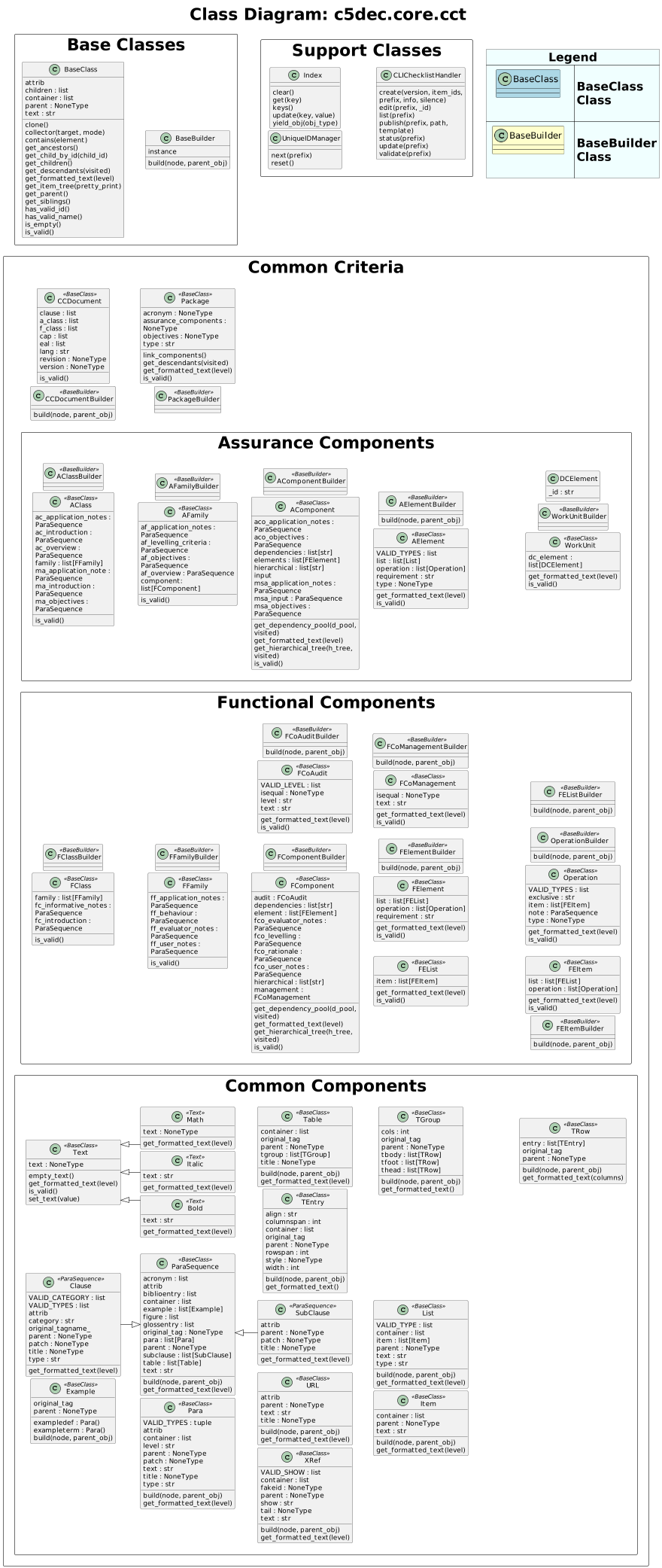
Parent links: ARC-003 C5-DEC CAD subsystems architecture, ARC-004 C5-DEC CAD system architecture
1.2 C5-DEC CAD classes SWD-002
Diagram
The diagram below shows the set of all classes comprising C5-DEC CAD, grouped by module and annotated with their inheritance and key composition relationships.

Parent links: ARC-003 C5-DEC CAD subsystems architecture, ARC-004 C5-DEC CAD system architecture
1.3 C5-DEC CAD packages SWD-003
Diagram
The diagram below shows the packages of C5-DEC CAD.

Parent links: ARC-003 C5-DEC CAD subsystems architecture, ARC-004 C5-DEC CAD system architecture
1.4 Centralized settings module SWD-018
Overview
C5-DEC CAD centralizes all configuration constants in a single module,
c5dec/settings.py, imported project-wide under the canonical alias
c5settings. The module resolves all file-system paths relative to
PROJECT_ROOT_PATH and reads runtime parameters from
c5dec_params.yml at import time.

Design rationale
| Concern | Approach |
|---|---|
| File-system paths | Resolved relative to PROJECT_ROOT_PATH at module load time; consistent across CLI, TUI, GUI, and container deployments |
| CC version selection | Read from c5dec_params.yml at import; overridable by CLI arguments at runtime |
| Feature flags | Dict controlling which modules are active (ssdlc, cct, cryptography, cpssec, isms, pm, transformer, cra, sbom) |
| Doorstop defaults | Centralized UID format, evaluation attributes, and publish attributes for all Doorstop operations |
| Logging | Graduated format/level constants supporting -v / -vv / -vvv verbosity |
Usage convention
All modules import the settings module using the canonical alias:
import c5dec.settings as c5settings
Path constants are then referenced as c5settings.SPECS_FOLDER_PATH,
c5settings.CRA_DATABASE_PATH, etc. No module hard-codes file paths.
Parent links: ARC-003 C5-DEC CAD subsystems architecture
2.0 CCT data model
This section describes the CCT data model, including Doorstop metadata and Markdown body representations.
2.1 C5-DEC CCT data model part 1 SWD-004
Diagram
The diagram below shows part 1 of the overall C5-DEC CCT data model.
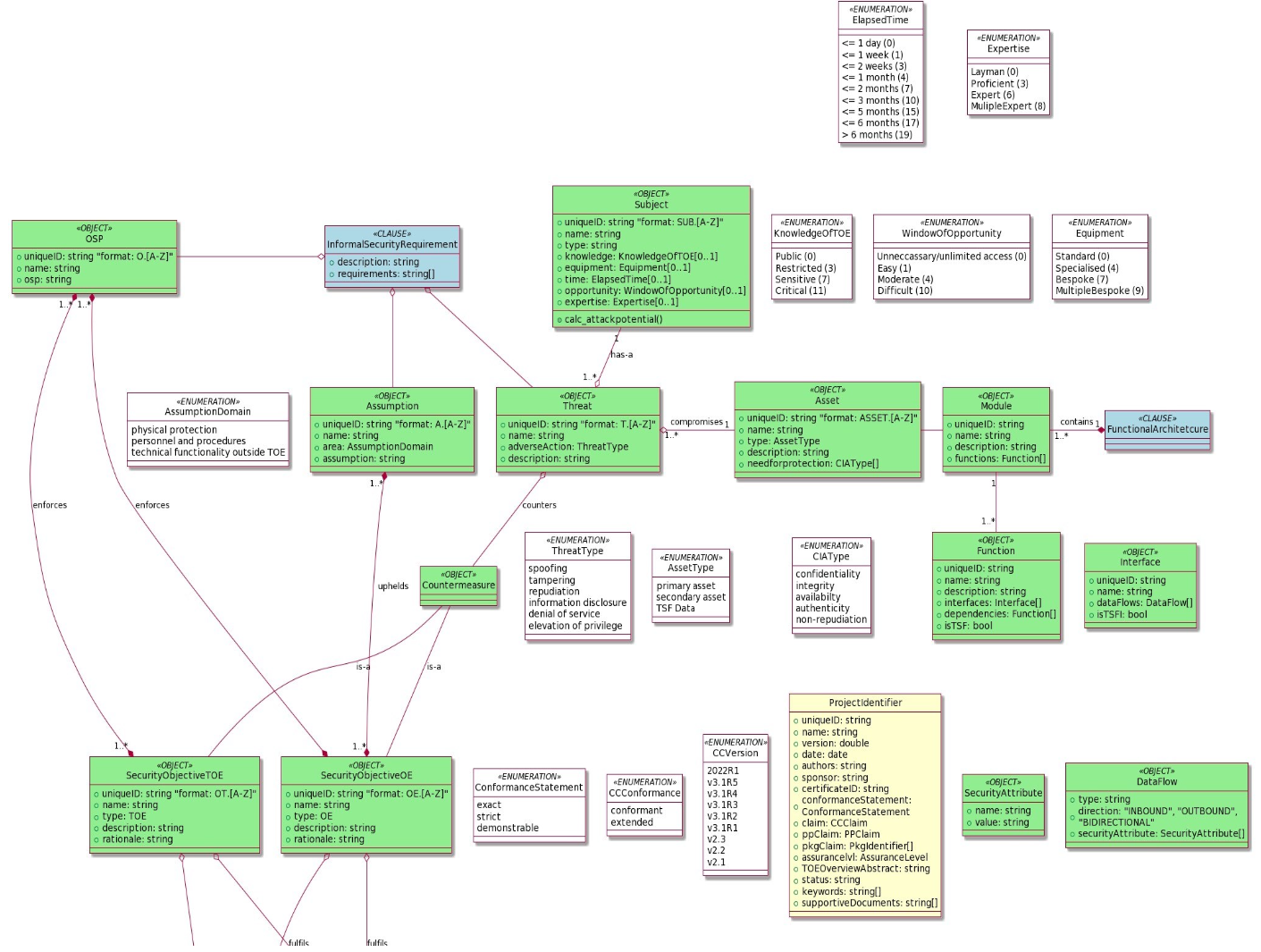
Parent links: ARC-003 C5-DEC CAD subsystems architecture, ARC-004 C5-DEC CAD system architecture
2.2 C5-DEC CCT data model part 2 SWD-005
Diagram
The diagram below shows part 2 of the overall C5-DEC CCT data model.
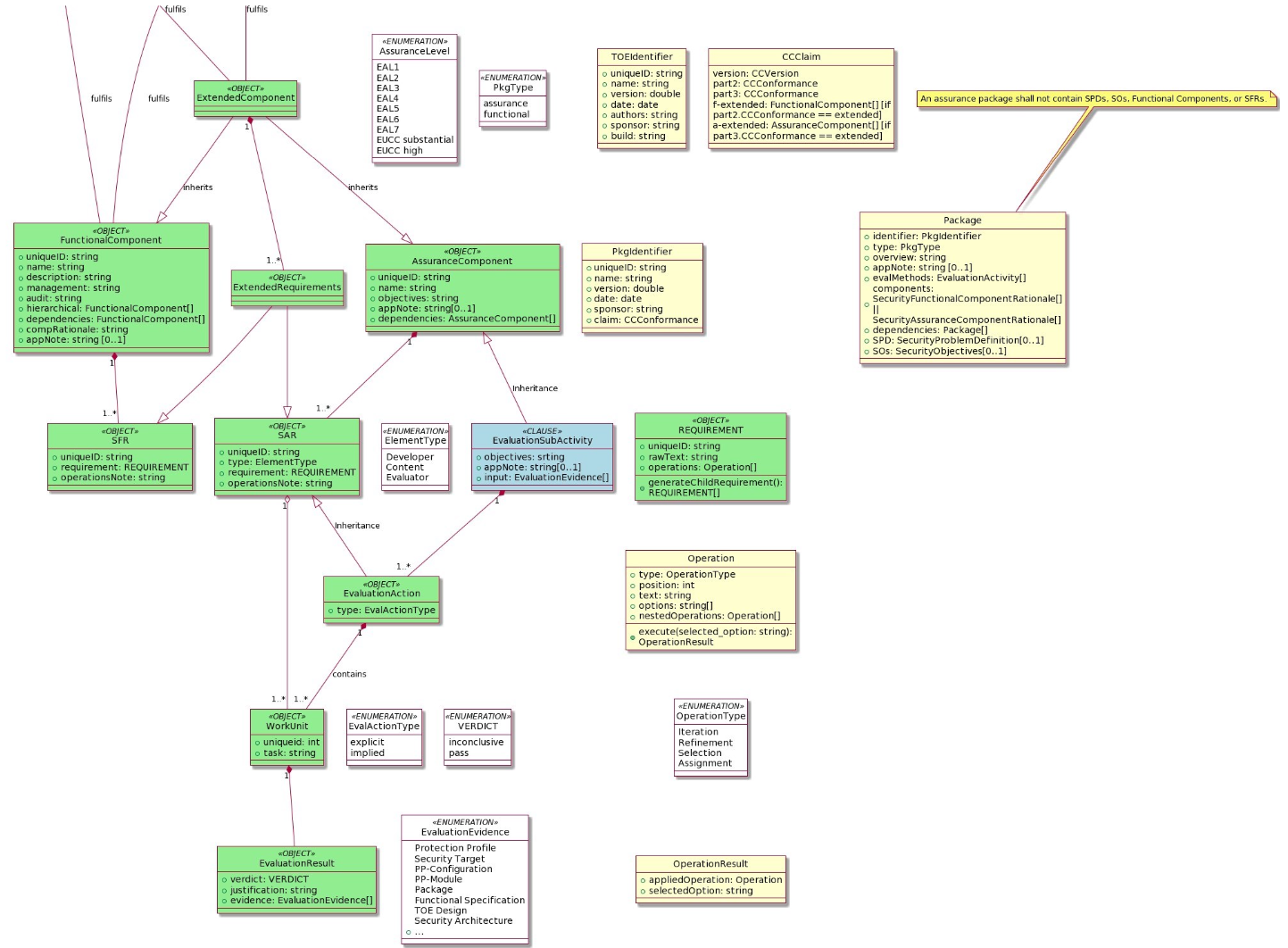
Parent links: ARC-003 C5-DEC CAD subsystems architecture, ARC-004 C5-DEC CAD system architecture
2.3 C5-DEC CCT Doorstop metadata SWD-006
Diagram
The diagram below shows the C5-DEC CCT Doorstop metadata model.
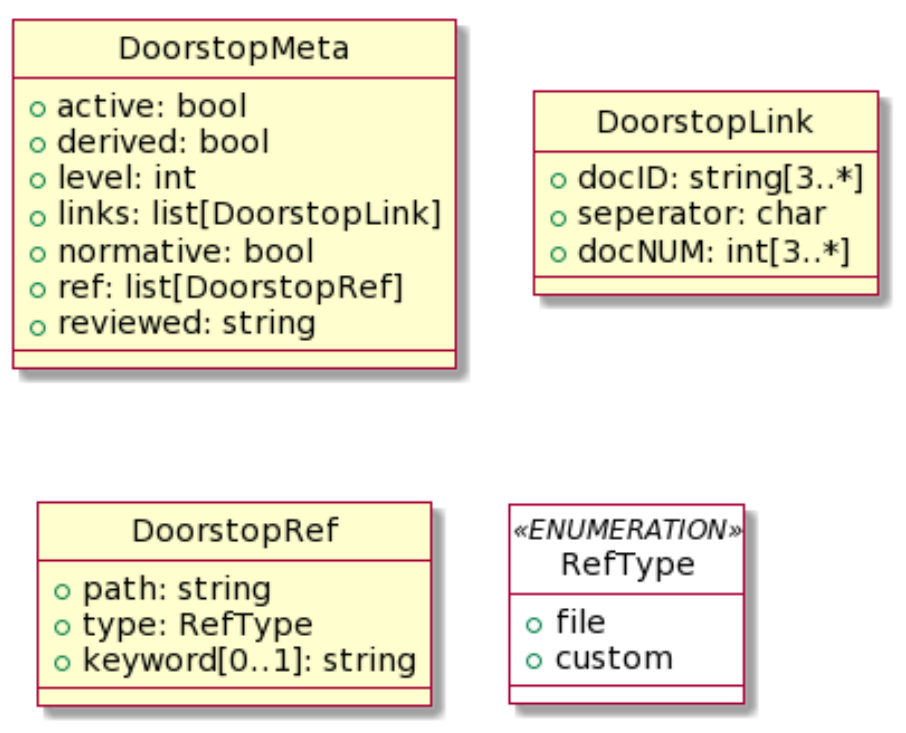
Parent links: ARC-003 C5-DEC CAD subsystems architecture, ARC-004 C5-DEC CAD system architecture
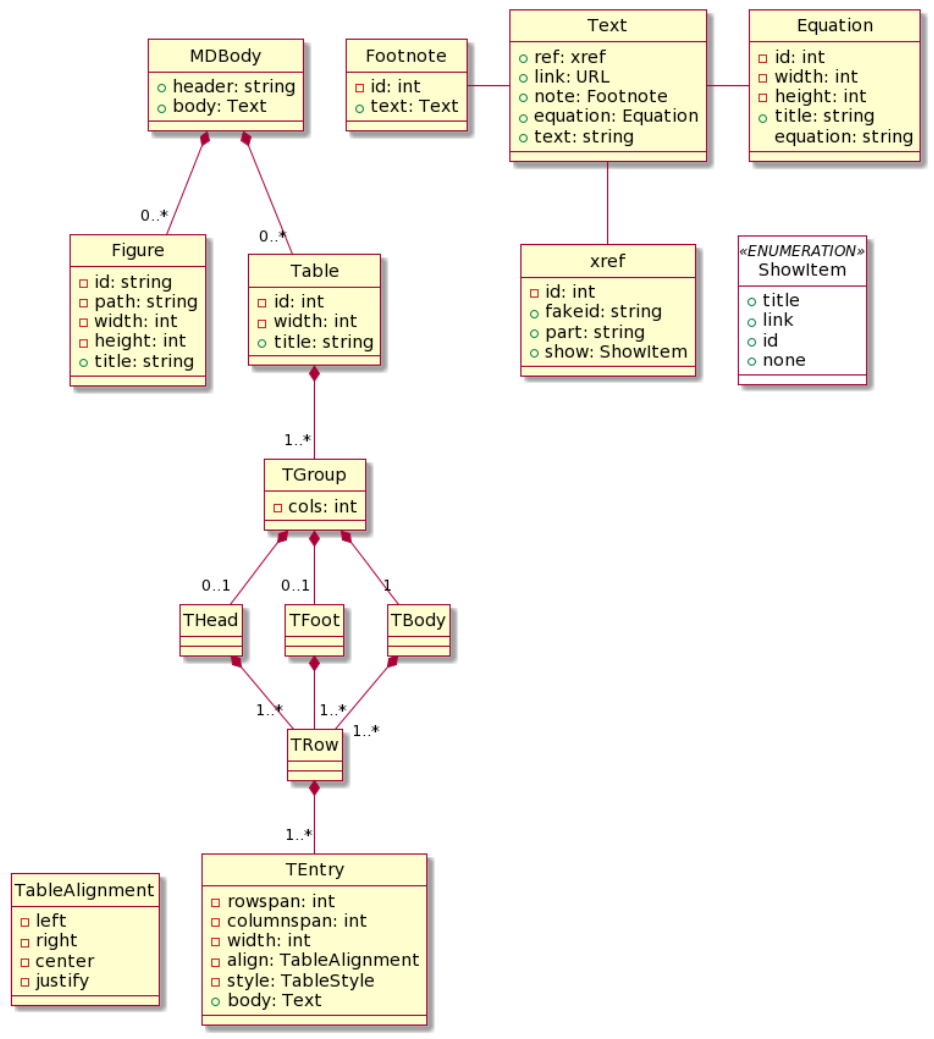
2.4 C5-DEC CCT Doorstop Markdown body SWD-007
Diagram
The diagram below shows the C5-DEC CCT Doorstop Markdown body data model.
Parent links: ARC-003 C5-DEC CAD subsystems architecture, ARC-004 C5-DEC CAD system architecture
3.0 Security classes and evaluation
This section covers the design of CCT security functional and assurance classes, element operations, CEM evaluation activities, and their dependencies.
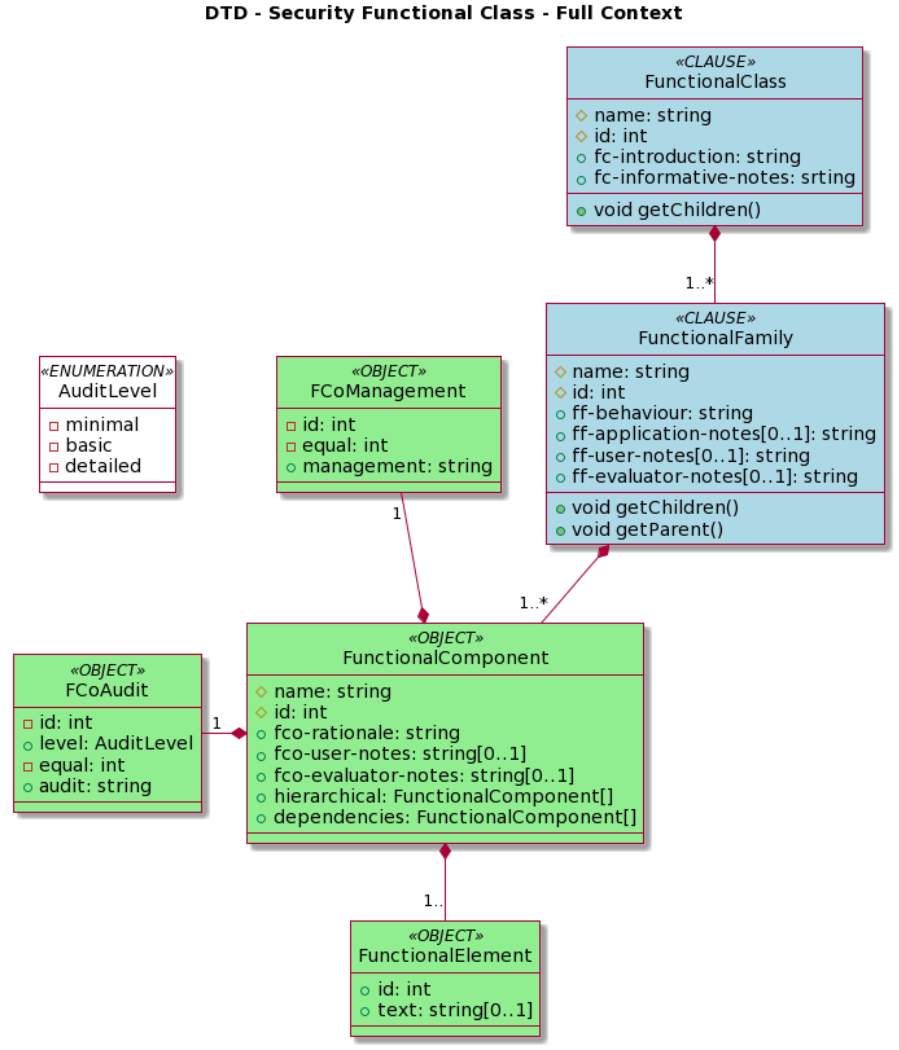
3.1 C5-DEC CCT security functional class SWD-008
Diagram
The diagram below shows the C5-DEC CCT security functional class data model.
Parent links: ARC-003 C5-DEC CAD subsystems architecture, ARC-004 C5-DEC CAD system architecture
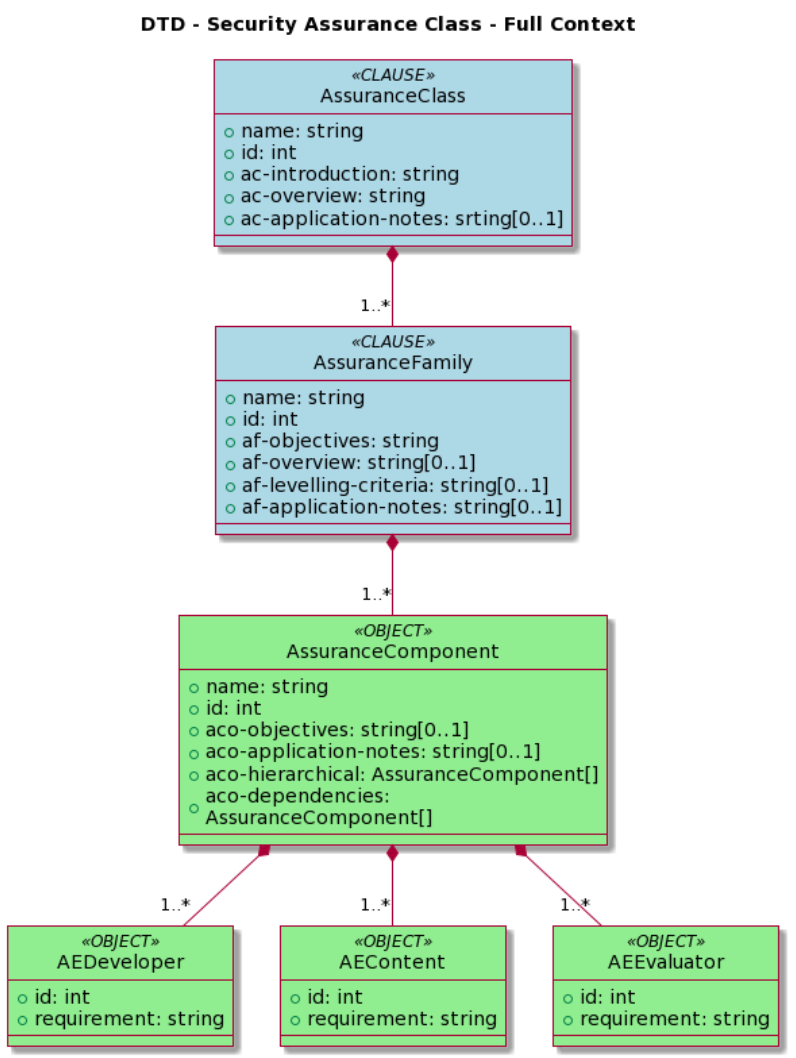
3.2 C5-DEC CCT security assurance class SWD-009
Diagram
The diagram below shows the C5-DEC CCT security assurance class data model.
Parent links: ARC-003 C5-DEC CAD subsystems architecture, ARC-004 C5-DEC CAD system architecture
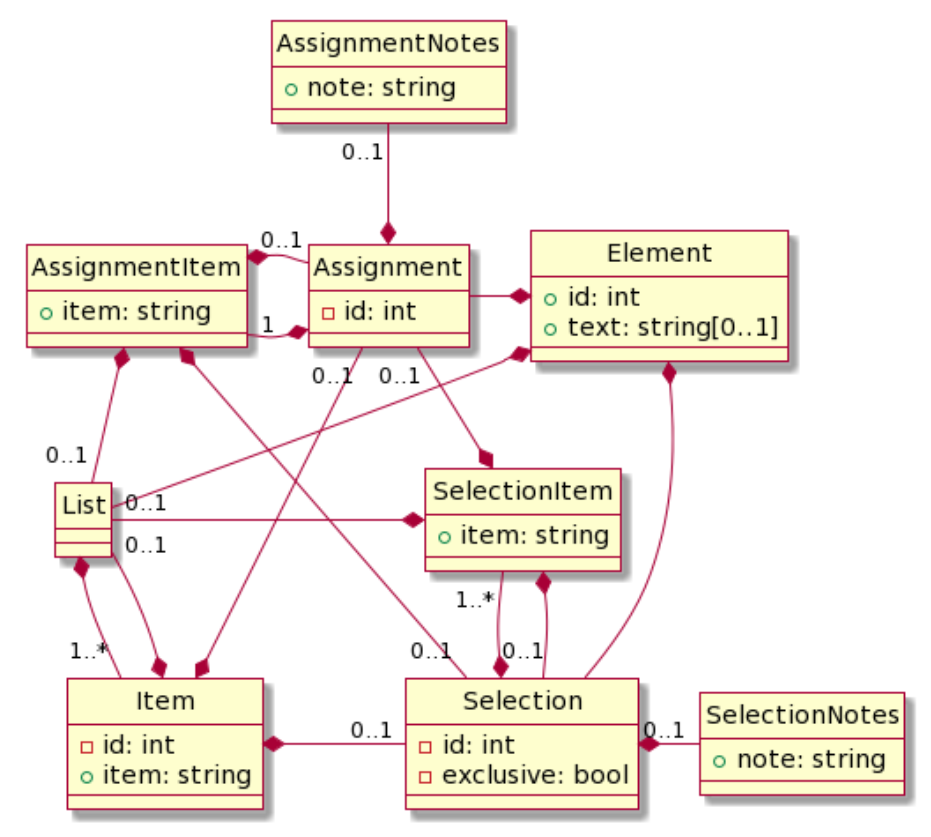
3.3 C5-DEC CCT element operations SWD-010
Diagram
The diagram below shows the C5-DEC CCT element operations data model.
Parent links: ARC-003 C5-DEC CAD subsystems architecture, ARC-004 C5-DEC CAD system architecture
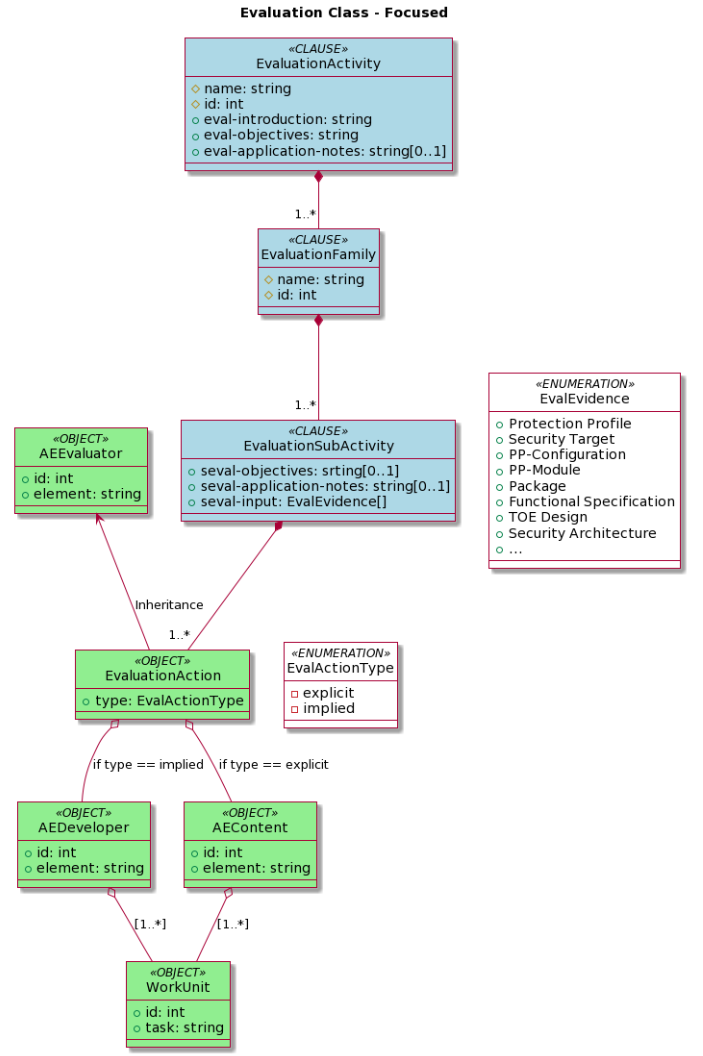
3.4 C5-DEC CCT CEM evaluation activities SWD-011
Diagram
The diagram below shows the C5-DEC CCT CEM evaluation activities data model.
Parent links: ARC-003 C5-DEC CAD subsystems architecture, ARC-004 C5-DEC CAD system architecture
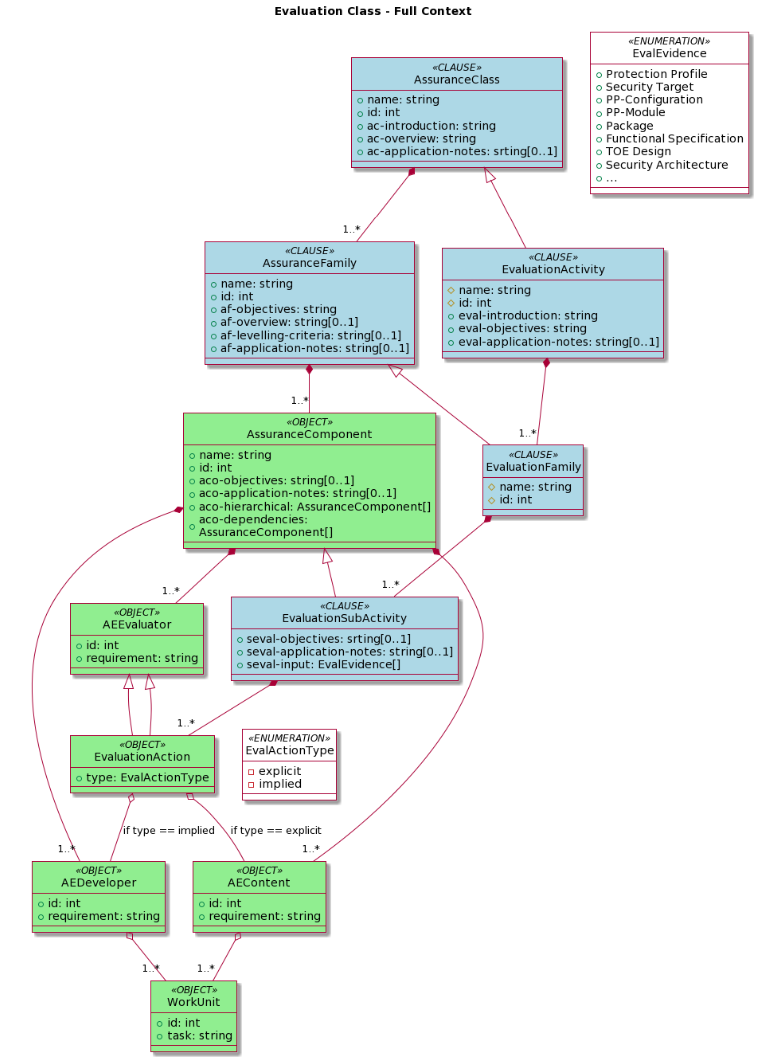
3.5 C5-DEC CCT sec. assurance and eval. act. dependencies SWD-012
Diagram
The diagram below shows the C5-DEC CCT security assurance evaluation and evaluation activities dependencies data model.
Parent links: ARC-003 C5-DEC CAD subsystems architecture, ARC-004 C5-DEC CAD system architecture
4.0 Document models
This section presents the generic Doorstop document model and the security target data model.
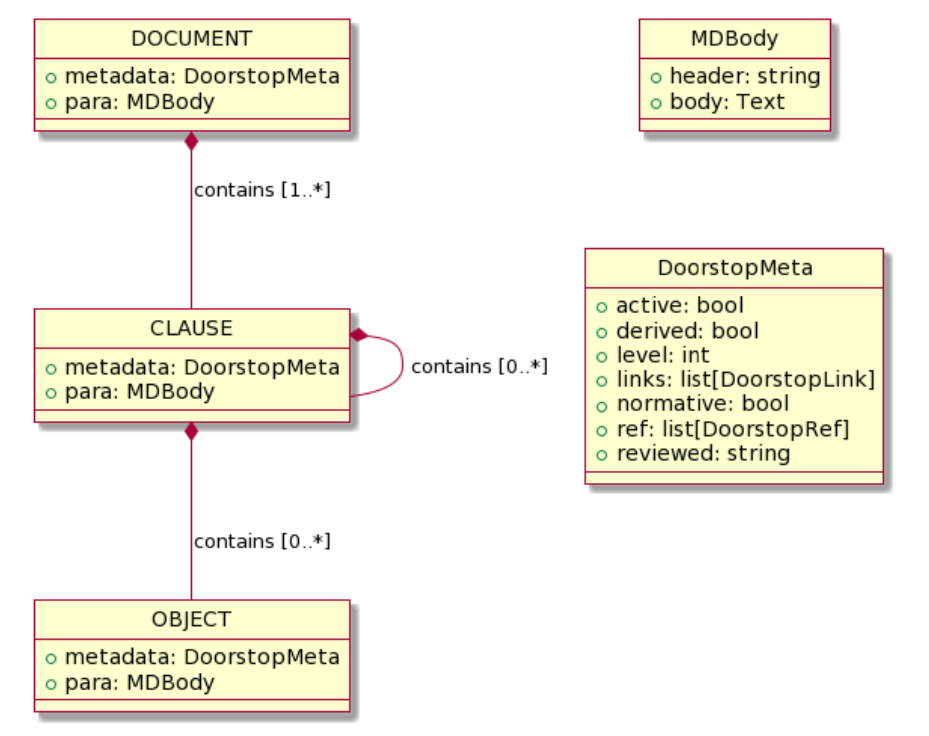
4.1 C5-DEC CCT generic Doorstop document SWD-013
Diagram
The diagram below shows the C5-DEC CCT generic Doorstop document model.
Parent links: ARC-003 C5-DEC CAD subsystems architecture, ARC-004 C5-DEC CAD system architecture
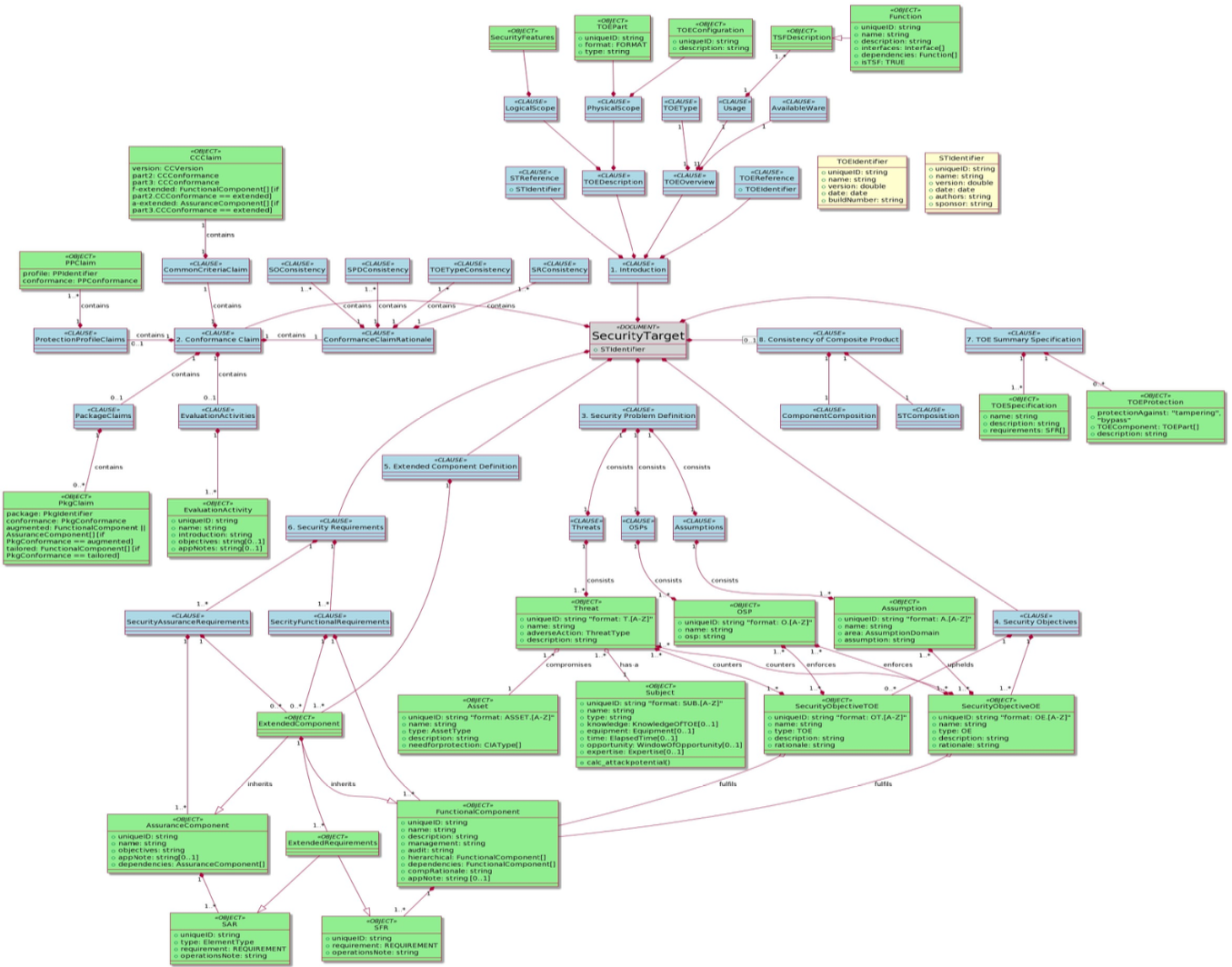
4.2 C5-DEC CCT security target data model SWD-014
Diagram
The diagram below shows the C5-DEC CCT security target data model.
Parent links: ARC-003 C5-DEC CAD subsystems architecture, ARC-004 C5-DEC CAD system architecture
5.0 CRA and SBOM compliance modules
This section presents the design of the c5dec.core.cra and c5dec.core.sbom
modules introduced in C5-DEC CAD v1.2 to support EU Cyber Resilience Act compliance
workflows.
5.1 CRA module class diagram SWD-015
Overview
The c5dec.core.cra module implements the Cyber Resilience Act (EU Regulation
2024/2847) compliance workflow. It provides an object model for CRA requirements
organized by category and section, a loader for the local CRA database, and a
checklist builder that exports an Excel compliance worksheet.
The module also provides helper functions for linking an SBOM to CRA requirements, enabling automated pre-verification of SBOM-traceable obligations.
Diagram

Key design decisions
CRADatabase.load()reads structured YAML/JSON files fromc5dec/assets/database/CRA/and deserializes them into the class hierarchy.CRAChecklistBuilderdelegates SBOM linkage verification to the module-level helper functionsverify_sbom_exists,link_sbom_to_cra_requirement, andauto_verify_sbom_requirement.- The module relies on
c5dec.core.transformerfor any format conversion during import. - All path constants are resolved via
c5dec.settings(CRA_DB_PATH,CRA_LOG_FILE).
Parent links: ARC-003 C5-DEC CAD subsystems architecture, ARC-004 C5-DEC CAD system architecture
5.2 SBOM module design SWD-016
Overview
The c5dec.core.sbom module provides a functional (non-class-based) interface
for generating, validating, importing, and comparing Software Bills of Materials.
It wraps the external Syft tool for generation and implements its own parsing,
validation, and Doorstop-import logic.
Activity diagram
@startuml sbom_activity
skinparam backgroundColor White
skinparam activityBackgroundColor LightBlue
skinparam activityBorderColor DarkBlue
skinparam ArrowColor DarkBlue
skinparam dpi 150

title "c5dec.core.sbom — SBOM Workflow"

|User / CLI|
start
:Invoke c5dec sbom <subcommand>;

|sbom module|
if (subcommand == generate?) then (yes)
  :check_syft_installed()|
  if (Syft available?) then (yes)
    :Run syft on target_path;
    :Write SBOM to output_path;
    :Return output_path;
  else (no)
    :Raise C5decError;
    detach
  endif
elseif (subcommand == validate?) then (yes)
  :validate_sbom(sbom_path)|
  :Load JSON schema (CycloneDX/SPDX);
  :Validate against schema;
  :Return validation result;
elseif (subcommand == import?) then (yes)
  :parse_cyclonedx_sbom(sbom_path)|
  :Extract component list;
  :import_sbom_to_doorstop()|
  :Create Doorstop items per component;
  :Return item list;
else (diff)
  :compare_sboms(sbom_a, sbom_b)|
  :Identify added / removed / changed;
  :export_sbom_diff_report()|
  :Write diff report to output_path;
endif

|User / CLI|
:Display result / path to output;
stop

@enduml
Public API summary
| Function | Description |
|---|---|
check_syft_installed() |
Verify Syft binary is on PATH |
generate_sbom(target, fmt, output) |
Invoke Syft and produce CycloneDX/SPDX JSON |
parse_cyclonedx_sbom(path) |
Deserialize CycloneDX JSON into a dict tree |
import_sbom_to_doorstop(sbom, doc) |
Create Doorstop items from SBOM components |
compare_sboms(sbom_a, sbom_b) |
Return added/removed/changed component delta |
export_sbom_diff_report(diff, path) |
Write delta report to a text file |
validate_sbom(path) |
Validate SBOM against its JSON schema |
Key design decisions
- The module is intentionally function-oriented rather than class-based to keep
the CLI glue code lean; each
c5dec sbomsubcommand maps directly to one function. - Syft is treated as an external dependency;
check_syft_installed()provides a clear user-facing error when it is absent. - Path constants (
SBOM_LOG_FILE) are resolved viac5dec.settings. - Both CycloneDX and SPDX formats are supported; format aliases are normalized
internally via a
format_mapdict.
Parent links: ARC-003 C5-DEC CAD subsystems architecture, ARC-004 C5-DEC CAD system architecture
6.0 DocEngine template design
This section documents the design of the C5-DEC DocEngine template system, covering the report, presentation, and CRA technical documentation template types and the v2 configuration schema introduced in C5-DEC CAD v1.2.
6.1 DocEngine template types and configuration design SWD-017
Overview
The DocEngine (c5dec docengine) scaffolds three Quarto-based document
templates from the source trees stored in c5dec/assets/:
| CLI argument | Source tree | Output format |
|---|---|---|
report |
c5dec/assets/report/ |
PDF (LaTeX) + HTML |
presentation |
c5dec/assets/presentation/ |
RevealJS HTML |
cra-tech-doc |
c5dec/assets/cra_tech_doc_template/ |
PDF (LaTeX) |
Template directory structure

c5dec_config_v2.yml schema
The v2 configuration format extends the original c5dec_config.yml with
structured project metadata blocks used by custom_vars_v2.py to populate
Quarto template variables at render time.

Key differences from v1
| Feature | c5dec_config.yml (v1) |
c5dec_config_v2.yml (v2) |
|---|---|---|
| Author handling | Single string | List of author objects |
| Organization block | Not present | Explicit organization block |
| Document metadata | Flattened | Nested document block |
| Quarto overrides | Not present | Explicit quarto block |
| Used by | _quarto.yml Lua filter |
custom_vars_v2.py pre-processor |
DocEngine CLI design

CRA technical documentation template chapters
The cra-tech-doc template pre-populates chapters aligned with CRA Annex V
technical documentation obligations:
| Chapter file | CRA Annex V obligation |
|---|---|
01-product-description.qmd |
Product description and intended purpose |
02-design-development.qmd |
Design, development, and production processes |
03-risk-assessment.qmd |
Cybersecurity risk assessment |
04-applied-standards.qmd |
Applied harmonised standards and common specifications |
05-eu-declaration.qmd |
EU declaration of conformity reference |
06-sbom.qmd |
Software Bill of Materials |
Settings constants
Path constants relating to DocEngine are defined in c5dec/settings.py:
| Constant | Path |
|---|---|
REPORT_TEMPLATE_PATH |
c5dec/assets/report/ |
PRESENTATION_TEMPLATE_PATH |
c5dec/assets/presentation/ |
CRA_TECH_DOC_TEMPLATE_PATH |
c5dec/assets/cra_tech_doc_template/ |
Parent links: ARC-003 C5-DEC CAD subsystems architecture
7.0 CPSSA TARA integration design
This section specifies the software design of the Cyber-Physical System Security
Assessment (CPSSA) subsystem implemented in c5dec/core/cpssa/.
The CPSSA module bridges C5-DEC SSDLC projects with external Threat Analysis and Risk Assessment (TARA) tooling — Threagile, OWASP pytm, and pyfair — through five stateless integration functions.
The design is organized into the following modules:
| Sub-section | Function / area | Responsibility |
|---|---|---|
| 7.1 | Doorstop ingestion helpers | Read and normalize Doorstop architecture items |
| 7.2 | Threagile mapping layer | Map Doorstop attributes to Threagile schema values |
| 7.3 | create_threat_model() |
Generate Threagile YAML, pytm Python, or pytm JSON from ARC items |
| 7.4 | generate_cpssa_report() |
Produce structured Markdown CPSSA report from threat model |
| 7.5 | generate_dfd() |
Derive PlantUML Data Flow Diagram from ARC items |
| 7.6 | generate_fair_input_template() |
Generate FAIR calibration YAML template |
| 7.7 | run_quantitative_risk_analysis() |
FAIR-based Monte Carlo simulation via pyfair |
| 7.8 | Sidecar files and data conventions | Threat actors, assumptions, and Doorstop field conventions |
| 7.9 | CPSSA orchestration and CLI integration | CLI subcommands and end-to-end workflow |
7.1 Doorstop ingestion helpers SWD-019
Overview
The ingestion layer reads Doorstop architecture items (ARC/HARC/LARC) from a C5-DEC SSDLC project and normalizes them into plain Python dicts suitable for consumption by the threat-model generators and DFD builder.
All ingestion helpers are private functions in c5dec/core/cpssa/cpssa.py.
Key functions
| Function | Purpose |
|---|---|
_read_doorstop_items(doc_path) |
Reads all Markdown item files from a Doorstop document directory, parsing YAML frontmatter and body text into a list of dicts |
_doorstop_text(item) |
Extracts the display text from an item dict (falls back from header to first # Heading to first 60 chars of text) |
_find_arc_dir(project_path, arc_folder) |
Locates the architecture item directory by searching for arc, harc, or larc subdirectories containing .doorstop.yml |
_find_specs_root(project_path) |
Discovers the Doorstop specs root directory from a project path |
_collect_arc_items(arc_dir, limit) |
Reads and filters architecture items, enforcing the 40-item processing cap |
_collect_links(item) |
Extracts Doorstop link UIDs from an item's links field |
_collect_flows(item) |
Parses the flows YAML field for data-flow definitions; falls back to ARC-prefixed links when flows is absent |
Processing pipeline
Doorstop .md files
    → _read_doorstop_items() — parse YAML frontmatter + body
    → _collect_arc_items() — filter, cap at 40 items
    → _collect_flows() / _collect_links() — extract relationships
    → normalized dicts ready for threat-model / DFD generation
Data flow fallback convention
When the flows field is absent from an item, the ingestion layer falls
back to reading entries in the Doorstop links field whose UID starts with
an architecture-document prefix (ARC-, HARC-, LARC-) and constructs
minimal flow dicts using item-level protocol and port fields.

Parent links: ARC-009 CPSSA subsystem – component diagram
7.2 Threagile mapping layer SWD-020
Overview
The Threagile mapping layer (c5dec/core/cpssa/cpssa.py) translates
Doorstop architecture item attributes into Threagile-compatible schema
values. Mappings are configured externally in threagile-mappings.yml
and loaded lazily at first use.
Mapping file
threagile-mappings.yml is a YAML file colocated with cpssa.py.
Each top-level key is a mapping section (e.g. protocol, authentication)
and each value is a {doorstop_value: threagile_value} dict.
Supported mapping sections
| Section | Purpose |
|---|---|
protocol |
Communication protocol names |
authentication |
Authentication mechanism types |
authorization |
Authorization model types |
technology |
Threagile technology classification |
asset_type |
Technical asset type (datastore, external-entity, process) |
encryption |
Encryption status |
machine |
Physical vs. virtual deployment |
size |
Asset size classification |
confidentiality |
CIA confidentiality rating |
integrity |
CIA integrity rating |
availability |
CIA availability rating |
trust_boundary_type |
Trust boundary classification |
data_format |
Data format classification |
Key functions
| Function | Purpose |
|---|---|
_load_threagile_mappings() |
Lazy-loads and caches threagile-mappings.yml; normalizes all keys to lowercase |
_map_threagile(section, value, default) |
Generic lookup: returns the mapped value or the default |
_map_protocol(raw) |
Maps protocol name to Threagile protocol |
_map_authentication(raw) |
Maps authentication type |
_map_authorization(raw) |
Maps authorization model |
_map_technology(raw_type) |
Maps asset type to Threagile technology |
_map_asset_type(raw_type) |
Maps to datastore, external-entity, or process |
_map_encryption(raw) |
Maps encryption status (including boolean is_encrypted fallback) |
_map_machine(raw) |
Maps physical/virtual classification |
_map_confidentiality(raw) / _map_integrity(raw) / _map_availability(raw) |
Map CIA ratings |
_sanitise_name(raw, max_len) |
Normalize display names to safe identifiers |
_safe_threagile_id(raw, max_len) |
Generate URL-safe Threagile-compatible identifiers |
Design rationale
Externalizing the mappings to a YAML file decouples the Doorstop schema
vocabulary from the Threagile schema. New Doorstop attribute values can be
supported by editing threagile-mappings.yml without modifying Python code.
keys and value ranges. The model hash is the SHA-256 of the canonical JSON bytes,
stored in C.meta.json alongside the binary C.npy matrix.
Parent links: ARC-009 CPSSA subsystem – component diagram
7.3 Threat model generation — create_threat_model() SWD-021
Overview
create_threat_model() reads Doorstop architecture (ARC/HARC/LARC) items
from a C5-DEC SSDLC project and produces a threat-model template in one of
three output formats: Threagile YAML, pytm Python script, or pytm JSON.
Function signature
def create_threat_model(
    project_path: Path,
    output_path: Optional[Path] = None,
    format: str = "threagile",
    arc_folder: Optional[str] = None,
    specs_path: Optional[Path] = None,
) -> str:
Processing pipeline

Output formats
| Format | Default file | Content |
|---|---|---|
threagile |
threat-model.yml |
Complete Threagile-compatible YAML with technical assets, trust boundaries, communication links, data assets, abuse cases, and security requirements |
pytm-python |
threat-model.py |
Executable pytm Python script with TM, Boundary, Server/ExternalEntity/Datastore/Process, and Dataflow objects |
pytm-json |
threat-model.json |
JSON representation of the pytm model dict |
Threagile output structure
The Threagile YAML contains:
technical_assets: One entry per ARC item with technology, encryption, CIA ratings, machine type, data formatstrust_boundaries: Zone-based groupings from thezoneattributecommunication_links: Data flows derived fromflowsfield (with link fallback)data_assets: Referenced data assets fromdata_assets/data_assets_processed/data_assets_storedabuse_cases: Synthesized from trust-boundary crossings and internet-facing assetssecurity_requirements: Extracted from items with security-related attributes
Sidecar files
Two optional YAML files in the ARC item directory enrich the output:
threat-actors.yml— threat actor definitionsassumptions.yml— documented assumptions
Processing limit
At most 40 architecture items are processed per invocation.
Parent links: ARC-009 CPSSA subsystem – component diagram
7.4 CPSSA report generation — generate_cpssa_report() SWD-022
Overview
generate_cpssa_report() consumes a Threagile-compatible YAML threat model
and generates a structured Markdown CPSSA report suitable for Quarto /
DocEngine publishing.
Function signature
def generate_cpssa_report(
    threat_model_path: Union[str, Path],
    output_path: Optional[Union[str, Path]] = None,
) -> str:
Report structure
The generated report contains 10 numbered sections:
| # | Section | Content source |
|---|---|---|
| 1 | Executive summary | Placeholder for human review |
| 2 | System description | business_overview and technical_overview from YAML |
| 3 | Assets and dependencies | technical_assets, data_assets, trust_boundaries |
| 4 | Threat landscape | STRIDE categories, threat_actors, assumptions from sidecar data |
| 5 | Attack scenarios | abuse_cases section |
| 6 | Risk assessment | Placeholder table |
| 7 | Security requirements | security_requirements map from YAML |
| 8 | Recommended controls | Placeholder table |
| 9 | Residual risk | Placeholder for human review |
| 10 | Conclusion | Placeholder for human review |
Processing flow
threat-model.yml
    → YAML parse
    → Extract technical_assets → render asset table
    → Extract data_assets → render data asset table
    → Extract trust_boundaries → render boundary list
    → Extract abuse_cases → render STRIDE-categorized scenarios
    → Extract security_requirements → render requirements table
    → Inject placeholder prompts for sections requiring human review
    → Write cpssa-report.md
Output conventions
- Written to
output_pathor<threat_model_dir>/cpssa-report.mdby default - Placeholder prompts use the format
_[Complete this section.]_ - Returns the absolute path of the written file
- Raises
C5decErroron unrecoverable errors (file not found, parse failure)
Parent links: ARC-009 CPSSA subsystem – component diagram
7.5 DFD generation — generate_dfd() SWD-023
Overview
generate_dfd() derives a PlantUML Data Flow Diagram from Doorstop
architecture (ARC/HARC/LARC) items. The output is cross-referenceable
with the Threagile YAML generated by create_threat_model().
Function signature
def generate_dfd(
    project_path: Union[str, Path],
    output_path: Optional[Union[str, Path]] = None,
    arc_folder: Optional[str] = None,
) -> str:
Processing pipeline
ARC item files
    → _collect_arc_items() — up to 40 items
    → Classify each item:
        datastore → PlantUML "database"
        external-entity → PlantUML "actor"
        process → PlantUML "component"
    → Group by zone → PlantUML "rectangle" trust boundaries
    → Extract flows (_collect_flows with link fallback)
    → Label: "flow-N [protocol / enc-status / auth]"
    → Write cpssa-dfd.puml
Element classification
Asset type is determined by _dfd_kind_for_item() using the type attribute:
Doorstop type values |
DFD element | PlantUML keyword |
|---|---|---|
database, datastore, historian |
Data store | database |
actor, external, user, attacker |
External entity | actor |
| All others | Process | component |
Color scheme
| Element type | Color |
|---|---|
| Process | #AED6F1 |
| External entity | #A9DFBF |
| Data store | #FAD7A0 |
| Trust boundary | #E8DAEF |
Cross-reference consistency
The DFD output matches the Threagile threat model in:
- Element IDs: Generated via
_safe_threagile_id()(lowercase, hyphens, max 31 chars) - Trust boundary IDs:
_safe_threagile_id("<zone>-zone") - Flow labels:
flow-Nmatching Threagilecommunication_linkskeys - Flow annotations:
[protocol / enc-status / auth]matching Threagile link attributes
Output
- Written to
output_pathor<project_dir>/cpssa-dfd.pumlby default - Renderable with
java -jar plantuml.jar cpssa-dfd.puml - Returns the absolute path of the written file
Parent links: ARC-009 CPSSA subsystem – component diagram
7.6 FAIR input template generation — generate_fair_input_template() SWD-024
Overview
generate_fair_input_template() generates a FAIR calibration YAML template
from a threat model so that per-scenario PERT distribution bounds can be
calibrated before running the quantitative risk analysis.
Function signature
def generate_fair_input_template(
    model_path: Union[str, Path],
    output_path: Optional[Union[str, Path]] = None,
) -> str:
Input format auto-detection
The function accepts both Threagile YAML and pytm JSON threat models, auto-detected by file extension:
.yml/.yaml→ Threagile YAML (scenarios fromabuse_cases).json→ pytm JSON (one synthesized scenario per element when no explicitabuse_casesare present)
Generated template structure
defaults:
  lef:   { low: 1, mode: 5, high: 20 }
  lm:    { low: 10000, mode: 100000, high: 1000000 }
  # --- advanced decomposition (uncomment to override lef/lm) ---
  # tef: { low: ..., mode: ..., high: ... }
  # vulnerability: { low: ..., mode: ..., high: ... }
  # contact: { low: ..., mode: ..., high: ... }
  # action: { low: ..., mode: ..., high: ... }
  # tc: { low: ..., mode: ..., high: ... }
  # cs: { low: ..., mode: ..., high: ... }
  # pl: { low: ..., mode: ..., high: ... }
  # sl: { low: ..., mode: ..., high: ... }
  # slef: { low: ..., mode: ..., high: ... }
  # slem: { low: ..., mode: ..., high: ... }

scenarios:
  scenario-name-1:
    lef: { low: ..., mode: ..., high: ... }
    lm:  { low: ..., mode: ..., high: ... }
  scenario-name-2:
    # ...
FAIR model tree nodes
The template exposes the full FAIR model tree:
| Node | Description | Active by default |
|---|---|---|
lef |
Loss Event Frequency | Yes |
lm |
Loss Magnitude | Yes |
tef |
Threat Event Frequency | No (commented) |
vulnerability |
Vulnerability | No (commented) |
contact |
Contact Frequency | No (commented) |
action |
Probability of Action | No (commented) |
tc |
Threat Capability | No (commented) |
cs |
Control Strength | No (commented) |
pl |
Primary Loss | No (commented) |
sl |
Secondary Loss | No (commented) |
slef |
Secondary Loss Event Frequency | No (commented) |
slem |
Secondary Loss Event Magnitude | No (commented) |
To use a finer decomposition, uncomment child nodes and remove their parent.
Default PERT bounds
| Parameter | Low | Mode | High |
|---|---|---|---|
| LEF | 1 | 5 | 20 |
| LM | 10,000 | 100,000 | 1,000,000 |
Output
- Written to
output_pathor<threat_model_dir>/fair-params.ymlby default - Returns the absolute path of the written file
Parent links: ARC-009 CPSSA subsystem – component diagram
7.7 Quantitative risk analysis — run_quantitative_risk_analysis() SWD-025
Overview
run_quantitative_risk_analysis() runs a FAIR-based Monte Carlo simulation
via the pyfair library for each abuse-case scenario and produces an
Annualised Loss Expectancy (ALE) summary with supporting output artifacts.
Function signature
def run_quantitative_risk_analysis(
    threat_model_path: Union[str, Path],
    output_path: Optional[Union[str, Path]] = None,
    simulations: int = 10000,
    fair_params_path: Optional[Union[str, Path]] = None,
) -> str:
Calibration parameter resolution
Parameters are resolved in order of precedence:
- Dedicated FAIR parameters file (
fair_params_path) — YAML mapping scenario names to PERT bounds (generated bygenerate_fair_input_template) - Inline in threat model — abuse case values as dicts containing FAIR
node keys (
lef,lm,tef,vulnerability, etc.) - Fallback defaults — conservative placeholders (a warning is emitted for each scenario that uses defaults)
Processing pipeline

FAIR model configuration
For each scenario, a pyfair.FairModel is created with PERT distributions.
The simple path uses:
- LEF (Loss Event Frequency):
model.input_data("Loss Event Frequency", low, mode, high) - LM (Loss Magnitude):
model.input_data("Loss Magnitude", low, mode, high)
Advanced decomposition nodes (when provided): tef, vulnerability,
contact, action, tc, cs, pl, sl, slef, slem.
Output artifacts
All outputs are written to the output_path directory (defaults to the
threat model's parent directory):
| File | Content |
|---|---|
cpssa-risk-summary.md |
Markdown summary with input parameters table and ALE statistics per scenario |
cpssa-risk-results.csv |
Raw Monte Carlo simulation results |
cpssa-risk-{N}.html |
One interactive pyfair report per scenario (indexed from 1), comparing individual model against meta-model |
Dependencies
- pyfair — FAIR Monte Carlo simulation engine (imported at module level)
- pyyaml — YAML parsing for threat model and FAIR parameters
Error handling
- Raises
C5decErrorif the threat model file is not found or unparseable - Emits warning-level log messages for scenarios using fallback defaults
- Returns the absolute path of
cpssa-risk-summary.md
Parent links: ARC-009 CPSSA subsystem – component diagram
7.8 Sidecar files and Doorstop field conventions SWD-026
Overview
The CPSSA module relies on Doorstop architecture item attributes and optional sidecar files to parameterize threat-model generation, DFD construction, and risk analysis. This item documents the data conventions.
Doorstop item attributes
Core fields
| Field | Doorstop attribute | Notes |
|---|---|---|
| Node label | header or UID |
Falls back to UID, then first 60 chars of text |
| Asset type | type |
server, plc, database, actor, firewall, etc. |
| Trust zone | zone |
Maps to Threagile trust boundary / pytm Boundary |
| Data flows | flows |
Primary mechanism; falls back to ARC-prefixed links |
Threagile-specific fields
| Field | Doorstop attribute | Default |
|---|---|---|
| Technology | type |
unknown-technology |
| Encryption | encryption / is_encrypted |
none (transparent if boolean true) |
| Machine | machine |
physical for PLC/RTU/HMI/workstation; virtual otherwise |
| Size | size |
component |
| Confidentiality | confidentiality |
confidential |
| Integrity | integrity |
critical |
| Availability | availability |
critical |
| Data formats | data_formats_accepted |
["json"] |
| Owner | vendor |
TBD |
| Internet-facing | internet |
false |
| Out of scope | out_of_scope |
false |
pytm-specific fields
| Field | Doorstop attribute | Notes |
|---|---|---|
| OS | os / os_version |
Operating system |
| Port | port |
Listening port |
| Protocol | protocol |
Communication protocol |
| Security controls | is_encrypted, has_access_control, authenticates_source |
Boolean flags |
Data flows (flows field)
The flows field is the primary mechanism for defining data-flow edges:
flows:
  - target: ARC-006
    protocol: OPC-UA
    port: 4840
    encrypted: false
    authentication: none
    authorization: none
    vpn: false
    readonly: false
    data_assets_sent: [sensor-readings]
    data_assets_received: [control-commands]
When flows is absent, the module falls back to reading ARC-prefixed
entries in links and constructing minimal flow dicts from item-level
protocol and port fields.
Sidecar files
Two optional YAML files placed in the ARC item directory:
| File | Content | Used by |
|---|---|---|
threat-actors.yml |
Threat actor definitions | Threagile threat_actors section, CPSSA report |
assumptions.yml |
Documented security assumptions | Threagile assumptions section, CPSSA report |
Processing limit
At most 40 architecture items are processed per invocation across all CPSSA functions.
Parent links: ARC-009 CPSSA subsystem – component diagram
7.9 CPSSA orchestration and CLI integration SWD-027
Overview
The CPSSA module exposes five stateless public functions that form a
complete TARA workflow pipeline. All functions are re-exported from
c5dec.core.cpssa and integrated into the CLI via c5dec cpssa
subcommands.
Public API
from c5dec.core.cpssa import (
    create_threat_model,
    generate_cpssa_report,
    generate_dfd,
    generate_fair_input_template,
    run_quantitative_risk_analysis,
)
End-to-end workflow

CLI subcommands
| Command | Function called | Description |
|---|---|---|
c5dec cpssa create-threat-model [--format F] [--arc-folder P] |
create_threat_model() |
Generate Threagile / pytm threat model |
c5dec cpssa generate-report --model M |
generate_cpssa_report() |
Generate CPSSA Markdown report |
c5dec cpssa generate-dfd [--project P] [--arc-folder P] |
generate_dfd() |
Generate PlantUML DFD |
c5dec cpssa fair-input --model M |
generate_fair_input_template() |
Generate FAIR calibration template |
c5dec cpssa risk-analysis --model M [--simulations N] [--fair-params F] |
run_quantitative_risk_analysis() |
Run FAIR Monte Carlo analysis |
Function conventions
All five functions follow the same design conventions:
- Accept
Path-like inputs - Write output to disk (configurable
output_path) - Return the absolute path string of the primary written file
- Raise
common.C5decErroron unrecoverable errors - Log progress and warnings via
common.logger(__name__)
Package layout
c5dec/core/cpssa/
├── __init__.py                # Public re-exports
├── cpssa.py                   # All five TARA integration functions + helpers
├── threagile-mappings.yml     # Doorstop → Threagile schema value mappings
├── threagile-schema.json      # Threagile JSON schema reference
└── examples/
    └── water-treatment/       # Self-contained ICS / SCADA demo
Dependencies
| Library | Purpose |
|---|---|
pyfair |
FAIR Monte Carlo simulation engine |
pyyaml |
YAML parsing for threat models, mappings, sidecar files |
c5dec.common |
Logging (logger), error handling (C5decError) |
c5dec.settings |
Path constants |
Parent links: ARC-009 CPSSA subsystem – component diagram